60
Assembly
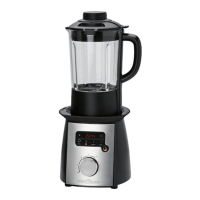
Attach the mixing jug
Placethemixingjugontothebaseunit.Payatten-
tion to the symbols while doing so. The marking on
themixingjugbeneaththehandleandthemarking
on the base unit have to be precisely aligned one
above the other.
Put the lid on
1. Placethelidontothemixingjugsothatthelatch
with the lock is situated on the right beside the
handle.
2. Twist the lid clockwise up to the stop. The lock
mustsitsecurelyinthehandleofthemixingjug.
NOTE:
Incorrect assembly will prevent the appliance from
being operated.
Instructions for use
Electrical connection
1. Check if the mains voltage that you want to use
matches the one of the appliance. You will find
the information about this on the rating plate.
2. Onlyconnecttheappliancetoaproperly
installed earthed socket. You will hear a beep
when the appliance is assembled correctly
together with the lid.
Functionality of the appliance
• Theapplianceisoperatedeitherwiththepower
control or with the function buttons.
• Eachpushofabuttonisconrmedwithabeep,
if the appliance has been turned on with the
POWERbutton.
• Withthepowercontrolyouwillsetthemixing
speed. Always start with the lowest speed (Set-
ting1)ifthejugislledtoitsmaximumcapac-
ity. The function of the power control will be
disabled if you use a program with the function
buttons.
• Withthefunctionbuttonsyouwillbeableto
heat, cook and puree dishes. Use the HIGH,
MEDIUM,orLOWbuttonsfortheheatingfunc-
tion. You can stir the dish with the PULSE but-
ton. The cooking time can be changed at minute
intervals with the and buttons. The function
buttons will be disabled if you have turned on
the appliance with the power control.
Turning on / off
PressthePOWERbutton.Theindicatorlightwill
flash. The appliance will be in standby mode.
Turning on / off with the power control
NOTE:
The appliance can only be turned on when the
mixingjugisclosedwiththelidandwhenthe
power control is set to 0.
• Turning on: Turn the control clockwise to the
desired speed setting.
Setting 1 = low speed
Setting 2 = medium speed
Setting 3 = high speed
Setting 4 = top speed
• Turning off: Turn the control anti-clockwise to
0.
Turning on / off with the function buttons HIGH,
MEDIUM,LOW
• Turning on: Press the relevant button once.
The indicator light in the selected button will light
up.
• Turning off: Press the button once more. The
indicator light will go out. The appliance will be
instandbymode.ThenpressthePOWERbut-
ton.
Function button PULSE
As long as you keep this button pressed down, the
appliance will run at speed setting 2.
Display
The appliance has a display on which you can
read the remaining time of the cooking program in
minutes and seconds.


 To Next Page
 Loading...