12
5
TROUBLE-SHOOTING
Most treadmill problems can be solved by following the steps below. Find the symptom that applies, and
follow the steps listed. If further assistance is needed, please call our Customer Service Department.
1. SYMPTOM: THE POWER DOES NOT TURN ON
a. Make sure that the power cord is plugged into a properly earthed outlet. (See HOW TO PLUG IN THE
POWER CORD on page 7.) If an extension cord is needed, use only a 14-gauge cord of five feet (1,50 m) or
less in length.
b. After the power cord has been plugged in, make sure that the key is fully inserted into the console. (See step
1 on page 9.)
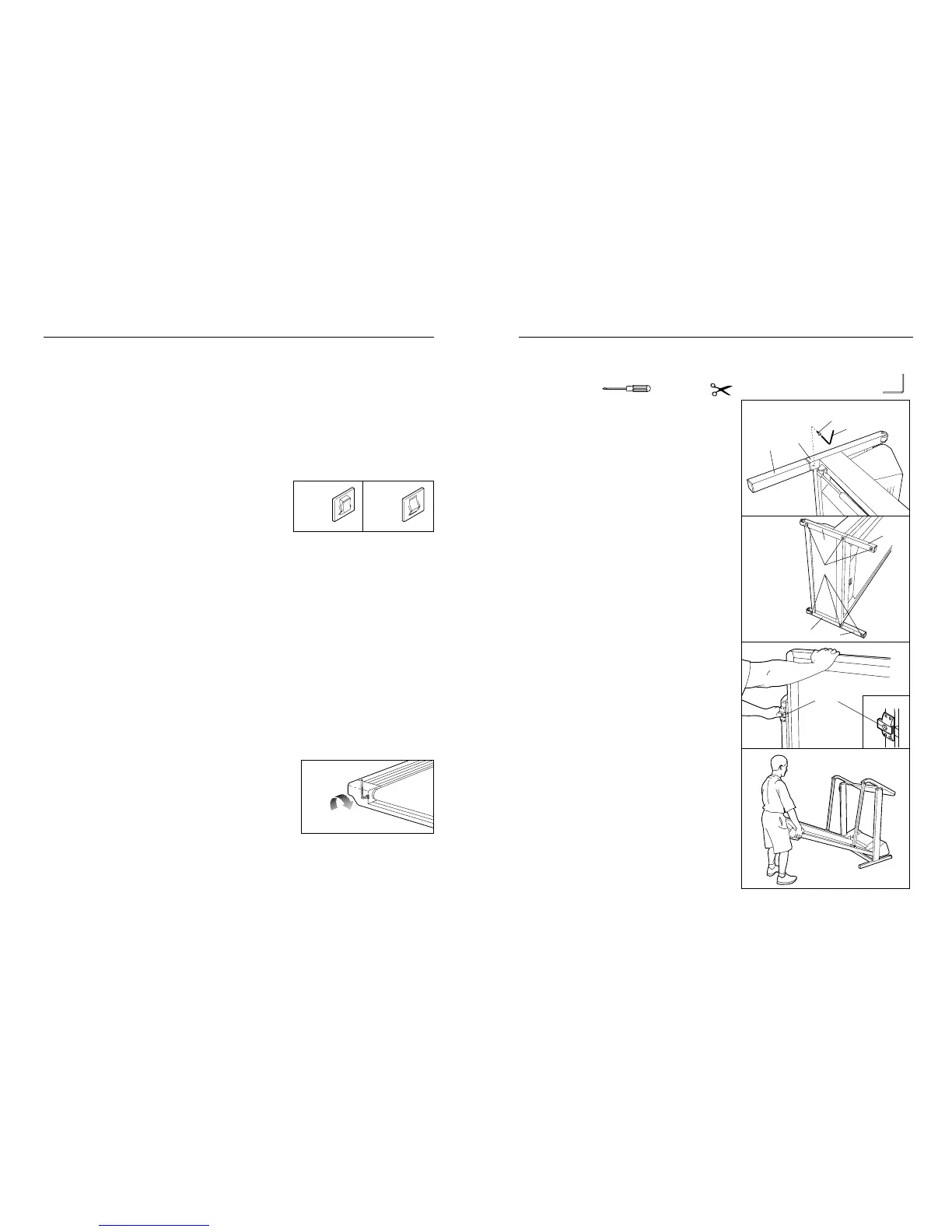
c. Check the circuit breaker located on the treadmill near the
power cord. If the switch protrudes as shown, the circuit breaker
has tripped. To reset the circuit breaker, wait for five minutes
and then press the switch back in.
2. SYMPTOM: THE POWER TURNS OFF DURING USE
a. Check the circuit breaker located on the treadmill frame near the power cord (see 1. c. above.) If the circuit
breaker has tripped, wait for five minutes and then press the switch back in.
b. Make sure that the power cord is plugged in.
c. Remove the key from the console. Reinsert the key fully into the console. (See step 1 on page 9.)
d. If the treadmill still will not run, please call our Customer Service Department.
3. SYMPTOM: THE DSPLAYS OF THE CONSOLE DO NOT FUNCTION PROPERLY
a. Check th ebatteries in the console. (See BATTERY INSTALLATION on page 8.) Most problems are the re-
sult of drained batteries.
4. SYMPTOM: THE WALKING BELT SLOWS WHEN WALKED ON
a. If an extension cord is needed, use only a 14-gauge cord of 5 feet (1,50 m) or less in length.
b. If the walking belt still slows when walked on, please call our Customer Service Department.
5. SYMPTOM: THE WALKING BELT IS OFF-CENTRE WHEN WALKED ON
a. If the walking belt has shifted to the left, first remove the key and
UNPLUG THE POWER CORD. Using the allen wrench, turn the
left rear roller adjustment bolt clockwise 1/4 of a turn. Plug in the
power cord, insert the key and run the treadmill for a few min-
utes. Repeat until the walking belt is centred.
a
Tripped Reset
c
ASSEMBLY
Assembly requires two people. Set the treadmill in a cleared area and remove the packing materials. Do not
dispose of the packing materials until assembly is completed. Assembly requires the included allen wrench ,
a phillips screwdriver , and scissors (not included) .
1. Refer to the drawing on page 4 and identify the right
side of the treadmill. With the help of a second person,
carefully lay the treadmill on its right side; do not lay the
treadmill on its left side or the storage latch may be
damaged.
Firmly slide a Base Extension (76) into one side of the
Base (86.) Using the Allen Wrench (89), tighten an
Extension Bolt (13) into the Base Extension and the Base.
Attach the other Base Extension (not shown) in the same
manner.
2. Attach six Base Pads (43) to the Base (86) and the Base
Extensions (76) in the indicated locations. Note: One
extra Base Pad may be included.
With the help of a second person, carefully raise the
treadmill to the upright position so the Base (86) and the
Base Extensions (76) are resting on the floor.
3. Hold the upper end of the treadmill with your right hand
as shown. Using your left thumb, slide open the storage
latch and hold it open. Pivot the treadmill until the frame
is past the storage latch.
4. Hold the treadmill firmly with both hands, and lower the
treadmill to the floor. To decrease the possibility of in-
jury, bend your legs and keep your back straight.
76
13
89
86
1
86
86
76
76
43
2
Storage
Latch
Opened
3
4






 To Next Page