PROGRAMMABLE CONSOLE DIAGRAM
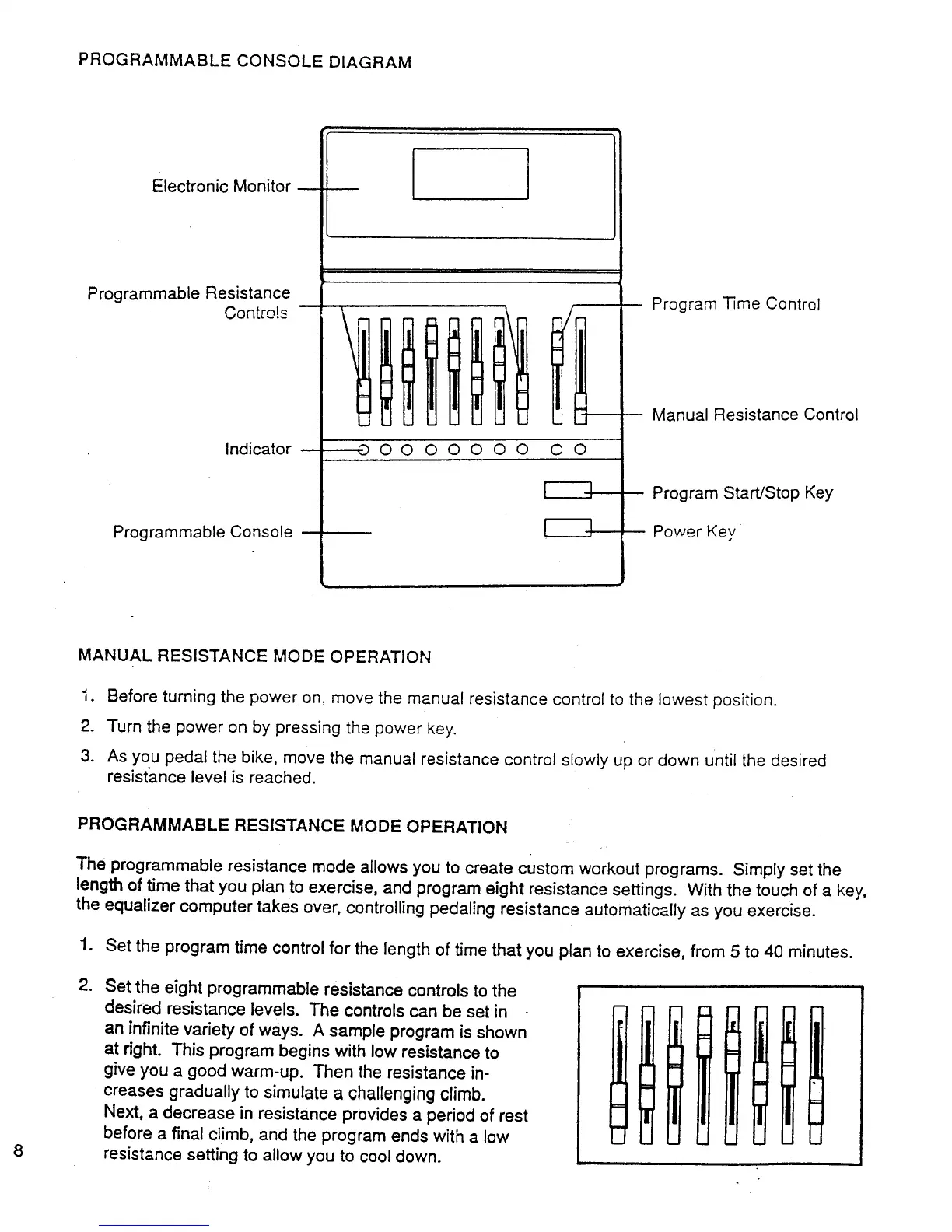
Electronic Monitor
Programmable Resistance
Contro!s
Indicator
Programmable Console
0 000000 O0
Program Time Control
Manual Resistance Control
Program Start/Stop Key
Power Key
MANUAL RESISTANCE MODE OPERATION
1. Before turning the power on, move the manual resistance control to the lowest position.
2. Turn the power on by pressing the power key.
3. As you pedal the bike, move the manual resistance control slowly up or down Until the desired
resista.nce level is reached.
PROGRAMMABLE RESISTANCE MODE OPERATION
The programmable resistance mode allows you to create custom workout programs. Simply set the
length of time that you plan to exercise, and program eight resistance settings. With the touch of a key,
the equalizer computer takes over, controlling pedaling resistance automatically as you exercise.
1. Set the program time control for the length of time that you plan to exercise, from 5 to 40 minutes.
.
Set the eight programmable resistance controls to the
desired resistance levels. The controls can be set in
an infinite variety of ways. A sample program is shown
at right. This program begins with low resistance to
give you a good warm-up. Then the resistance in-
creases gradually to simulate a challenging climb.
Next, a decrease in resistance provides a period of rest
before a final climb, and the program ends with a low
resistance setting to allow you to cool down.



 To Next Page