The Progear LCD-M5 Hand Control Panel is a display manual for an electric bicycle, designed to be assembled by a skilled bicycle mechanic. This manual provides detailed information on the display's outer shell, functions, and key operations.
Function Description:
The LCD-M5 display offers a comprehensive range of functions to enhance the user's riding experience. Key display functions include:
- Speed Display: Shows the current riding speed.
- Power Level Display: Indicates the current power assist level (0-9 adjustable PAS levels).
- Power Indicator: Displays the remaining battery power using a segmented energy bar.
- Failure Warning: Alerts the user to potential system malfunctions.
- Total Mileage (ODO): Tracks the total distance covered by the bicycle.
- Single Mileage (TRIP A, TRIP B): Records the distance of individual trips, with two separate trip counters.
- Single Driving Time Display (TM): Shows the duration of the current ride.
- Battery Current Voltage (VOL): Displays the real-time battery voltage.
- Current Operating Current (CUR): Shows the current draw from the battery.
- Remaining Mileage (RM): Estimates the remaining distance that can be covered based on current battery levels.
- Instrument Boot Time (TM): Displays the time since the instrument was powered on.
The display also supports various control and setting functions:
- Power Switch Control: Manages the power supply to the system.
- 6Km/h Point Control: Activates a 6 km/h cruise mode.
- Wheel Diameter Setting: Allows calibration of the display for different wheel sizes (in inches) to ensure accurate speed and distance readings.
- Maximum Speed Setting: Enables the user to set a maximum speed limit.
- Idle Automatic Hibernation Time Setting: Configures the time after which the display enters hibernation mode when idle.
- Backlight Brightness Setting: Adjusts the display's backlight intensity for optimal visibility in various lighting conditions.
- Voltage Level Setting: Configures voltage-related parameters.
The display communicates using the UART protocol, ensuring reliable data exchange between the control panel and the bicycle's system. Upon boot-up, the display performs a full screen self-test for 1 second, showing all available content.
Important Technical Specifications:
- Outer Shell Material: ABS (Acrylonitrile Butadiene Styrene), known for its durability and impact resistance.
- Liquid Crystal Transparent Window Material: High hardness acrylic, providing clear visibility and scratch resistance.
- Dimensions (Display Unit):
- Front View: 56.4mm (width) x 93.4mm (height) x 86mm (base width).
- Side View: 6.4mm (thickness) x 31.8mm (clamp diameter).
- Dimensions (Switch Unit):
- Front View: 18.15mm (width) x 48mm (height).
- Side View: 43.85mm (depth) x 48mm (width) x 22.2mm (clamp diameter).
- Stent Availability: The 31.8mm stent is available, and transfer rings are provided for compatibility with 22.2mm, Ø25.4mm, and 28.6mm handlebars.
- PAS Levels: 0 to 9 adjustable power assist levels.
- Parameter Settings (P01-P20): Includes settings for wheel diameter, number of magnetic steel, liquid crystal brightness, low pressure points, etc.
Usage Features:
The LCD-M5 features an intuitive key introduction for easy operation:
- Up/Down Keys (A and V):
- Short Press (A or V): When riding, these keys are used to modify the power/speed file (e.g., A for +1, V for -1).
- Short Press (A or V) in Settings Interface: Used to increment or decrement the value of a parameter with minimum precision. Long pressing these keys can also perform this operation.
- Mode Key (M):
- Short Click: Toggles display data for multi-function areas during cycling (e.g., ODO, TRIP A, TRIP B, VOL, CUR, RM, TM).
- Long Press: Primarily used to switch modes or states. For instance, a long press will turn off the screen if the display is working, and another long press will turn it back on.
- Short Press in Settings Interface: Switches to the next parameter, exits settings, and saves parameters. If no operation is performed, modified parameters are automatically exited and saved after 8 seconds.
- Combination Keys (Long Presses): Used for setting parameters due to the complexity of the operation, which helps reduce accidental triggers.
- Long Press (A + V): Enters the parameter setting interface (P01-P20).
- Long Press (M + A): Toggles the speed display (e.g., between current speed, max speed, avg speed).
- Long Press (V): From a static state, a long press will enter 6KM/h cruise mode. Releasing the key will exit cruise mode.
- Long Press (A): For five seconds, this action clears the ODO (total mileage) in the P16 menu interface.
Vehicle Modes:
- Walk Boost Mode: Provides assistance for walking the bicycle.
- PAS (Power Assist System): Offers 0 to 9 adjustable power file positions, allowing riders to choose their desired level of motor assistance.
- Cruise Mode: A 6 km/h cruise mode can be activated by a long press of the 'V' key when the vehicle is static.
Maintenance Features:
The manual emphasizes that the device should ONLY BE ASSEMBLED BY A SKILLED BICYCLE MECHANIC. This highlights the importance of professional installation to ensure proper functioning and safety. Users are instructed to read all instructions carefully before using the product and to retain the owner's manual for future reference.
A note within the manual indicates that due to product upgrades, the content of the product may differ slightly from the specifications, but this will not affect normal use. This suggests that the manufacturer may release minor updates or variations to the product without necessarily updating the manual immediately, but these changes are not expected to impact core functionality.

 Need help?
 General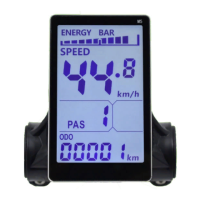

 To Next Page