Page 6 Owner’s Handbook
T-II
Timer Instructions
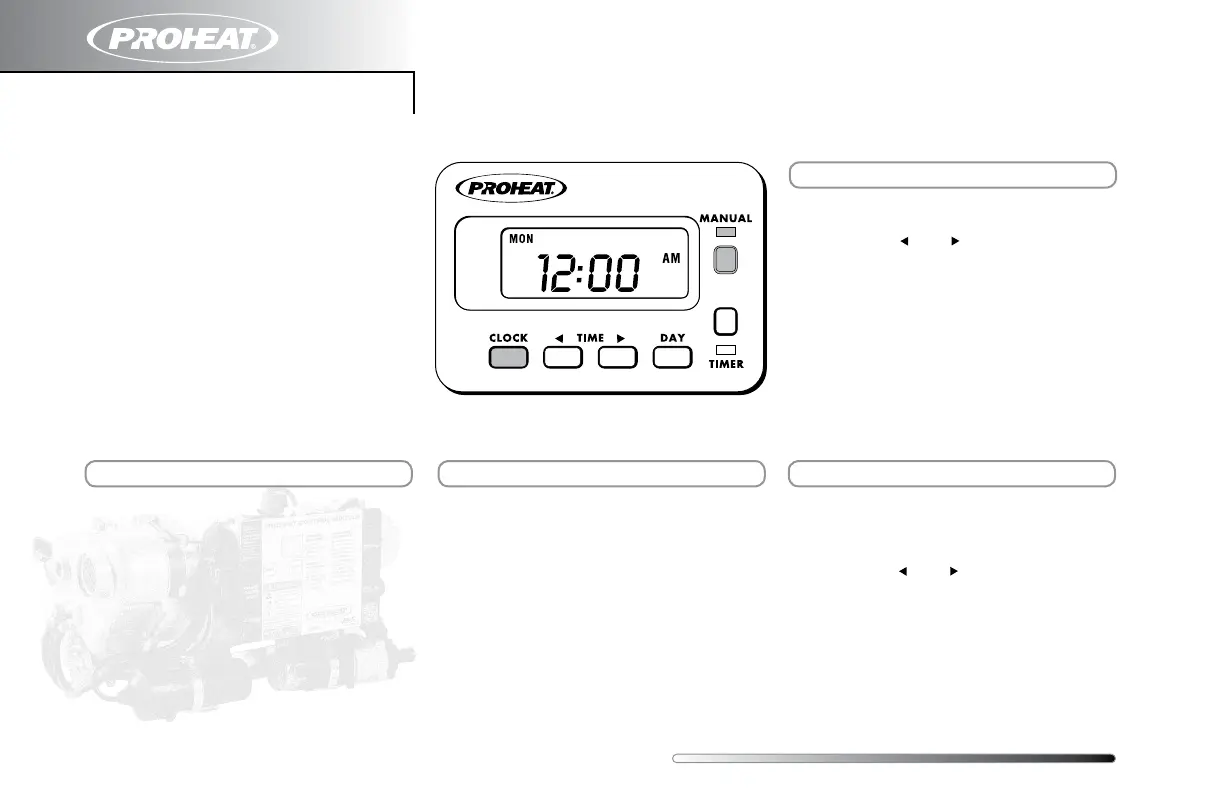
STEP 1 Press and Hold “TIMER” (green light
will turn on and “T1” will flash).
STEP 2 Press “ “ or “ “ to set time
STEP 3 Press “DAY” to advance the day.
STEP 4 Release “TIMER”. (green light and
“T1” will remain lit to activate timer).
STEP 1 Press and hold “CLOCK”
STEP 2 Press “ “ or “ “ to set time
STEP 3 Press “DAY” to advance the day.
STEP 4 Release “CLOCK”.
MANUAL button is used to turn the PROHEAT
On and Off when desired.
STEP 1 Press “MANUAL” to turn on the
PROHEAT (red light will go on and
the heater will operate indefinitely).
STEP 2 Press “MANUAL” again to turn Off
the heater (red light and the
PROHEAT will turn Off).
For complete Timer information,
please refer to the T-II Timer Installation
and Operating Instructions 958829 at
www.proheat.com
Note maNual operatioN timed operatioN
SettiNg clock


 To Next Page