
 Need help?
Do you have a question about the Prolific PL-2303 and is the answer not in the manual?
Lists the necessary software and hardware requirements for installing the Mac OS X driver.
Explains how to adjust Mac OS X security settings to allow driver installation from unidentified developers.
Instructions for downloading the Mac OS X Universal Binary driver from the Prolific website.
Guide to running the driver installer file and proceeding with the installation process.
Procedure to restart the computer after the driver installation is complete.
Steps to check if the PL-2303 device is detected by the Mac using System Profiler.
How to verify USB serial port device setup using the Terminal program and commands.
Information regarding a pop-up for a new network interface upon detecting the USB-Serial Controller.
Steps to connect a 56K serial modem to the PL-2303 adapter via System Preferences > Network.
Instructions on how to add the USB Serial Controller device if it's not already visible in Network settings.
Selecting the 'USB-Serial Controller' interface and naming the service for modem connection.
Configuring the serial modem's Internet dial-up settings, including telephone number and account details.
Clicking the 'Connect' button to establish the Internet dial-up connection for the serial modem.
Checking the modem connection status via Safari browser and monitoring data sent/received.
Instructions for downloading and installing the CoolTerm serial port terminal program.
Setting up CoolTerm, selecting the PL-2303 device ('usbserial'), and connecting the port.
Configuring serial port settings for a second PL-2303 cable to match the first one.
Using a null modem cable to connect two PL-2303 cables and transfer text files between them.
Using a loopback connector (TX-RX short) to test the PL-2303 serial port by sending characters.
Using 'sudo rm -rf' commands in Terminal to remove driver files and related receipts.
Removing the USB-Serial Controller port from Mac's Network settings via System Preferences.
Restarting the computer after uninstallation before attempting to reinstall the driver.
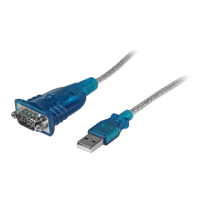
The Prolific PL-2303 USB-to-Serial Bridge Controller is a versatile device designed to facilitate communication between Mac OS X computers and serial devices. This guide outlines the installation and usage of its universal binary driver, supporting Mac OS X versions 10.6 through 10.10, including 64-bit systems.
The primary function of the PL-2303 is to act as a bridge, converting USB signals from a computer into serial signals compatible with various serial devices, and vice-versa. This enables modern Mac computers, which often lack native serial ports, to interface with older or specialized serial equipment such as modems, networking devices, industrial control systems, and other peripherals that rely on serial communication. The driver ensures that the PL-2303 USB-to-Serial Cable Adapter is recognized as a standard serial port by the Mac OS X operating system, allowing applications to interact with connected serial devices as if they were directly attached to a physical serial port. The universal binary driver ensures broad compatibility across different Mac architectures.
The installation process begins by downloading the appropriate driver from the Prolific website. Apple's enhanced security settings in Mac OS X may initially prevent the installation of software from "unidentified developers." To address this, users must navigate to "System Preferences," then "Security & Privacy," and temporarily adjust the setting to "Allow apps downloaded from: Anywhere." This step is crucial for the successful execution of the driver installer. Once the security settings are adjusted, running the installer package is straightforward, guiding the user through a series of steps. Upon completion, a system restart is required to finalize the driver installation and ensure proper integration with the operating system.
After the system reboots, the PL-2303 USB-to-Serial adapter or cable can be connected to a USB port on the Mac. To verify that the device is correctly detected, users can utilize the "System Profiler" program, found within the "Applications-Utilities" folder. Within System Profiler, selecting "USB" under the hardware section should reveal "USB-Serial Controller" or "USB-Serial Controller D," indicating that the Mac recognizes the hardware.
Further verification of the serial port setup can be performed using the "Terminal" program, also located in "Applications-Utilities." By typing cd /dev and then ls tty.usbserial*, users should see a device listed as "tty.usbserial." If multiple PL-2303 devices are connected, they will appear as "tty.usbserialx," where 'x' denotes an assigned device number, similar to COM port assignments in Windows.
Mac OS X may also prompt the user about a "new network interface" being detected when a USB-Serial Controller device is connected. This is a common occurrence and can be managed through "Network Preferences."
A practical application of the PL-2303 is connecting a serial modem. To do this, users go to "System Preferences" and click on "Network." If the "USB Serial Controller" device is not visible in the left-hand column, it can be added by clicking the "+" button. Once added, users select "USB-Serial Controller" as the interface and can optionally rename the service (e.g., "PL2303 Modem") for easier identification, especially when multiple serial devices are in use. The network settings for the serial modem can then be configured, including telephone number, account name, and password. Clicking "Connect" initiates the dial-up connection, provided the serial modem is properly connected to a telephone line and powered on. The connection status, including data sent and received, can be monitored, allowing users to browse the internet using Mac OS X Safari or other web browsers.
For advanced users or those needing to interact directly with the serial port, a terminal program like CoolTerm can be used. CoolTerm, available from freeware websites, allows users to open, configure, and communicate through the serial port. After installing CoolTerm, users select the PL-2303 device (e.g., "usbserial") from the "Options-Serial Port" menu, set the desired baud rate, data bits, parity, stop bits, and flow control. Clicking "OK" and then "Connect" opens the serial port for communication. If two PL-2303 cables are used with a serial null modem cable connecting them, text files can be transferred between two instances of CoolTerm, demonstrating full duplex serial communication. Alternatively, a simple loopback connector (shorting TX and RX pins) on a single PL-2303 serial port allows users to type on the keyboard and see the characters echoed back on the local terminal window, confirming basic functionality.
Uninstalling the PL-2303 drivers is a straightforward process, although it requires administrative privileges. Users must be logged on as root or use the sudo command to execute the necessary commands in a Terminal session. The following commands remove the driver files and associated receipts:
sudo rm -rf /System/Library/Extensions/ProlificUSBSerial.kextsudo rm -rf /var/db/receipts/*PL2303*.*sudo rm -rf /var/db/receipts/*ProlificUSbSerial*.*In addition to removing the driver files, the serial port entry itself needs to be removed from the system. This is done by navigating to "System Preferences," then "Network," selecting the "USB-Serial Controller" device from the list, and clicking the "-" (remove) button. After these steps, a computer restart is recommended to ensure all components of the driver are fully uninstalled before any potential reinstallation or further system operations. This systematic approach to uninstallation helps maintain system integrity and prevents conflicts with future driver installations.
 General
| Chipset | Prolific PL-2303 |
|---|---|
| Data Bits | 5, 6, 7, 8 |
| Stop Bits | 1, 1.5, 2 |
| Baud Rate | 75 bps - 6 Mbps |
| Parity | None, Odd, Even, Mark, Space |
| Flow Control | RTS/CTS |
| Operating System Support | Windows, Linux |
| USB Specification | USB 1.1 |
| Operating Voltage | 5V |

 To Next Page