C
C
O
O
N
N
T
T
R
R
O
O
L
L
P
P
A
A
N
N
E
E
L
L
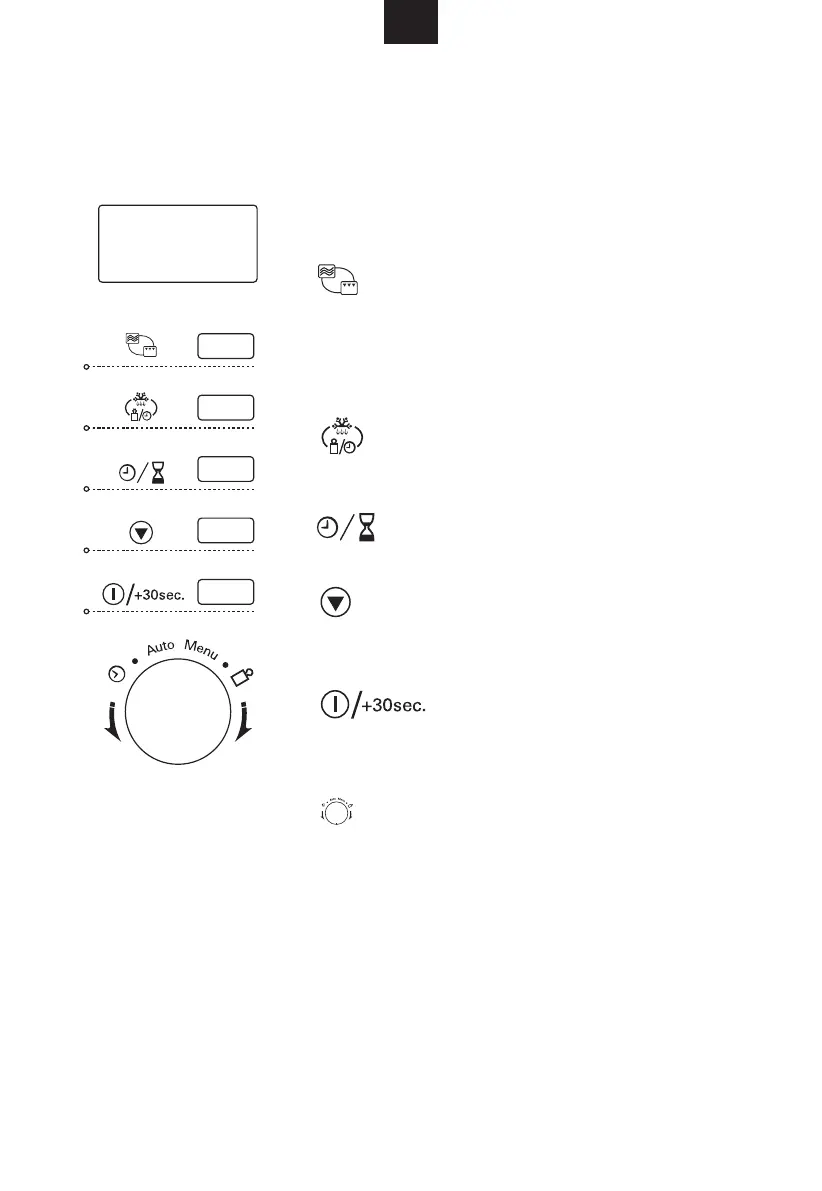
DISPLAY SCREEN
Cooking time, power, indicators and present time
are displayed.
Micro. / Grill / Combination
Press to select microwave power level, set a grill
cooking program and set a cooking program
combining microwave and grill cooking power.
Weight / Time Defrost
Press to defrost food by weight or time.
Clock / Preset
Press to set clock time and set a preset mode.
Stop / Clear
Press to stop cooking program or clear all
previous settings before cooking starts.
Start / 30-second increment
Press to start cooking program or increase
cooking time by 30 seconds.
Time / Auto Menu / Weight (Dial)
Rotate to set clock time, power level, cooking
time, weight, defrost time and auto menu.
GB
Downloaded from www.vandenborre.be


 To Next Page