EasyManua.ls Logo

Propel RC FLEX 2.0 - User Manual

Propel RC FLEX 2.0
8 pages
Print Icon
To Next Page IconTo Next Page
Loading...
15
INSTRUCTION BOOKLET
WARNING: Never leave product charging unattended for extended periods of
time. Always disconnect the battery from charger immediately after the battery
is fully charged. Please refer to enclosed safety instructions.
PACKAGE CONTAINS:
Colors and styles may vary slightly.
PROPEL
ON BOARD
HD VIDEO
ON BOARD
HD CAMERA
1280 x 720 pixel
20 frames per second
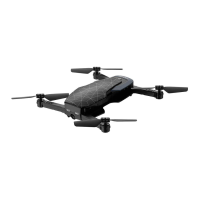
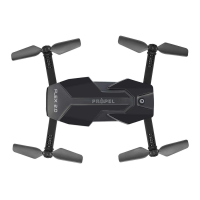
Compact Folding Drone with HD Camera
FLEX 2.0
TM
Instruction
Manual
Spare Parts Battery
FLEX 2.0
USB Charger 2.4G Wireless
Controller
Phone Holder
CHOKING HAZARD
-
Small parts.
Not suitable for children under 3 years.
WARNING!
FCC Part 15 C Notice
CAUTION: Changes or modifications not expressly approved by the party responsible for compliance could
void the user’s authority to operate the equipment.
NOTE: This equipment has been tested and found to comply with the limits for a Class B digital device,
pursuant to Part 15 of the FCC Rules. These limits are designed to provide reasonable protection against
harmful interference in a residential installation. This equipment generates, uses and can radiate radio
frequency energy and, if not installed and used in accordance with the instructions, may cause harmful
interference to radio communications. However, there is no guarantee that interference will not occur in a
particular installation. If this equipment does cause harmful interference to radio or television reception,
which can be determined by turning the equipment off and on, the user is encouraged to try to correct the
interference by one or more of the following measures:
• Reorient or relocate the receiving antenna.
• Increase the separation between the equipment and receiver.
• Connect the equipment into an outlet on a circuit different from that to which the receiver is connected.
• Consult the dealer or experienced radio/TV technician for help.
This device complies with Part 15 of the FCC Rules. Operation is subject to the following two conditions :
(1) This device may not cause harmful interference, and
(2) this device must accept any interference received, including interference that may cause undesired
operation.
This equipment complies with FCC/ IC radiation exposure limits set forth for an uncontrolled environment.
This equipment should be installed and operated with minimum distance 20cm between the radiator and
your body.
Cet équipement est conforme aux limites d'exposition aux radiations FCC/IC établies pour un
environnement non contrôlé. Cet équipement doit être installé et utilisé avec une distance minimale de 20
cm entre le radiateur et votre corps.
CAN ICES-3(B)/NMB-3(B)
This product meets the applicable Innovation, Science and Economic Development Canada
technical specifications.
This product is manufactured by Amax Group
12645 Memorial Drive Suite F1 #388 Houston, TX 77024
Propel™ and Propel RC™ are the licensed trademarks of Rooftop Group LTD Singapore.
©2020 All rights reserved. Visit us at www.propelrc.com
INDUSTRY CANADA NOTICE: CANADA ONLY.
This device contains licence-exempt transmitter(s)/receiver(s) that comply with Innovation, Science and Economic Development
Canadas licence-exempt RSS(s). Operation is subject to the following two conditions:
1. This device may not cause interference.
2. This device must accept any interference, including interference that may cause undesired operation of the device.
L’émetteur/récepteur exempt de licence contenu dans le présent appareil est conforme aux CNR d’Innovation, Sciences et
Développement économique Canada applicables aux appareils radio exempts de licence. L’exploitation est autorisée aux deux conditions
suivantes :
1. L’appareil ne doit pas produire de brouillage;
2. L’appareil doit accepter tout brouillage radioélectrique subi, même si le brouillage est susceptible d’en compromettre le
fonctionnement.
Conforms to safety requirements of
FCC, RSS247, RSS210.
Costco Wholesale Canada Ltd.*
415 W. Hunt Club Road
Ottawa, Ontario
K2E 1C5, Canada
1-800-463-3783
www.costco.ca
* faisant affaire au Québec sous
le nom les Entrepôts Costco
Made in China
CT-6168
C004-CA-V1.0
Question and Answer IconNeed help?

Do you have a question about the Propel RC FLEX 2.0 and is the answer not in the manual?

Summary

Drone Setup and Features

Drone Features Overview

Lists key features such as compact design, altitude lock, HD camera, gyro stability, speed settings, and radio range.

Remote Control Battery Installation

Instructions for installing 4 "AAA" batteries into the remote control unit.

Charging the Li-Poly Battery

Guide for connecting and charging the FLEX 2.0™ Li-Poly battery via USB, including indicator status.

Installing the Aircraft Battery

Steps to insert and secure the FLEX 2.0™ Li-Poly battery into the drone's compartment.

Expanding and Folding Drone Arms

Instructions on how to safely expand and fold the drone's arms before and after flight.

Flight Preparation and Syncing

Flight Preparation Checklist

Ensures drone and controller batteries are ready, and selects a safe, open area for flight.

Syncing the Drone and Controller

Step-by-step guide to pair the FLEX 2.0™ drone with its remote controller.

Basic Flight Operations

Recognizing Drone Front and Rear

Identifies the front (white lights) and rear (red light) of the drone for orientation.

Starting and Stopping Rotors

Manual and automatic methods for starting and stopping the drone's rotors.

Speed Selection

How to cycle through slow, medium, and high speed modes using the speed select button.

Flight Controls and Practice

Details on basic flight controls for ascent, descent, rotation, and directional movement.

Advanced Flight Adjustments

Adjusting Flight Trim

Guides for using trim buttons to correct drifting in forward/backward, banking, and spinning.

Calibrating the Drone

Procedure to recalibrate the drone's gyro sensors when it drifts or loses center position.

Performing 360° Stunt Rolls

Instructions on how to initiate and perform 360-degree stunt rolls using the controller.

App Integration and Usage

Live Video Streaming Setup

Instructions for connecting the drone's camera to a mobile device for live video.

WiFi App Installation and Pairing

Steps to install the Propel 1890 App and connect it to the drone via Wi-Fi.

Quick Start with the App

Basic steps to start flying using the mobile app's controls and features.

Detailed App Overview

Explains the various functions and interfaces available within the Propel 1890 mobile application.

Troubleshooting and Maintenance

Troubleshooting Common Issues

Addresses problems like no power, unresponsiveness, lift-off issues, spinning, and stability.

Replacing Propeller Blades

Guide on how to safely replace damaged or worn propeller blades with correct indicators.

Safety, Warnings, and Warranty

General Drone Warnings

Important safety information regarding outdoor use, propeller hazards, and battery handling.

Battery Safety Guidelines

Precautions for using Li-Poly and controller batteries, including mixing and charging.

Care and Maintenance

Recommendations for cleaning, storing, and maintaining the drone and remote control.

Limited 90-Day Warranty

Details the warranty period, coverage, exclusions, and contact information for repairs.
Propel RC FLEX 2.0 Specifications

General IconGeneral
BrandPropel RC
ModelFLEX 2.0
CategoryDrones
LanguageEnglish

Related product manuals