Need help?
Do you have a question about the Propel RC SNAP 2.0 and is the answer not in the manual?
Lists all items included in the SNAP 2.0™ drone package.
Instructions for installing batteries in the controller and drone, and charging the drone battery.
Guidance on how to safely expand and fold the drone's arms before and after flight.
Essential checks and conditions required before attempting to fly the drone.
Step-by-step guide to wirelessly pair the drone with its remote controller.
Identifying the drone's front/rear and manual/automatic methods for starting/stopping rotors.
Explanation of speed settings and an introduction to basic flight control.
Details on using control sticks for ascending, descending, rotating, and moving the drone.
Recommended exercises for mastering drone flight, from basic takeoffs to complex patterns.
How to correct drifting or spinning by adjusting trim settings for stable flight.
Procedure to immediately stop drone rotors in case of loss of control.
Instructions to recalibrate the drone after crashes for improved stability.
Steps to execute aerial flips and rolls using the stunt button and control stick.
How to set up the mobile app for live video feed and photo capture from the drone's camera.
Guide to installing the Propel 1890 app and connecting your mobile device to the drone via Wi-Fi.
Initial steps to launch the app, start motors, and control the drone using a mobile device.
Explanation of the app's interface, including home page, control sticks, and help sections.
A guide to diagnosing and resolving issues like no power, unresponsiveness, or flight instability.
Instructions on how to safely remove and replace damaged propeller blades.
Important safety precautions for operating the SNAP 2.0™ drone, including hazards and supervision.
Guidelines for using, charging, and maintaining the drone's rechargeable battery and controller batteries.
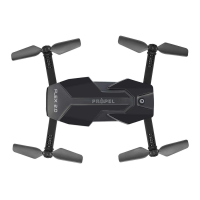
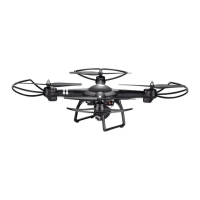
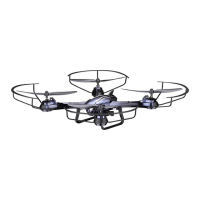
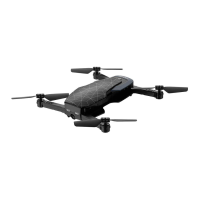
The SNAP 2.0™ is a compact, foldable drone equipped with an HD camera, designed for both beginner and advanced pilots. Its primary function is to provide stable flight for capturing video and still pictures, offering a blend of portability and performance.
The core function of the SNAP 2.0™ is aerial photography and videography. It features an onboard HD camera capable of recording video at 1280 x 720 pixels at 30 frames per second. The drone's compact fold-in design enhances portability, making it easy to transport. An air pressure sensor is integrated to lock flight altitude, ensuring stable video footage. For maneuverability and stability, the drone utilizes a 6-axis gyro system. It offers three speed settings, catering to different skill levels, from beginners to more experienced pilots. The wide-range digital radio allows for a flight range of up to 300 feet.
The drone can be controlled using a dedicated 2.4G wireless controller or a compatible mobile device (Apple® iOS or Android™). The mobile app, "Propel 1890," enables real-time video streaming from the drone's camera to the mobile device. Through the app, users can also control the drone's flight, take still pictures, and record videos, which are then stored directly on the mobile device.
Remote Control Battery Installation: The wireless controller requires four "AAA" alkaline batteries. To install, unscrew the battery cover, insert the batteries as shown in the diagram, replace the cover, and push the power button up. A lit power indicator confirms correct installation.
Drone Battery Charging: The SNAP 2.0™ uses a Li-Poly battery. To charge, insert the battery into the charger and connect the USB end of the cable to a computer's USB port or a USB wall charger. The red LED indicator will turn off during charging and light up again when charging is complete. Average charging time is approximately 110-120 minutes via a 5.0V=2A USB wall charger. A fully charged battery provides 5-7 minutes of flight time, depending on environmental conditions and user input. It is crucial to unplug the charging cord when not in use.
Aircraft Battery Installation: Once charged, the battery is inserted into the drone's battery compartment and secured by locking the two ends with the battery locks.
Expanding and Folding the Drone: Before flight, the foldable arms of the SNAP 2.0™ must be expanded. Turn the drone over, bottom side facing up, and carefully pull and expand the four arms until they are fully extended. After flying, the arms can be gently folded back in for storage.
Speed Settings: The SNAP 2.0™ has three speed settings: 1 (SLOW), 2 (MEDIUM), and 3 (HIGH). The default is SLOW. Press the speed setting button to cycle through speeds; beeping sounds will indicate the current setting. Speed can be adjusted before or during flight.
Adjusting Trim: The drone is pre-trimmed and calibrated. However, after crashes or for personalized flight style, trim adjustments may be needed.
Calibrating the Drone: If the drone drifts or cannot hold its center position after crashes, recalibration is needed. Place the drone on a flat, level surface, ensure it's on and synced with the controller (but blades not spinning). Move both throttle and control sticks down and to the right corner, holding for 5 seconds. The drone's lights will rapidly flash and then stop, indicating successful calibration.
Replacing Propeller Blades: The SNAP 2.0™ has four sets of blades, marked "B" and "A" on the front and "A" and "B" on the rear. If a blade is damaged, unscrew and remove it, then replace it with a new blade, ensuring the markings match. After replacing the blade, click the blade guard into place and secure it with a screw.
 General
| LED Lights | Yes |
|---|---|
| Skill Level | Beginner |
| Camera Resolution | 720p |
| Gyro | 6-axis |
| Features | Headless Mode |
| Battery | 3.7V 500mAh LiPo |
| Battery Life | 7-8 minutes |
| Charging Time | 60 minutes |

 To Next Page