NOTE: The use of the Trim buttons are accompanied with a Beep tone. A single long Beep indicates the
product is center trimmed. Continuous long Beeps indicate the product is trimmed to the maximum on a
particular side.
NOTE: When set to 3 Channel the screen will be orange color.
When set to 4 Channel the screen will be blue color
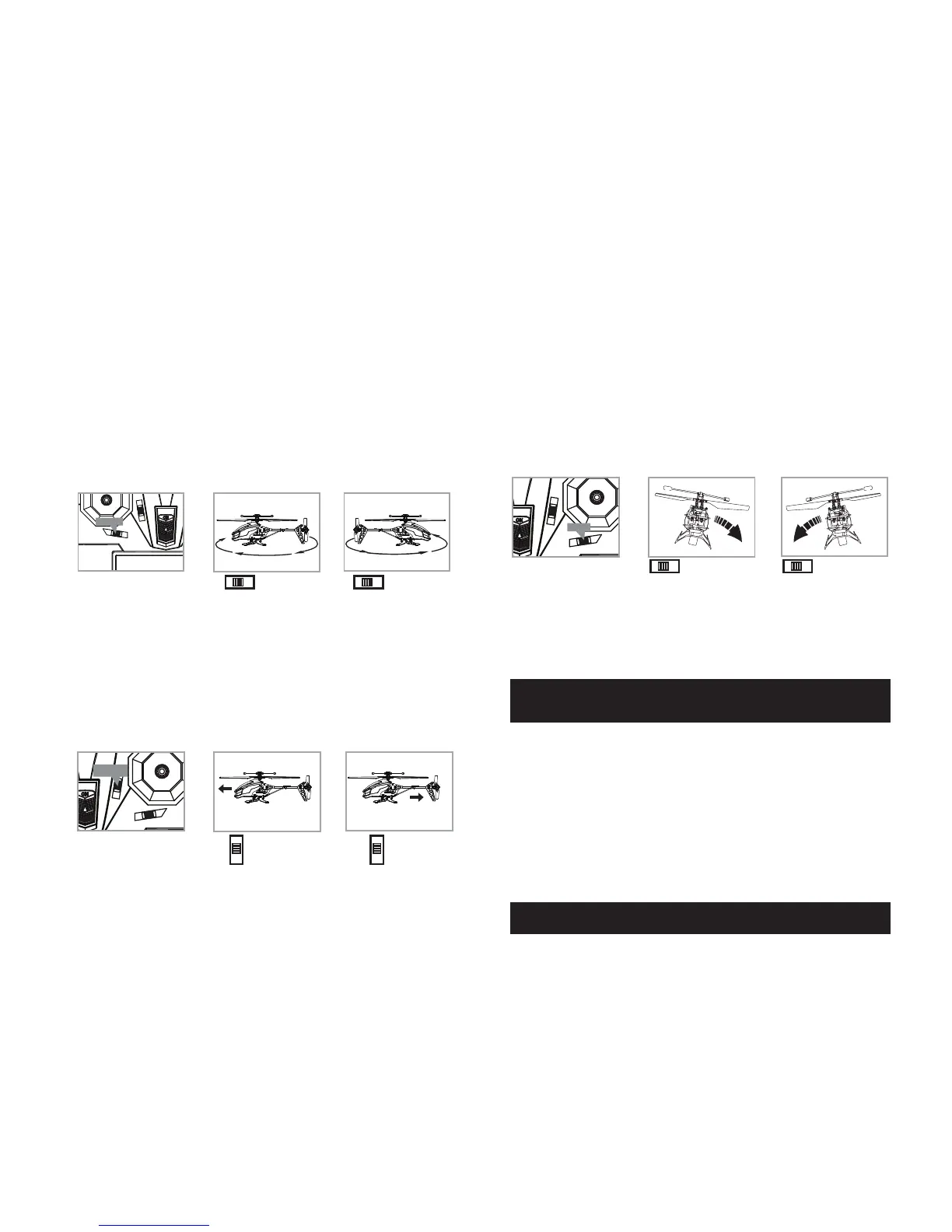
UNDERSTANDING TRIM ADJUSTMENTS
Turn Left/Right Trim
�• If your helicopter nose rotates to the left or right uncontrollably, you may need to utilize the
DIRECTION TRIM buttons.
• If your helicopter over rotates CLOCKWISE (to the right), push and release the DIRECTION TRIM
button repeatedly to left side until the turning stops and proper flight is maintained.
• If your helicopter over rotates COUNTER-CLOCKWISE (to the left), push and release the DIRECTION
TRIM button to right side in the same manner until the problem is resolved.
• From time to time you may have to adjust the DIRECTION TRIM to left and right to ensure the
helicopter will fly straight and respond accurately to control commands.
Forward/Backward Trim
�• If your helicopter is moving forwards or backwards automatically, you may need to adjust the
FORWARD/BACKWARD TRIM buttons.
•�If your helicopter flies forward, push and release the FORWARD/BACKWARD TRIM button
back/down repeatedly until the moving stops and proper flight is maintained.
•�If your helicopter flies backwards, push and release the FORWARD/BACKWARD TRIM button
forward/up in the same manner until the problem is resolved.
• From time to time you may have to adjust the FORWARD/BACKWARD TRIM to ensure the
helicopter will hover in mid-air and respond accurately to your commands.
Banking Left/Right Trim
�• If your helicopter is not steadily hovering and is banking to the left or right automatically, you
may need to adjust the BANKING TRIM buttons.
•��If your helicopter banks to the left, push and release the BANKING TRIM button repeatedly to the
right until the banking stops and proper flight is maintained.
•��If your helicopter banks to the right, push and release the BANKING TRIM button to the left in the
same manner until the problem is resolved.
• From time to time you may have to adjust the BANKING TRIM to left/right to ensure the helicopter
will steadily hover in mid-air and respond accurately to your commands.
Throttle Sensitivity Trim
• If you find the throttle is too sensitive when you fly the helicopter, you may need to utilize the
Throttle sensitivity trim.
• Push the Throttle sensitivity trim button back to lower the sensitivity of the throttle. Push the
Throttle sensitivity trim button forward to increase the sensitivity of the throttle. The middle
position is recommended for beginners.
SPEED SELECT BUTTON
Press the SPEED SELECT button on the top left of the remote control and your helicopter will change to
high-speed mode [MODE 2]. Press the SPEED SELECT button a second time to go back to normal speed
[MODE 1](see Remote Diagram on page 3).
CHANNEL SELECT & HELICOPTER LIGHTS ON/OFF SWITCH BUTTONS
Press and hold down the CHANNEL SELECT button on the top right of the remote control for 3 seconds to
toggle between 3 Channel (Beginner Mode) and 4 Channel (Advanced Mode) modes. A beep tone
indicates a change of channel and will be indicated on the screen.
Quickly Press the LIGHT button on the top right of the controller (see CONTROLLER DIAGRAM on page 3 )
to remotely switch helicopter lights OFF and ON.
im
Direction Trim
It over rotates to the right…
Direction Trim Controls Push to left Push to right
It over rotates to the left…
d
Forward/Backward
Trim
Forward/backward
Trim Controls
Push down to
go backward
If flying forward... If flying backward...
Push up to
go forward
4 CH Left/Right Banking
Controls
Push to right to
increase right banking
sensitivity
Push to left to
increase left banking
sensitivity
Banks Trim
5 6


 To Next Page