Carefully snap on each side of the
head to the bar.
CONTENTS:
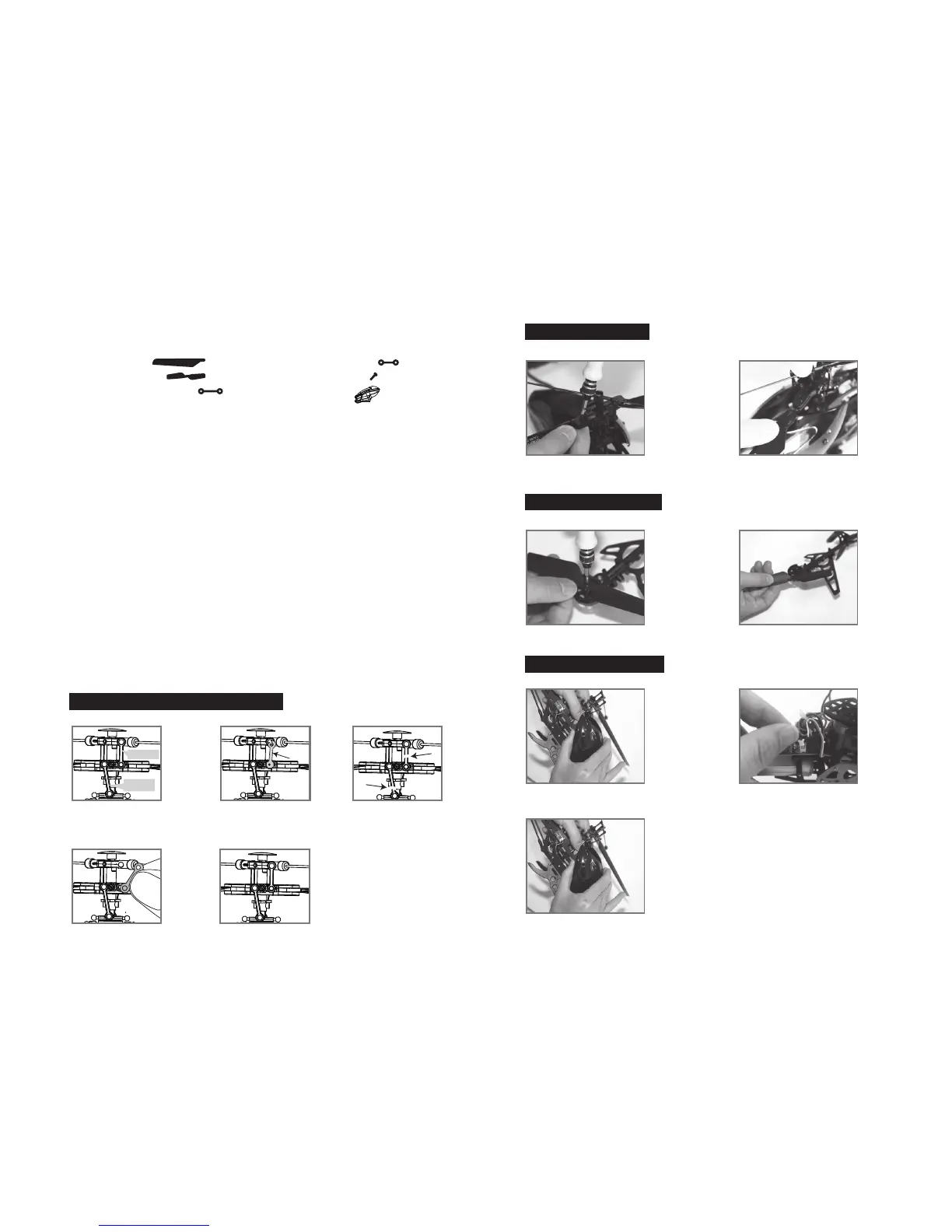
(1) Propeller blade x 2 (4) Connecting rods (L 23mm) x 2
(2) Tail propeller blade x 1 (5) 2.5*10mm screws x 4
(3) Direction connecting rods (L 28mm) x 2 (6) Training head x 1
CLOUD QUEST PROPELLER SYSTEM
Your CLOUD QUEST propeller system is a precision instrument that may need repair or replacement from time to time for
optimal flight function. Crash landing from high-speed aerial flights may cause damage to your CLOUD QUEST propeller or
propeller connecting rods.
TROUBLESHOOTING:
If your CLOUD QUEST loses its ability to fly correctly, please inspect the propeller system carefully for the following common
issues:
1. Replacing Connecting Rod and Direction Connecting Rod: The connecting rod is a small “handcuff” style device that
stabilizes the propellers. There are two connecting rods and two direction connecting rods on the propeller. Please see
Diagram 1.
If a connecting rod or direction rod is broken or missing simply replace it by “peeling” off the existing broken unit and
replacing it with a new one. You may have to use slight pressure when reattaching both ends of the new connecting rod.
Make sure that the new connecting rod is secured and locked in place. See Diagram 2. For changing connecting rod, make
sure there is no damage to the actual blade or arm that holds the connecting rod in place. If there is you must replace the
entire blade system.
2. Replacing Propeller: The propeller is subject to damage as you learn to properly fly and control your CLOUD QUEST. If after
a crash your helicopter has loss of control or flies erratically you should carefully inspect your entire propeller system for any
sign of damage. Most common are: cracked or chipped blade, broken “connecting rod”, frozen balance bar (this is when the
balancing bar and blade are jammed and can not move freely up and down). To replace the propeller blades follow
diagrams 3 through 4.
3. Replacing Tail Propeller Blade: If after a crash your helicopter tail propeller blade is damaged, please replace it follow
diagrams 5 through 6.
4. Interchanging the Head: Your Cloud Quest package includes a Training head. It is highly recommended for users who are
beginners to outdoor helicopters to practice initially with the Training head. It has been engineered using a more durable
material and is more likely to withstand crashes.
PART REPLACEMENT INSTRUCTIONS
Diagram 1
Replacing Connecting Rod and direction Connecting Rod
Replacing Damaged Propeller
Replacing Damaged Tail Propeller
Using or Replacing Training head
Broken connecting rodThere are two propeller connecting
rods on the propeller and two direction
connecting rods.
Diagram 3 Diagram 4
Diagram 5 Diagram 6
Broken connecting rod
Diagram 2
Proper connectionReplacing connecting rod
Using a Phillips screwdriver turn
counter clockwise to remove the
propeller screw.
Remove the broken blade,
carefully replace with a new one,
and then screw on.
Using a Phillips screwdriver turn
counter clockwise to remove the tail
propeller screw.
Remove the broken tail blade,
carefully replace with a new one,
and then screw on.
Carefully snap off each side of the
head from the bar.
Disconnect the head light power cord
inside and slide off the head.
Diagram 7
Diagram 8
Diagram 9
Direction
Connecting Rod
Connecting Rod
11 12


 To Next Page