12
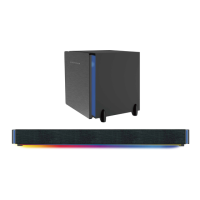
Press and hold the button to turn on/off the LED light on the soundbar and subwoofer.
Press the
button repeatedly on remote control to switch the LED light effect.
Mode 1: The RGB LED light with change its color alternatively following the music rhythm.
Mode 2: The LED light will be Blue.
Mode 3: The LED light will be Green.
Mode 4: The LED light will be Red.
Mode 5: The LED light will be Violet.
Mode 6: The LED light will be Cyan.
Mode 7: The LED light will be Light Green.
Mode 8: The LED light will be Light Blue.
Light Effect
Note:
The LED lights at the both ends of the soundbar and beside the front panel of
the
subwoofer keep changing in red and blue alternatively and will not answer the
color-
switching command of from the remote control
Sound Control
~ Press the + or - button on the sounbar or remote control repeatedly to adjust volume.
~ Press the button on remote control to turn off sound. The mode indicator on the
sounbar will blink, press the button again to resume.
~ Press the MUSIC button on remote control to turn to MUSIC sound effect mode.
~ Press the TALK button on remote control to turn to TALK sound effect mode.
~ Press the MOVIE button on remote control to turn to MOVIE sound effect mode.
~ Press the STANDARD button on remote control to turn to normal sound effect mode.


 To Next Page