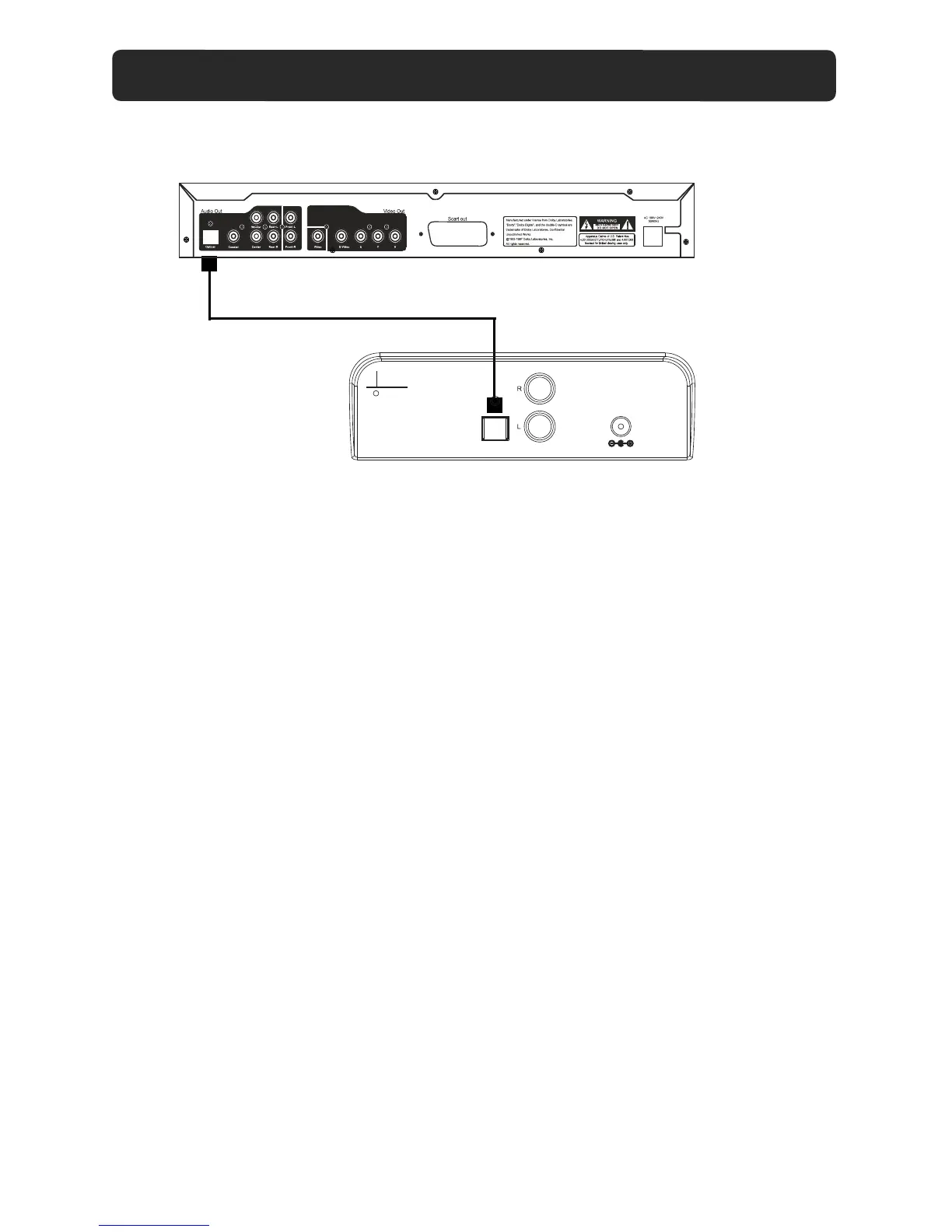
CONNECT THROUGH OPTICAL
Optical Input Jack of the unit
Optical Cable (not included)
OPTICAL IN source may include TV, DVD, etc.
DVD
(Only for PCM format)
DC IN 16V
OPTICAL IN
FM ANT
AUX-IN 1
4. Press the SOURCE button repeatedly until the indicator turns Indigo.
1. Connect one end of Optical cable to the "Optical In " jack on the rear of the unit
as the figure above.
2. Connect the other end to the optical jack on the external device.
5. Plays the music in the external player as usual.
3. Power ON the unit.
-During playback
•Press MUTE button to turn off the sound. Press again to resume the sound.
•Press VOLUME+/- buttons to adjust the volume level.
•Press BASS+/- buttons to adjust bass level.
•Press TREBLE+/-buttons to adjust treble level.
•Press EQ button to switch between POP/JAZZ/CLAS/ROCK/NORM.
11


 To Next Page