04
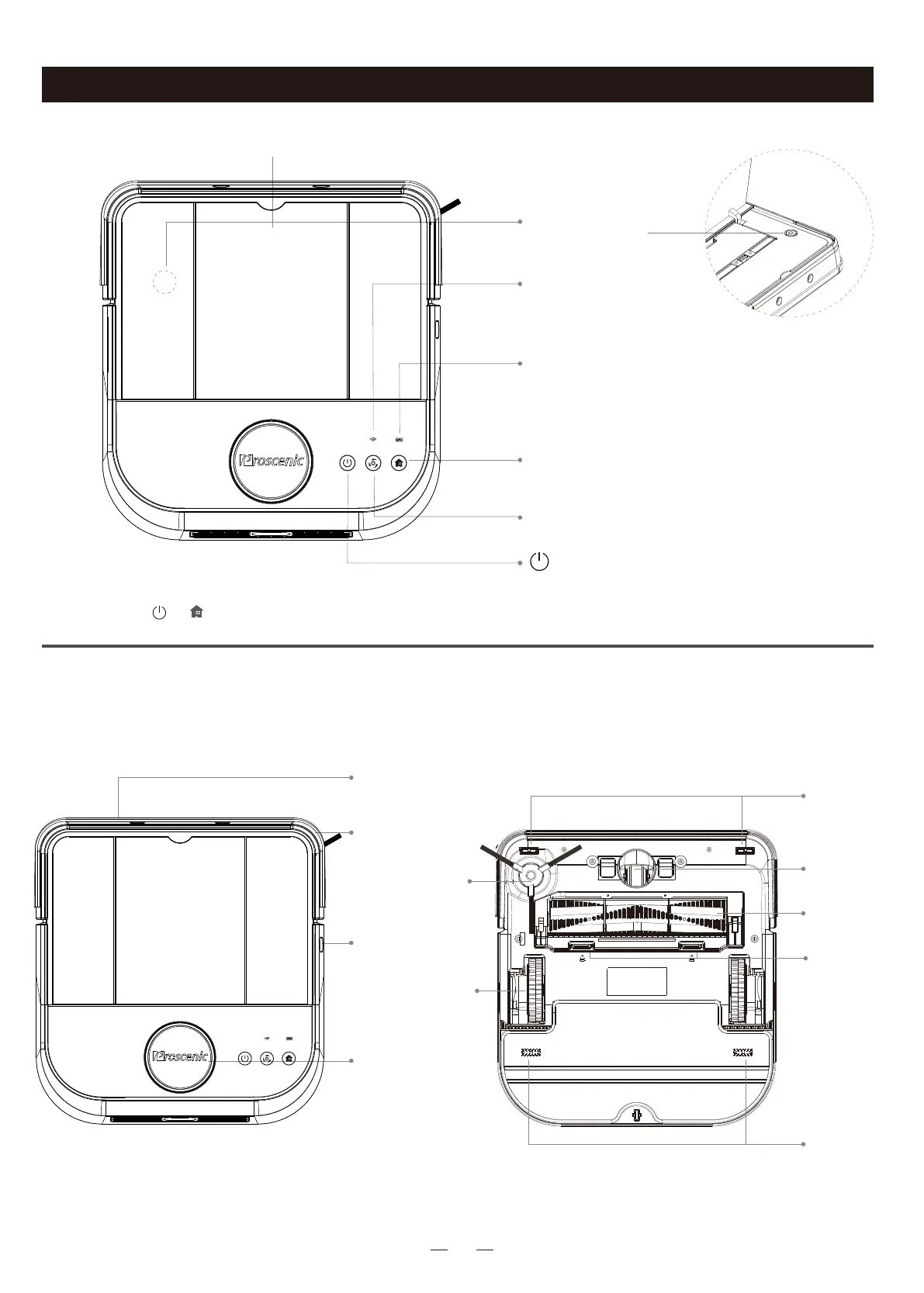
Robot cover
Network Configuration
Press and hold“ ”+“ ”for 3 seconds to start network
configuration.
Recharge Button
Clean Button
·Press it to start charging mode
·Press to start clean
Power Indicator
·Power >=20%: stable green light
·Power <20%: red light blinks
WIFI indicator
·flash fast/slowly: wifi connecting
·solid light: wifi connected
·No operation for 10 minutes / press and hold it for 3
seconds to enter sleep mode
·Press to stop cleaning
ON/OFF
Power Button
·Short press it to
power on/off the robot
Infrared Sensor
Collision Bumper
Side Brush
Fall-Arrest
Sensors
Universal
Wheel
Drive Wheels
Main Brush
Buckles of
Main Brush
Cover
Edge Sensor
LDS Laser
Distance Sensor
Fall-Arrest
Sensors
Key Buttons
Main Body
Product Introduction



 To Next Page