06
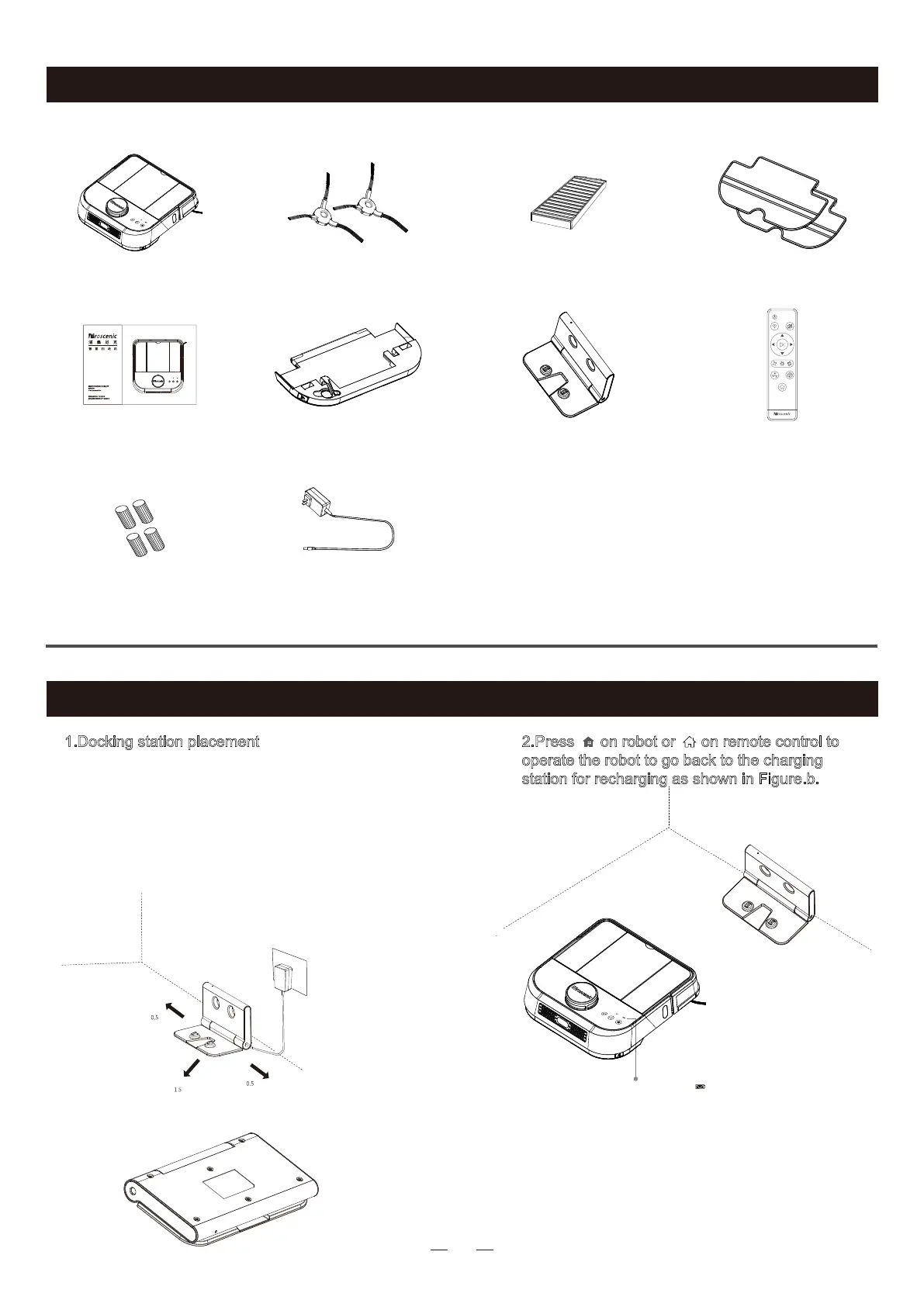
1.Docking station placement
Place docking station against the wall and remove
obstacles from within 0.5 meter at two sides and
about 1.5 meters in front of the station, as shown
in the figure a.
If the robot has been shut down,power on the
robot by pressing the power switch under the
robot cover.
2.
Press on robot or on remote control to
operate the robot to go back to the charging
station for recharging as shown in Figure.b.
Note: Power Indicator
Flash red : <20%
Flash green:in charging
Solid green light:fully charged
a.When the cleaning task is completed, the host will
automatically return to the charging stand.
b.If the battery runs low, the robot can not be turned
on.Please charge it.
c.The robot cannot be shut down while charging.
d.The charging base is foldable for easy carrying.
e.While charging, please remove the water tank.
f.Place the charging base out of direct sunlight .
meter
meter
meter
a
b
Main Body*1 Side Brush*2 HEPA Filter*1 Duster Cloth*2
Charging Base*1 Remote Control*1 Water Tank*1
(dust bin included)
Filter Elements*4
Manual*1
adapter*1
Main Body and Accessories
Product Operation



 To Next Page