07
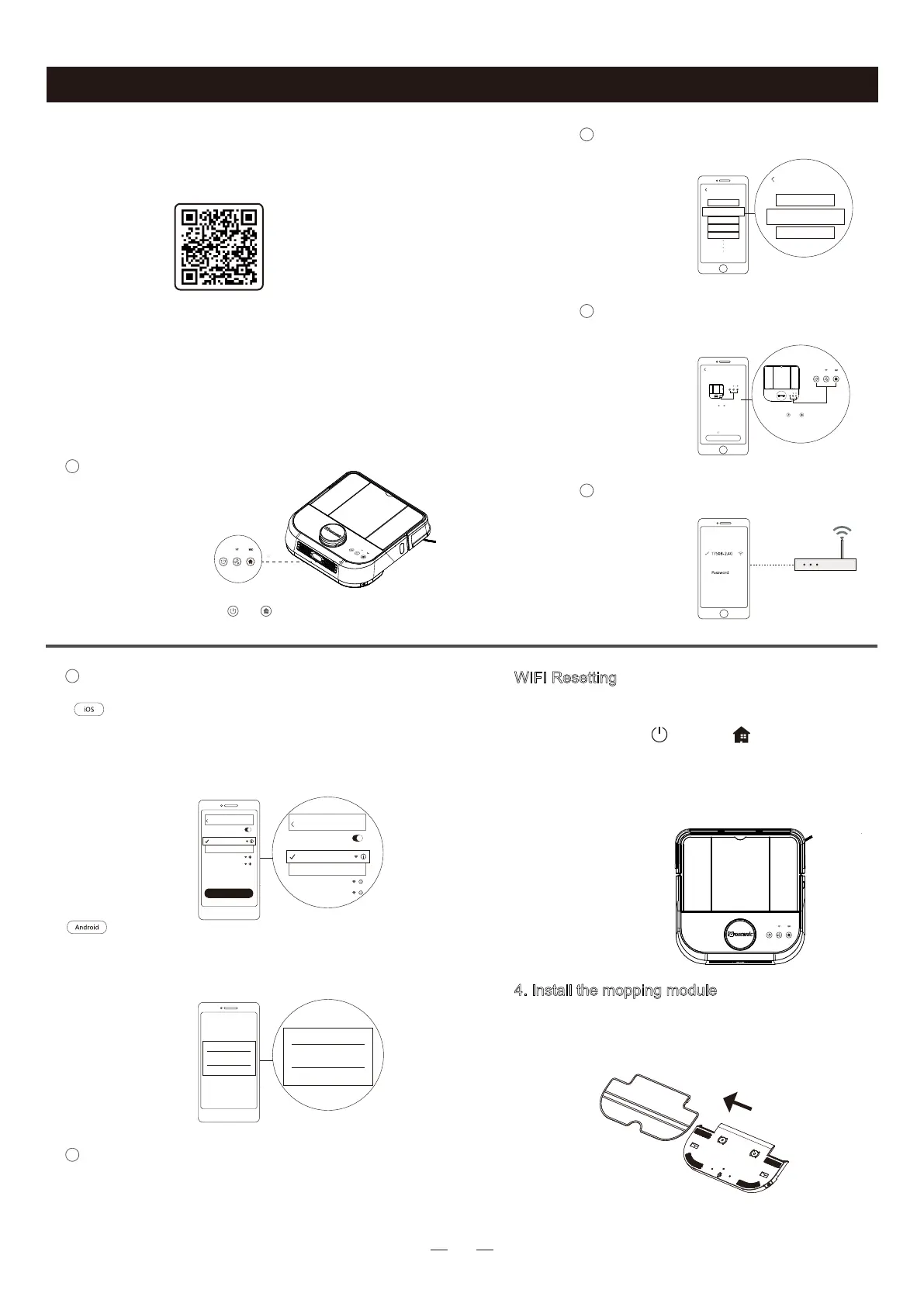
Please download APP“ProscenicHome” by sca-
ning the QR code or in Google Play or App Store.
·After the app installation, please follow the APP prompts to enter
network configuration. With APP, you can get more robot function
after connecting the robot wifi.
·The robot is not compatible with 5Ghz network.
press and hold “ ”+“ ”for 3 seconds to
start network configuration
Network Configuration
Network Configuration
1
Enter wifi password
4
Add a Devide
2
Make sure WIFI indicator flashes
3
LDS D500/D550
LDS-xxxx
M7
H500
H600
Please select the purchased device
Click or pull up to load more
Please select the purchased device
LDS D500/D550
......
......
Search Device Hotspots
WIFI indicator flashes
Hold Down “ ”+” ”for 3 seconds until
you hear "Network Configuration Begins”.
Network Configuration
Hold Down “ ”+” ”for 3 seconds until
you hear "Network Configuration Begins”.
WIFI Resetting
When the wifi connection between the mobile phone
and the robot fails, please reset the robot wifi by pre-
ssing and holding " " and " " for 3 seconds
until you hear a voice prompt "WI-FI has been reset,
meanwhile, the WIFI indicator blinks. The possible
causes of connection failure includes router configur-
ation change, wifi password change, and etc..
The wifi connection between APP and robot
begins.
Please wait until the connection completes.
Start network configuration
6
Connect to Robot WIFI
5
Enter the page of Setting > WIFI in your phone,
choose wifi “Proscenic-XXXX”.Reopen APP after
successfully connecting to wifi “Proscenic-XXXX”
Select and connect to the device network
according to the APP prompts
Proscenic-XXXX
Proscenic-XXXX
Device Choice
Cancel Refresh
Proscenic-XXXX
Proscenic-XXXX
Device Choice
Cancel Refresh
Setting
AVAILABLE NETWORKS......
WLAN
WLAN
Proscenic-XXXX
XXXXXXXX
XXXXXXXX
Setting
AVAILABLE NETWORKS
...
WLAN
WLAN
Proscenic-XXXX
XXXXXXXX
XXXXXXXX
Network Configuration
4. Install the mopping module
① Stick Mopping Cloth on the bottom of water
tank, and press to make it straight.
·Do not mop home when no one is at home
·Do not use the mopping module on carpets.
Not recommended for first cleaning
3.APP installation
Product Operation



 To Next Page