08
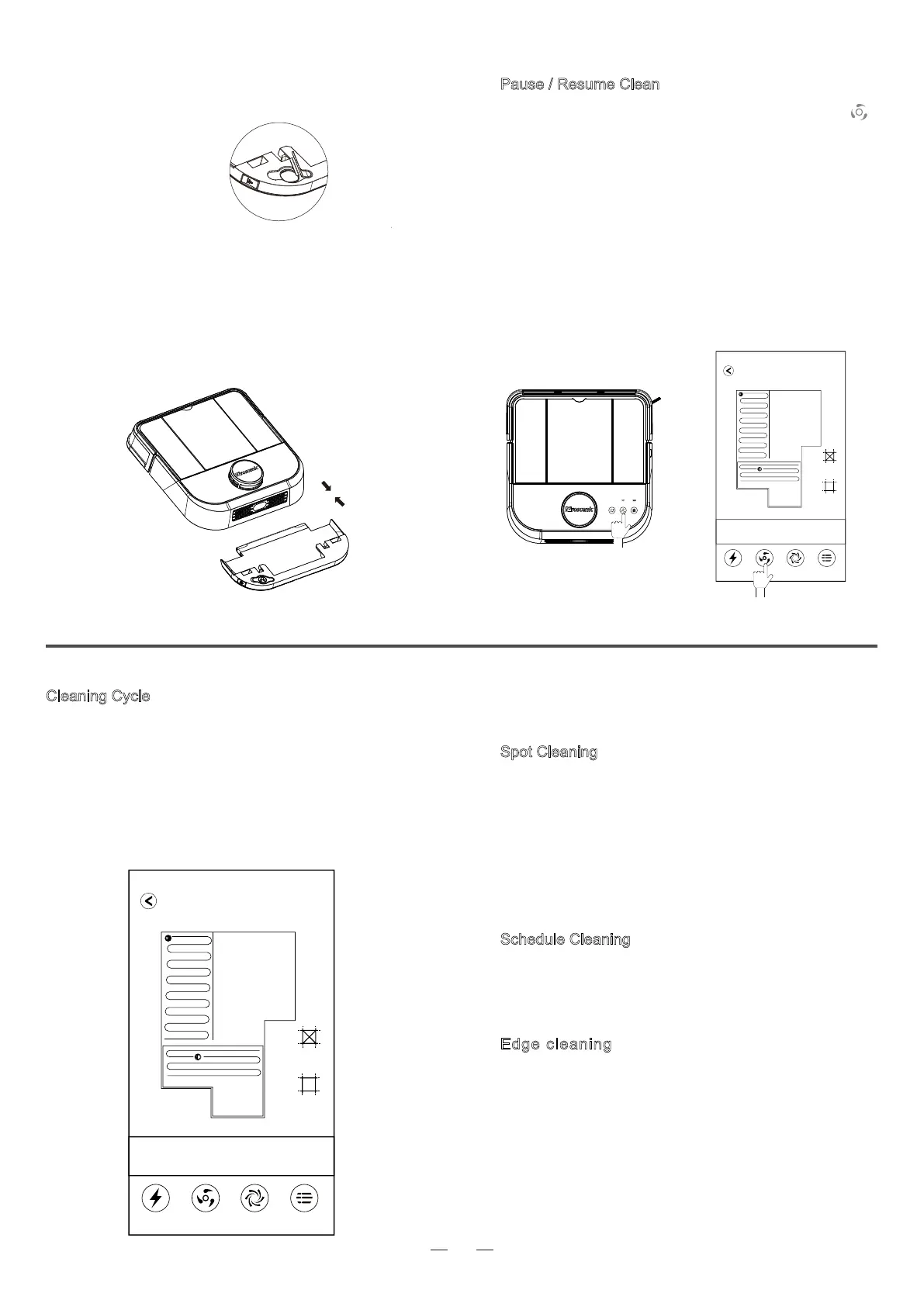
② Uncap the water tank, fill it with water, and fasten the
rubber cover.
③ As shown in the figure, push the mopping module
horizontally into the bottom of the robot.Please make
sure the buckles on both sides are installed properly.
Press the buckles on both sides of the mop module
to remove the mopping modules.
·Some disinfectant or detergent may clog the tank filter
·Please remove the mopping module while charging or not in service
Pause / Resume Clean
1. As the figure a shows, in standby mode, press" "
on the robot to start clean (Press any button to pause
cleaning ).
2. As the figure b shows, click the clean button in APP to
start clean (Click the pause button to pause the current
task)
Note:
·The robot vacuum is not recommend for cleaning liquids.
·If the power is less than 20%, the cleaning task will not be performed.
Please charge before starting the cleaning.
·Robot automatically shuts down when the battery is below 5%.
·Please put aside wires on the floor before cleaning to avoid power failure
or damage to furniture.
a b
42㎡
Cleaning Area
57%
Battery Level
38min
Clean Time
Charging 清扫
Charging
Vacuum Robot
Silent Mode More
Cleaning Cycle
Edge cleaning
The robot cleans along the walls, and it returns
to its charging base after the current task is fi-
nished.
Robot stars by scaning the house, generating a map for
the area and intelligently dividing the house into different
sections. In each section, the robot firstly cleans along
the wall, and then cleans in a zigzag pattern.The robot
completes the cleaning of each section in an efficient
and orderly way. When finished, the robot returns to
its base to get charged.
Note: If you move robot mid-cycle it will clear its map and create a new
one when you restart it.It will also be unable to return to its base.
The robot cleans in a square area of 1.5X1.5m.The
robot enters spot clean mode via either of the
following methods:
a.When the user specifies a point on the map, the
robot will come near that point, and then centering
on that point, the robot starts cleaning.
b.Start spot clean mode by remote control.
Spot Cleaning
Please use the APP to schedule cleaning.The robot will
start cleaning as scheduled,and return to base after
finishing cleaning.
Schedule Cleaning
42㎡
Cleaning Area
57%
Battery Level
38min
Clean Time
Charging Clean
Charging
Vacuum Robot
Quite Mode More



 To Next Page