1
Table of Contents ------------------------------------------------------------ 1
Installation ------------------------------------------------------------------- 2
Important Notes ------------------------------------------------------------- 3
Wiring
Identification of Control Functions --------------------------------------- 5
Controls -------------------------------------------------------------------- 6-7
Radio Section Operation --------------------------------------------------- 8
BT MUSIC Section Operation ---------------------------------------------- 9
USB Section Operation ----------------------------------------------- 10-11
AUX, RCA Description ---------------------------------------------------- 11
Trouble Shooting Guide -------------------------------------------------- 12
Specifications -------------------------------------------------------------- 13
Identification ------------------------------------------------------- 4
12
Table of Contents
Trouble shooting Guide
Reset Function:
A reset is accomplished by holding the Preset 1 button for 3 seconds at unit powered off.
It will display SYS CLR which indicates the system being successfully reset.
In many respects, a stereo acts much like a computer and occasionally requires
a reboot. In the unlikely event of product malfunction, a reset can usually fix the issue.
Note: It will be necessary to re-enter the radio preset memories and other personal settings as
these will have been erased when the microprocessor was reset. After resetting the player,
ensure all functions are operating correctly.
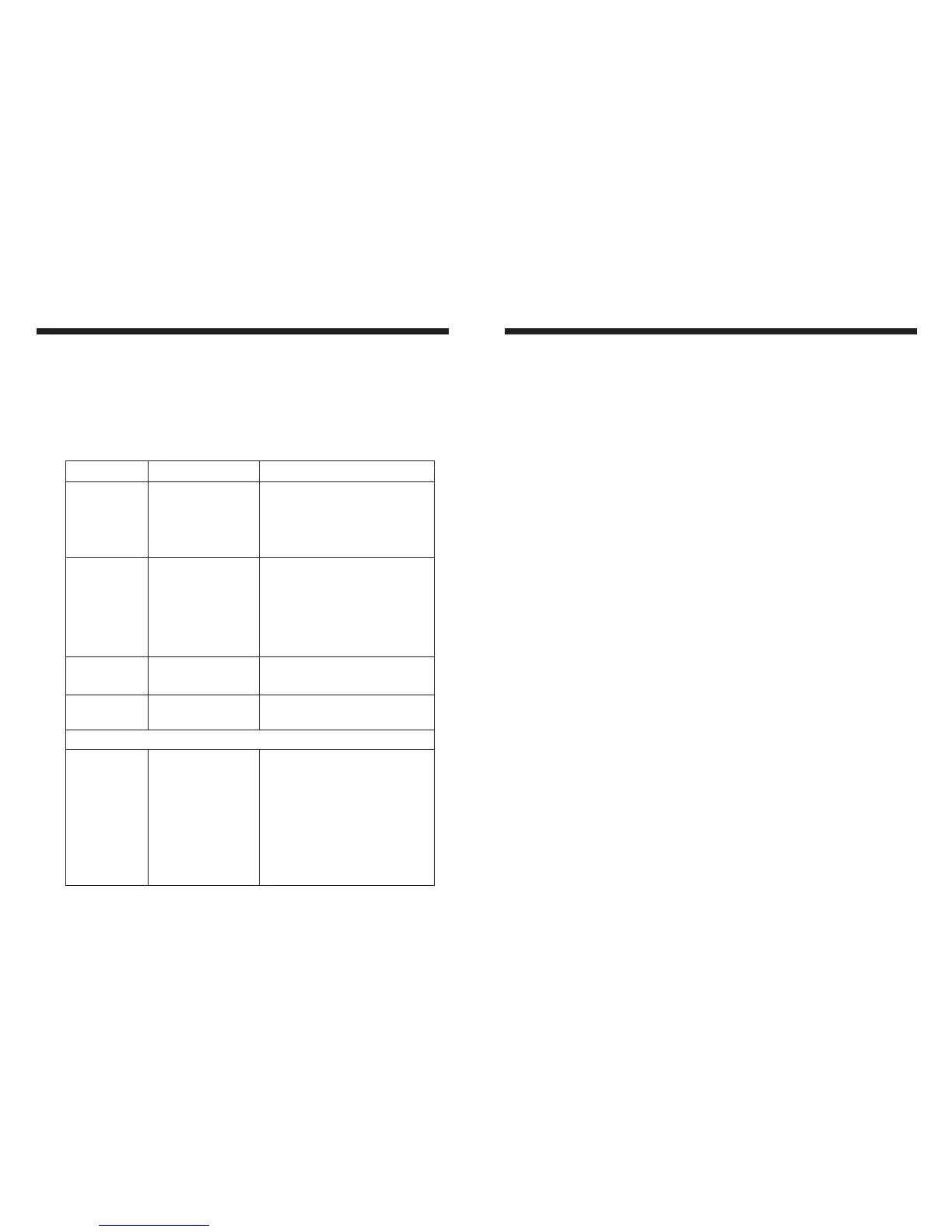
Issue
No power
No Sound
No Reception
USB stick not
reading
Cause
1. Incorrect wiring
2. Fuse is blown
3. Low battery voltage
1. Speaker connection
came loose
2. Bad speaker
3. Output blown
4. Volume too low on
media device
1. Antenna not firmly
seated in socket
1. File must be a mp3
or wma file
Solution
1. Double check wiring
2. Replace fuse
3. Check voltage of vehicle battery
with multimeter. Voltage must
be at least 11V.
1. Double check connections.
2. Replace bad speaker with known
good speaker and connect.
3. Send unit in for repair.
4. Increase volume of media device
1. Insert firmly
1. Convert format to mp3 or wma.
While in Bluetooth mode:
No Connection
1. You are not
connected to the
“MR70” address
on your portable
media device.
2. Out of range
3. The connection is
already in use.
1. Choose “MR70”
2. Bring portable media device closer
to the receiver. Device needs to be
within 30’.
3. Ask the person who first paired to
drop out.


 To Next Page
 Loading...