8
5
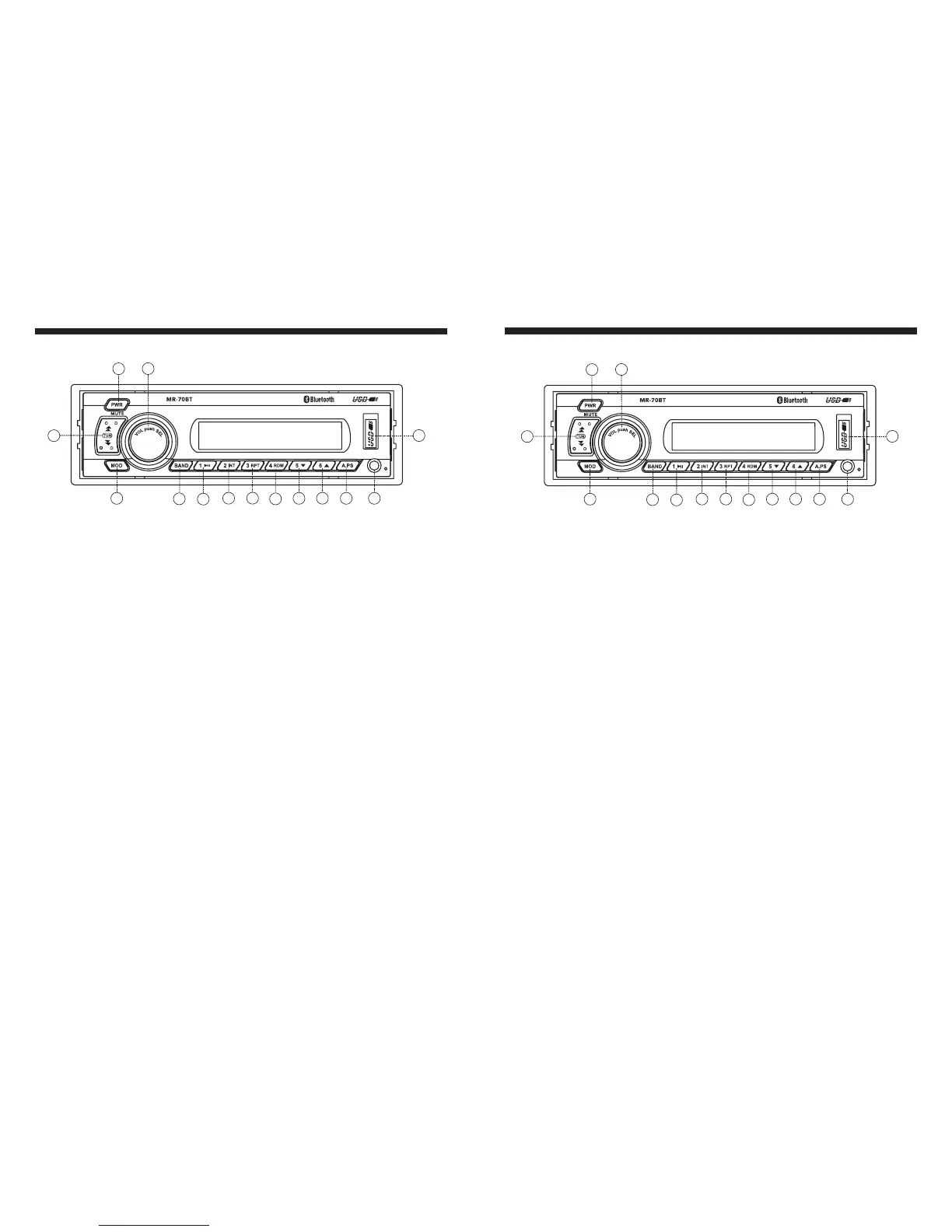
1. POWER ON/OFF button, MUTE button
2. Electronic function SELECT button, Volume control knob
3. MODE button ( Radio --> USB --> BT MUSIC --> AUX IN)
4. BAND button (FM1 --> FM2 --> FM3 --> AM1 --> AM2)
5. Track Play / Pause, radio Preset 1 button
6. Track Intro Scan button, radio Preset 2 button
7. Track Repeat button, radio Preset 3 button
8. Track Random play button, radio Preset 4 button
9. Directory Down button, Radio Preset 5 button
10. Directory UP button, Radio Preset 6 button
11. A.PS - Auto Preset Scan button
12. Track UP/Down button, Radio tune UP/Down button
13. AUX IN Jack
14. USB Slot
Identification of Control Functions
3
2
12
13
5
6
8
9
10
11
1
4
14
7
Radio Section Operation
1. Radio Operation
2. To Select Band
3. Auto / Manual Tuning buttons (12)
Note:
4. Station Store function
5. To Recall the Preset Stations
6. Stereo - / mono - reception
Press MOD button (3) to select Radio mode. Station frequency is indicated on display.
Press the BAND button (4) to select the desired band FM1, FM2, FM3, AM1, or AM2.
The Radio defaults in Auto tuning mode. Simply press Tune up/down button (12) and the unit
will automatically seek up or down the wave band and stop at the next station of sufficient
signal strength. Press and hold tuning button (12) for 2 seconds to enter Manual tuning mode.
Then simply press tuning button (12) the unit will seek up or down the wave band in steps.
With Manual tuning mode activated, if there is no operation within 5s, the unit would
revert back to Auto tuning mode.
Select the desired band and tune to a radio station to be memorized.
Choose one of the preset buttons (1-6) into which the station is to be stored, press and hold that
preset button for 2 seconds or until the corresponding preset number is shown on the display.
Press and hold A.PS button (11) for 2 seconds until you hear a beep sound
which confirms the memory function is engaged. The unit will "SEARCH" for six strong stations
and automatically store them on preset buttons 1-6.
6 stations can be memorized on each of the FM1, FM2, FM3, and AM.
- Briefly press the preset buttons 1-6 to recall the memorized radio station in that button.
- Briefly press A.PS button (11), the unit will search all preset stations. Each preset can be heard
for 5 seconds. After that the unit will begin searching again. All presets are searched ie- FM1,
FM2, FM3, and AM. At your desired preset station, press the A.PS button to stop search.
- Manual Station Store:
- Auto Station Store:
The unit automatically receives radio stations in stereo mode if the current station is broadcasting
in stereo; otherwise, mono will be used. The stereo indicator will show on the display if the current
radio station is broadcasting in stereo.
3
2
12
13
5
6
8
9
10
11
1
4
14
7


 To Next Page
 Loading...