112
Installation
1. Precautions
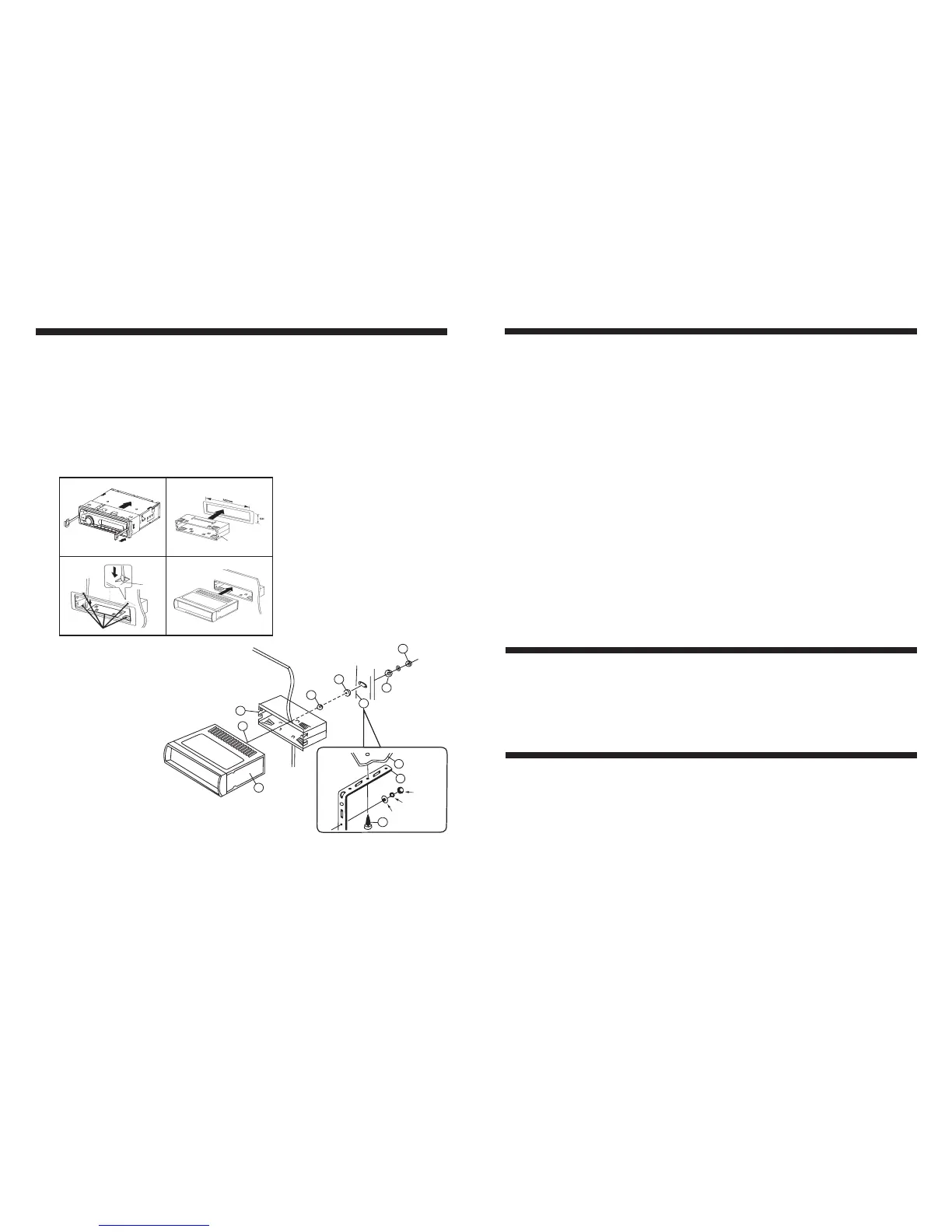
2. Mounting example (Installation in the cabinet)
3. Supporting the Unit
Choose the mounting location carefully so that the unit will not interfere with the normal
driving functions of the vehicle.
Avoid installing the unit where it would be subject to high temperature (such as from direct
sunlight or hot air) or where it would be subject to dust, dirt or excessive vibration. Use only
the supplied mounting hardware for a safe and secure installation. Always use a marine cover
to protect the unit as the faceplate is not waterproof."
12
4
Release Key
Half Sleeve
Tap
Bend these claws, if necessary.
3
Note: Keep the release key in a safe
place as you may need it in
future to remove the unit from
the vehicle.
3
5
2
1
4
3
9
7
6
HEX
7
8
Lock Washer
Plain Washer
1. UNIT
2. HALF SLEEVE
3. HEX NUT
4. LOCK WASHER
5. PLAIN WASHER
6. BODY
7. REAR SUPPORT STRAP
8. TAPPING SCREW
9. M5 HEX BOLT
- Accessories subject to change without notice.
1. Fuse replacement
If the fuse blows, check the power connection and replace the fuse. If the fuse blows again after
the replacement, there may be an internal malfunction. In this case, consult your nearest dealer.
2. Warning
Use the specified amperage fuse for each lead.
Use of a higher amperage fuse may cause serious damage.
USB Section Operation
7. Folder Down button (9)
8. Folder Up button (10)
9. Search Track via A.PS Button (11)
10. ID3 display
Smart Phone Charging Capability
During MP3 playback, simply press button (9) to select the previous folder (if available in
the device).
During MP3 playback, simply press button (10) to select the next folder (if available in the
device).
While USB playing, simply press A.PS button (11) once, the letter “T” will be displayed on
the LCD. Choose the desired file number by turning VOL knob (2), then press SEL button (2)
to confirm selection and begin to play the selected track.
While playing a MP3 file, the ID3 information displays on LCD by scrolling. If the MP3 file
does not have any ID3 information, it will display the track elapse time on the display panel.
The USB input can be used for charging most phones. A successful charging will be manifested
by the battery indication status on the phone itself.
With smart phone being charged, the USB mode will not be selected.
11.
Note:
Auxiliary Input Mode
A. Press the Mode button until “AUX” appears on the LCD screen.
B. The use of auxiliary mode allows you to play the portable music device through
the headphone jack. An auxiliary adaptor will need to be purchased separately
(Prospec offers part, SEAMINI2).
RCA output
Description: The use of RCA outputs allow an amplifier or subwoofer to be connected.


 To Next Page
 Loading...