4
9
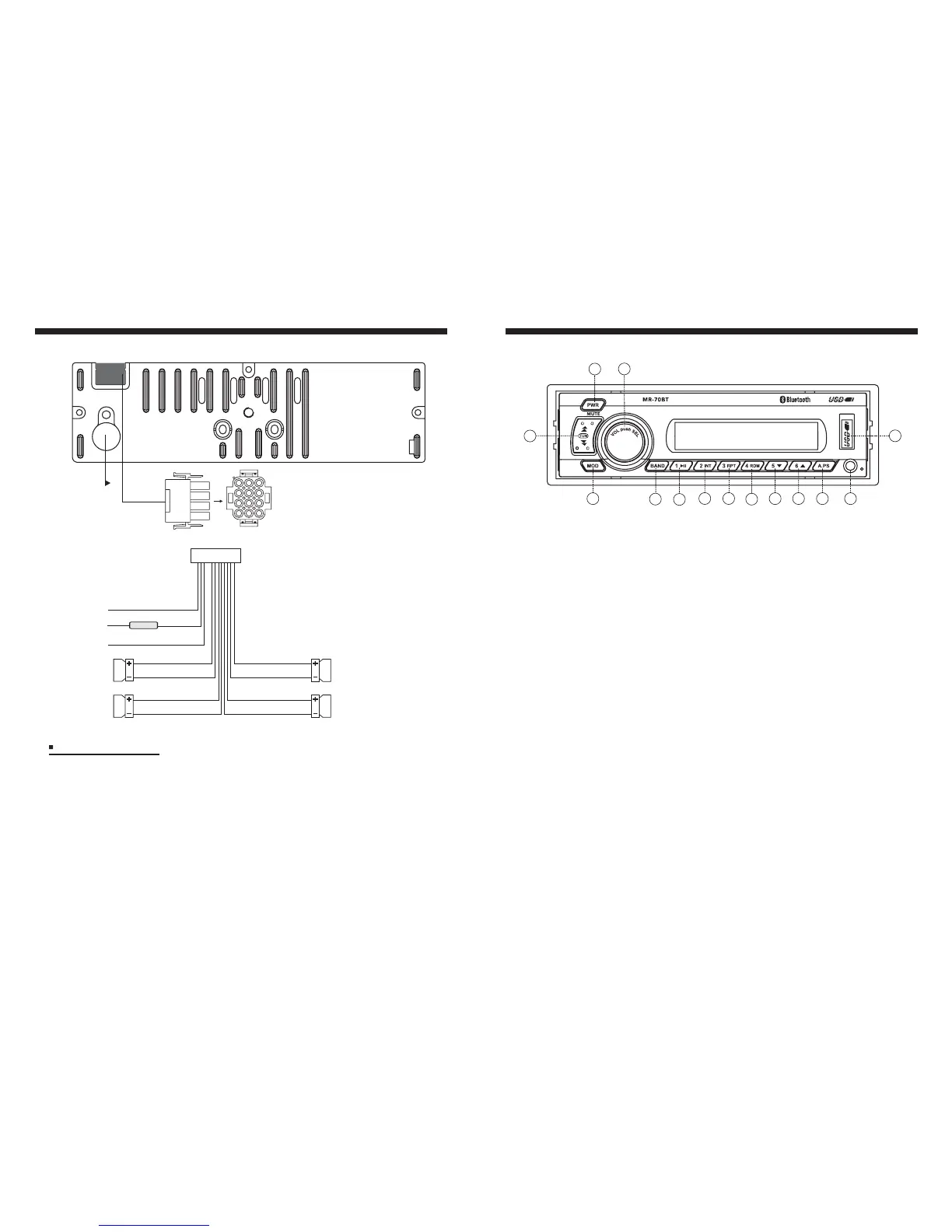
Wiring Identification
(ANT. socket)
BT Music Section Operation
3
2
12
13
5
6
8
9
10
11
1
4
14
7
Your media device must incorporate the Bluetooth option in order to stream music.
- To pair your Bluetooth device, press MODE button on the stereo until BT MUSIC appears.
- Press and hold A.PS button until PAIRING appears.
- Next, go to settings on the Bluetooth device and turn the Bluetooth option ON.
- Pick “MR-70” option on your Bluetooth enabled device. (If you are prompted for a password,
the code entered will be “1234”). Once paired OK, the Bluetooth icon will stay constand on
the display.
While in BT MUSIC mode, press and hold A.PS button for 2 seconds to disconnect the
Bluetooth Link with display “DISCONN”.
Simply press A.PS button in BT Music mode to re-connect the last paired Bluetooth Device
with display “CONNECT”.
1) In BT Music mode, once successful Bluetooth connection occurs, in most cases, the music
will play automatically. In some cases, you may have to activate the play function on the
media device first (It depends on the connected BT Device.)
2) During BT Music playing, you could select the previous or next track by pressing
TUNE up/down button on the Stereo or operate via your Bluetooth Device.
3) During BT Music playing, you could pause/play the playback by pressing PAUSE
button on the Stereo or operate via your Bluetooth Device.
1. Pairing your Stereo and Bluetooth Device
2. To disconnect Bluetooth Link
3. To connect the Bluetooth Link
4. Listening to Bluetooth Music
(ACC)
( Back Up )
( GROUND )
FUSE
RED
YELLOW
BLACK
GRAY
GRAY/BLACK
VIOLET
VIOLET/BLACK
( FRONT RIGHT )
(REARRIGHT)
GREEN
GREEN/BLACK
WHITE
WHITE/BLACK
( FRONT LEFT )
( REAR LEFT )
10A
12P CONNECTOR
Installation Notes
This radio contains four separate power amplifiers. To prevent possible damage to these
amplifiers please ensure the following:
(Applicable to both 2 and 4 speaker connection)
i) The vehicle chassis is not used as a loudspeaker ground(-).
ii) Front and rear loudspeaker connecting wires are not joined together.
iii) Any wires not used when completing a two speaker installation are fully insulated.
Iv) The power wire (red) is connected via the ignition switch of the vehicle.


 To Next Page
 Loading...