III
,
USB
Operation
~w
•
Note:
Our
USB
slot
is
for
USB sticks
only.
For
play
of
other
brands
of
media,
please
use
the
auxiliary
input.
A,
Insert
a
USB
stick
into
the
USB
slot.
Songs
must
be in
mp3
or
wma format.
B,
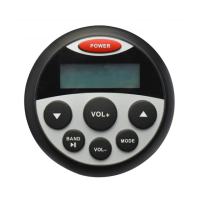
Press the
T
or
A
for
track
down/track
up
respectively.
C,
Press
..-u
button
to
pause
the
current
track;
press
..-u
again
to
resume
the
track.
0,
A long press
of
the
Tor
A
will reverse and
fast
forward the
current
track
respectively.
E,
Once
you exit the boat/vehicle/spa, always remove the
USB
stick from the USB port so as to
prevent
damage
to the stick.
IV,
Auxiliary
Input
Mode
~=
A,
Press the Mode button until "AUX" appears on the
LCD
screen.
B,
The
use
of
auxiliary
mode
allows
you to
play
the
portable
music device through the headphone jack.
In order to
accomplish
this,
an
auxiliary
adaptor
must
be used
(our
SEAMINI2
is
recommended).
V
,
Bass, Treble, Balance, Fader, Loud, Equalizer, Area Tuning
A,
To
adjust
bass, treble, balance, and fader,
long
press
the
MODE
button until the BAS
feature
appears.
If
you
want
to
change the
bass
then
use
the
VOL+
or
VOL-
button.
To
adjust
the
treble,
balance,
and
fader
setting,
long
press
the
MODE
button until
the
BAS
feature
appears,
then
quickly
press
the
MODE
button
until
TRE
appears.
Repeat
this
step
for
balance
(BAL), and
fader
(FAD).
Adjust
with
the
VOL+
or
VOL-
button.
B,
To
enter
LOUD
mode, long
press
the
Mode button until
BAS
appears,
then
quickly
press
the
MODE
button until
LOUD
appears.
Adjust
to
either
ON
or
OFF
using the
VOL+
or
VOL-
.
..


 To Next Page