EasyManua.ls Logo

Prospera PL009 - Operation and Adjustment

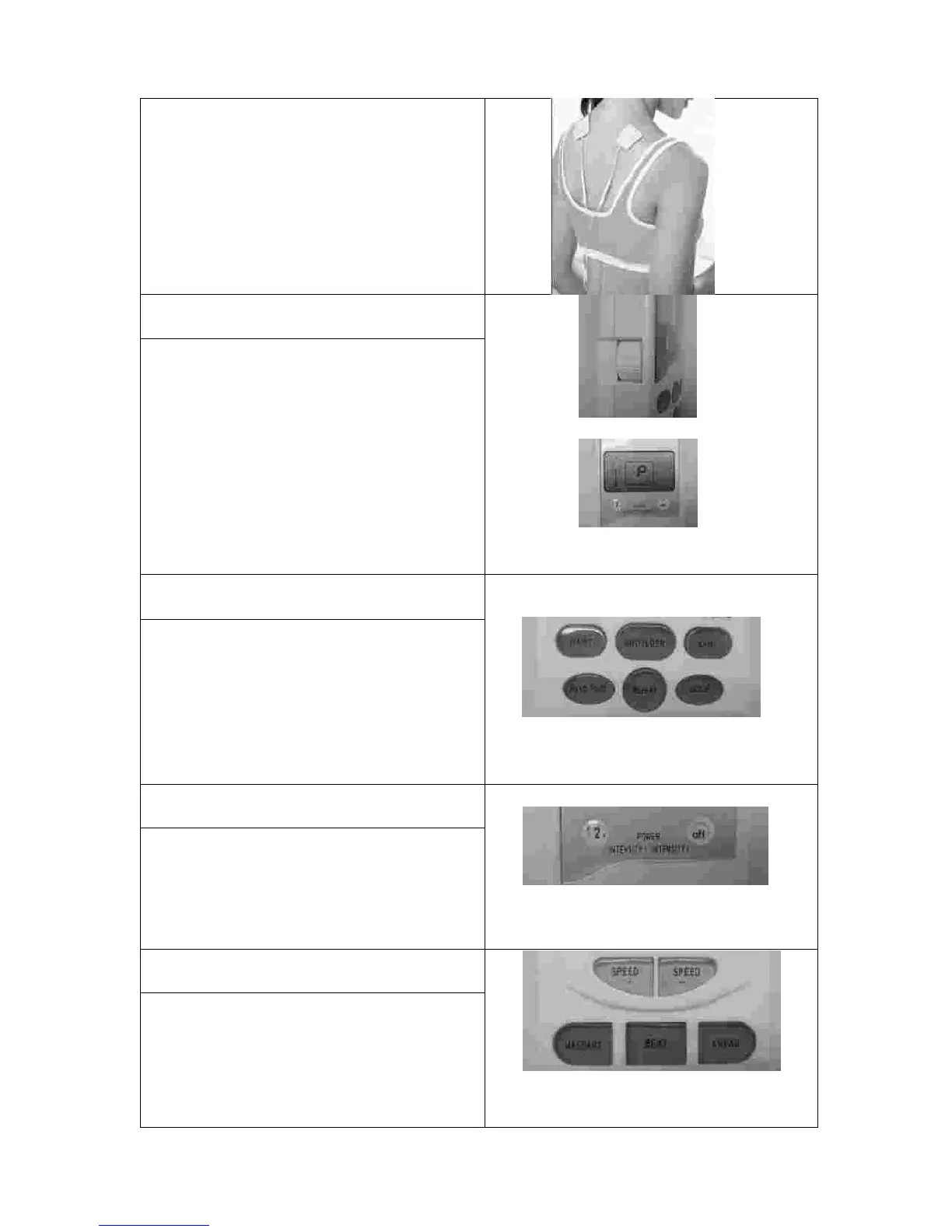
Prospera PL009
14 pages
Print Icon
To Next Page IconTo Next Page
To Previous Page IconTo Previous Page
Loading...
5
2
from
one
chan
ne
l
are
placed
on
the
body
area
such
as
shoulder at
the
sa
m
e
ti
m
e.
Make sure
the
stick
on
the
skin.
Do
not
place or
m
ove the
pads
when
the
device
is
on.
Keep
the
skin
clean
be
f
ore
pl
a
cing
the pads
4
th
Step
-
Rotate
the
switch
knobs
on
both
sides to
m
ake
the
power “ON”.
Switch
Button
LCD display
shows
“P”
There
are
two identical
power
knobs
located on
the
devices
upper left
and
upper
right
sides
respectively
.
To start use the device,
r
otate
the
switch knobs
to
turn
the
power
ON
”.
A
f
terwards, a
lett
e
r
P”
will
be
sh
ow
ed
on the
LCD display.
You may use the two channels
simultaneously or separately.
If you decide to
use one channel only, you may
just
turn one
knob to “OFF”.
Do
not
rotate
the
switch
knob too
fast. This knob
is
also for
the
Intensity control.
5
th
Step
-
Select
o
ne
of
auto
m
atic
sti
m
ulation
progra
m
s
5
auto
m
atic
sti
m
ulation
progra
m
s
+
repeat
Five
auto
m
atic
sti
m
ulation
progra
m
s
f
o
r
waist,
shoulder,
joint,
hand/foot,
sole
,
plus
a
repeat
to
sti
m
ulate the
sa
m
e
area
again.
T
h
e
LCD display will
show
a
ti
m
er
of
15
m
i
nutes when you choose
one
of
the
m
.
6
th
Step
-
Gradually
increa
s
e
the
m
assage
inten
s
ity
to
a
com
f
ortable
lev
e
l
Intensity
adjust
m
ent
The
beginning
intensity
level
should
from
1
.
Adjust
the
power/i
n
te
n
sity
to a
comfortable level
during
the
treat
m
ent
by
tuning the power knobs
. The
lowest
level
is
1
and
the
strongest
level is
10.
7
th
Step
-
Select
one
of
m
assage
m
odes
and
adju
s
t
electro
n
i
c
pulse
speed
Massage
m
and
Speed
The
m
anual
p
rogra
m
s
for
M
ASSAGE
,
BEAT
,
and
KNEAD can be selected by
pressing the corresponding button
.
Speed
program
is
available
for
the
m
.
Find
suitable
speed
by tuning
Speed
+”
or “Speed
”.
Note:
Important:

Other manuals for Prospera PL009

Related product manuals