19
Rev. D / January 2015
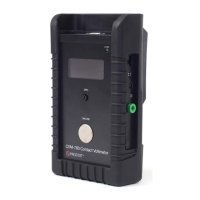
CVM-780 Contact Voltmeter
1. If the PGA-710 or PGA-710B and CVM-780 zero seng are the same measurement recordings
can be made
2. If they are not the same, stop the Preview and proceed as follows.
H. Adjust the CVM-780 carefully to display 000 on its LED.
I. Select the Autoanalysis drop down menu and open the window. In the Volt-
age secon:
a. Click buon, then
b. Click buon, then
c. Click buon to close the window and acve the zero reset
J. Start the Autoanalysis and compare the to the CVM-780’s LED
voltage; they should both be 000 ±1 volt.
As measured voltage increases, there is a small deviaon between CVM-780 displayed voltage and PGA-
710 or PGA-710B recorded voltage. It may be as low as ±2 volts below ±200 volts and increase to 5 or 6
volts deviaon at ±500 volts. The fact that the measurement can be made relavely accurately at that
level is signicant; the 5 to 6 volts deviaon is generally not an important error.
Maintenance ps and care of the CVM-780 follow.
A. There are no user adjustments or maintenance items inside the instrument case or probe assem-
bly. Do not open the case or probe as this will damage the instrument and VOID its warranty. War-
ranty seals are a reminder not to open these units.
B. Clean the surfaces of the instrument case and probe assembly with a low linng, non-abrasive
cloth lightly dampened with 70% soluon of alcohol and 30% water.
C. It is important to keep the front probe assembly black insulator very clean. Surface contaminants
on this insulator will cause voltage leakage to the probe’s grounded metal surface resulng in
unstable measurements. Use a low linng, non-abrasive cloth lightly dampened with 70% soluon
of alcohol and 30% water to clean the insulator. Alcohol prep wipes are useful for removing nger
oils and contaminants.
D. Excessive voltage dri while the probe is “oang” – that is, while not grounded or making a
contact measurement – may be caused by a large charge on the black insulator used for probe p
mounng. Insulator surface charge is caused by installing and removing the probe p cover. Exces-
sive “twisng” of the p cover increases this charge. This charge does not aect instrument ac-
curacy, but may become distracng. If desired remove this charge by exposing the probe assembly
to a balanced bench top ionizer. Note that the ionizer’s oset voltage (unbalance) will be displayed
on the CVM-780’s LED.


 To Next Page