N 93-602-00 Issue 1 Page 8 of 10 © Protec Fire Detection PLC 2015
4.4 Fire
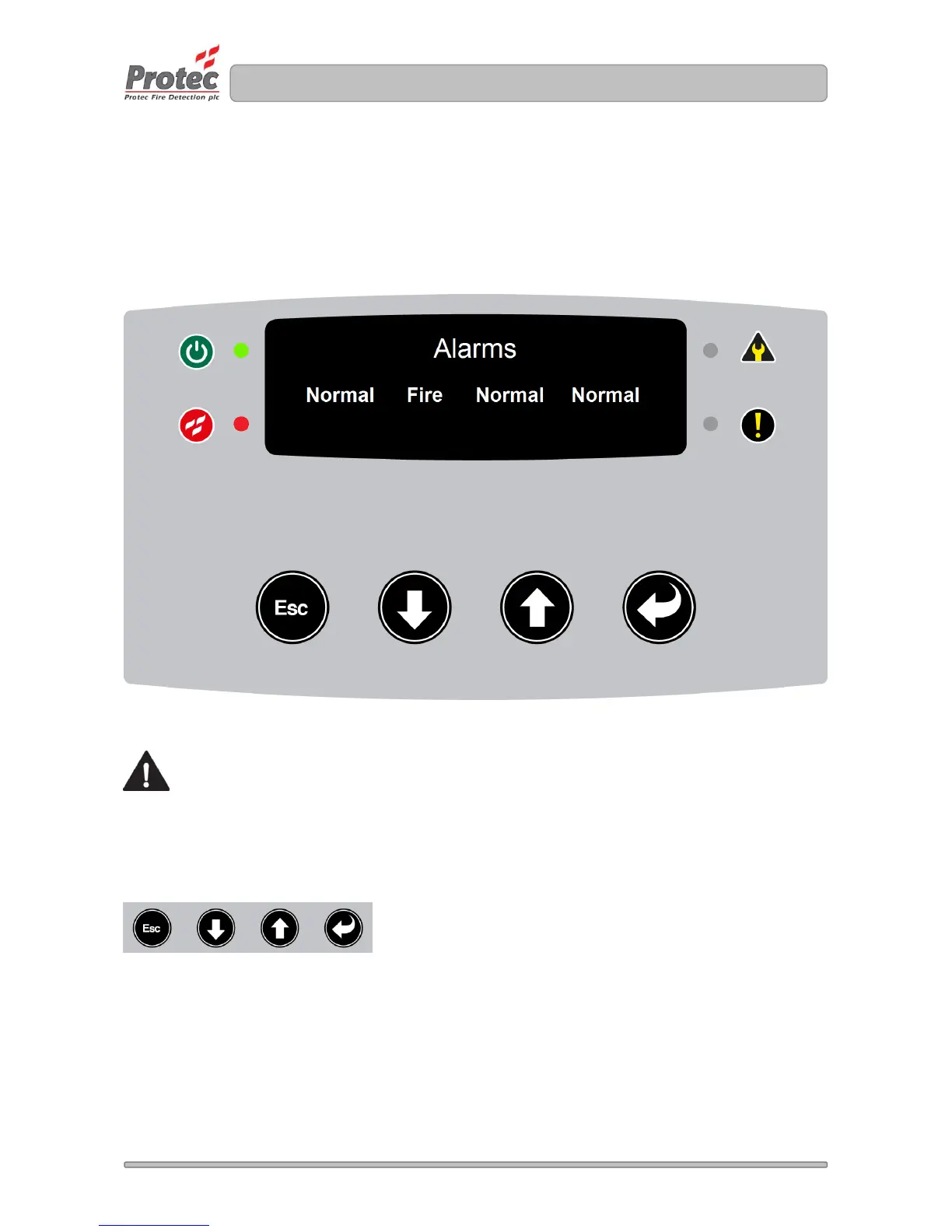
The Fire condition is prioritised over Pre-Alarm and faults. When a fire condition is activated the display
shows all pipes commissioned (1, 2, 3 or 4). The fire text is represented as ‘Fire’. The example picture
below shows 4 pipes; where Pipe 2 are in Fire condition, Pipe 1, Pipe 3 and Pipe 4 are in ‘Normal’
condition. The Fire LED is illuminated, any commissioned outputs will activate and the fire condition is
reported to the Protec Fire panel.
Figure 4.4 ProPointPlus displaying Fire Alarm condition
The building fire plan must be executed immediately.
Muting the buzzer
The buzzer can be muted by pressing any button.


 To Next Page