4
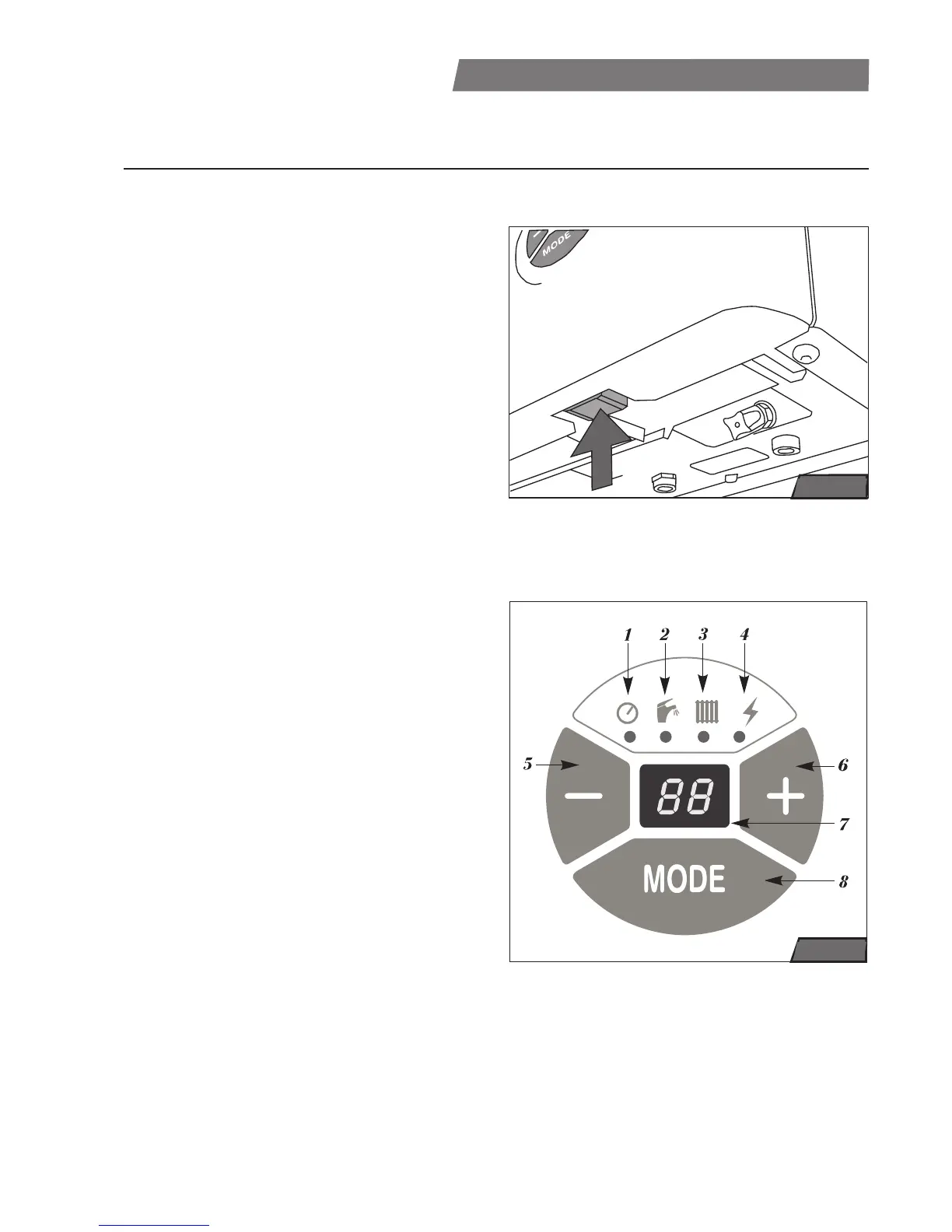
Main on/of switch
The main on/off switch (see fig.1) is on
the bottom of the boiler, below the control
panel.
Caution: Commencing and first start of the
boiler operation may only be carried out by
a specialised service centre! Only turned on
boiler has activated all protective function
(e.g. anti-freeze protection).
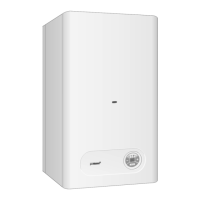
Control panel
It serves for indication of actual parameters
and for setting or changing required values
this parameters.
1 - heating system pressure LED
(indication of the heating water
pressure)
2 - domestic hot water LED
(indication DHW taking or domestic hot
water temperature setting)
3 - central heating LED
(indication of the heat requirement or
heating temperature setting
4 - fault message LED
(indication of faults in boiler operation)
5 - decrease button (-)
(decrease the setting value of
parameters)
6 - increasing button (+)
(increase the setting value of
parameters)
7 - display
(showing of pressure, temperatures,
service parameters and fault
messages)
8 - MODE button
(switches between setting modes and
corfirms setting value of parameters)
Control and Signaling
USER INSTRUCTONS
fig. 1
fig. 2




 To Next Page