AIRPORT ADJUSTMENT AND MAINTENANCE
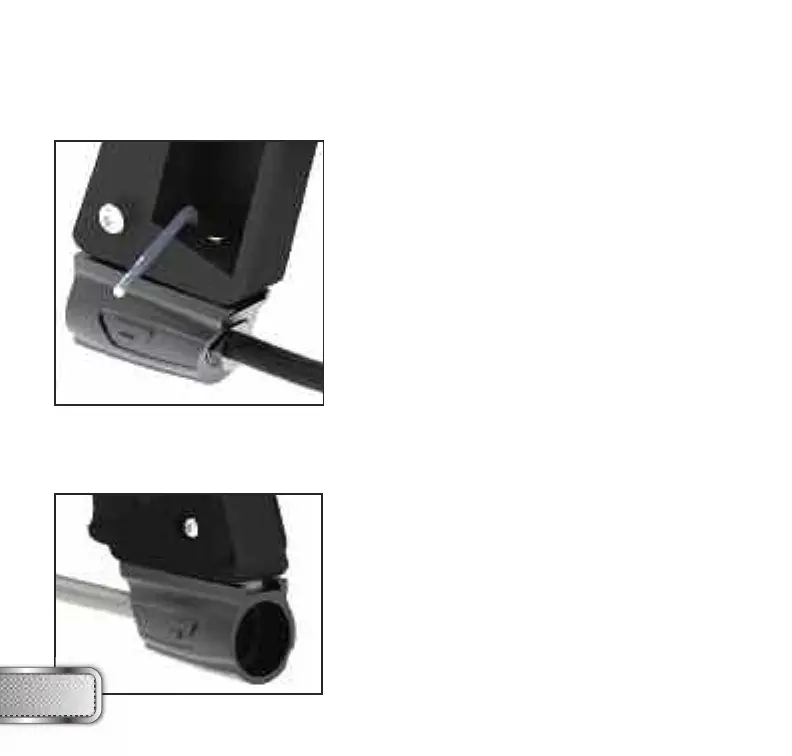
The location of the airport adapter can be moved
approximately 11⁄4” back or forward from the stock
position to fit your individual preference. To change the
position:
1. Open the three, right side grip panel screws with
a 3⁄32” Allen key.
2. Remove the 9V battery by pulling on the ribbon.
3. Using a 3⁄32” Allen key, loosen the airport locking
screw until airport slides back and forth loosely.
4. Set the airport to the desired position.
5. Tighten airport locking screw, install the 9V battery
and tighten the three grip panel screws.
When screwing the air system into the airport, always check that the threads on the air system and
the airport are clean and not worn out. If you think the threads are not in good condition, contact
DYE Precision or a professional store before screwing in the air system.
The RAIL™ airport will work with both 3000 psi,
4500 psi air systems and CO
2
tanks fitted with an
anti -siphon. It is recommended that you use the
DYE Throttle® air system, although the airport on
the RAIL™ is designed to work with most other air
systems. Always ensure that the o-ring at the top
of the preset regulator is in good condition before
connecting it to the RAIL™ marker.
W W W . P R O T O P A I N T B A L L . C O M
24
AIRPORT
ASSEMBLY AND MAINTENANCE


 To Next Page