CONNECT
1.) Start pairing mode for capsule 1
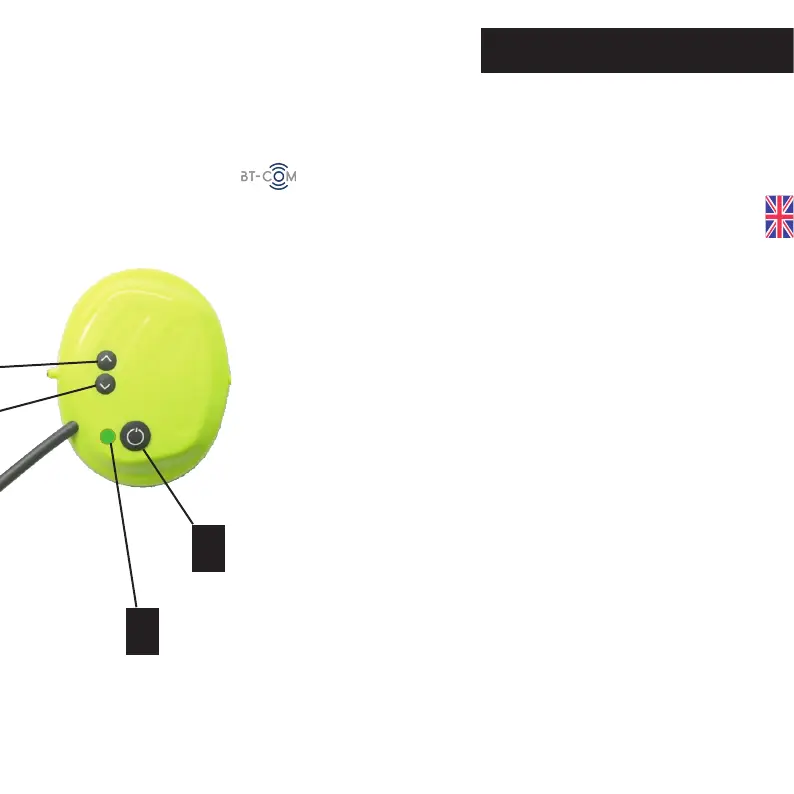
Simultaneously press the multifunction button (4) and the
up button (1). LED (3) flashes alternately red-green.
Disconnect a BT-COM radio capsule from the network
3.) Pairing capsule 3 / capsule 4
Pairing - new network
To connect up to four radio capsules, proceed as follows.
To disconnect a capsule from the network, press the Up but-
ton (1) for about 3 seconds until a descending signal sounds.
The capsule is now disconnected from the network.
To reconnect, press the Up button (1) again until an ascend-
ing signal sounds.
To connect capsule 3 to the network, repeat steps 1 and 2
with capsule 2 and capsule 3.
To integrate capsule 4 into the network, repeat steps 1 and 2
with capsule 3 and capsule 4.
2.) Start pairing mode for capsule 2
Simultaneously press the multifunction button (4) and the
up button (1). LED (3) flashes alternately red-green. Coupling
with capsule 1 begins. After a few seconds, the LED (3) turns
purple. After one minute, the LEDs (3) flash green again.
19
3
4


 To Next Page