APP
25
1
Startbildschirm Startscreen
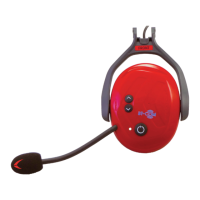
Die gekoppelte Kapsel
wird inkl. Seriennummer
angezeigt.
Tippen Sie auf die angezeigte
Kapsel um fortzfahren.
The screen shows the connected
capsule incl. the serial
number
Tap the displayed capsule to
continue.
2
Info / Update Info / Update
Protos®
Dieser Menüpunkt informiert
Sie über alle wesentlichen
Details der angeschlossenen
Kapsel
Update
Über diesen Menüpunkt kann
die angeschlossene Kapsel auf
die neueste Softwareversion
aktualisiert werden.
Nach dem erfolgten Update
erscheint auf dem Display die
Meldung:
“Protos®
ist auf dem
aktuellen Stand!”
Protos®
This menu item informs you
about all essential details of
the connected capsule
Update
This menu item updates the
connected capsule to the latest
software version.
After successful update, the
message appears on the
display:
“Protos®
is up to date!”


 To Next Page