12 © Prowise 2018
• The lift is equipped with anti-collision sensors, which will stop the lift as soon as
the lift meets resistance. This prevents damage to the lift and the touchscreen
installed on it. However, this does not prevent the risk of entrapment, make sure
no one is under the lift or that no body parts can be trapped between the lift and
another object.
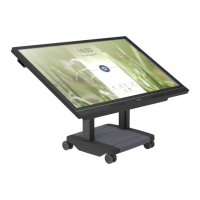
2.9. Moving the lift (Prowise iPro Mobile, iPro Tilt and
iPro Toddler Lift.
CAUTION!
The Prowise iPro Tilt, Toddler and Mobile lift can only be moved in the
lowest mode.
Take the following guidelines into account when moving the lift:
• Put the lift into the lowest mode before moving the screen with the lift. The wheels
will be unlocked in the lowest mode.
• Place the lift in an upward position before moving the screen with the lift. This
applies to both the Prowise iPro Tilt and Toddler lift.
• Switch off the touchscreen and remove the plug from the power outlet.
• Ensure the connecting cable does not drag over the fl oor or lies in the lift's
walkway.
• Ensure that no objects or people are in the vicinity of the lift's walkway.
• At least two people must move the lift.
• To move the screen, use the grips on the side of the screen.
• Only move the lift and the screen on a stable, fl at surface.
• Ensure that you avoid collision while moving the lift, as this can damage the screen,
the lift and the surrounding area.
• Do not stand on the lift or hang onto the touchscreen while these are being moved.
• Do not place the lift in the vicinity of water.
• Connect the lift to the mains A/C current once it is in the right place.
• Once the lift has been moved, it must be initialised; this prevents damage and
extends the lifespan of the lift.
▫ Put the lift in the lowest position by pressing the down button (-) of the manual
or foot control panel.


 To Next Page