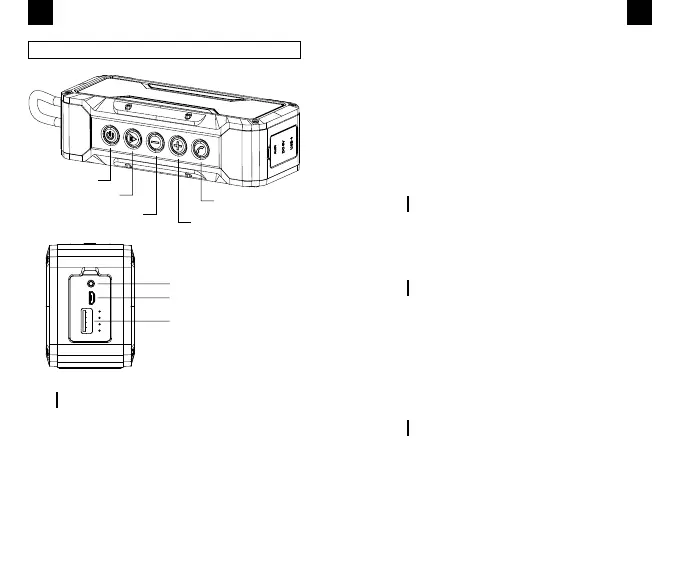
PRODUCT DESCRIPTION
Power ON/OFF
AUX In
Micro USB Charging Indicator
USB Out
Play/Pause
Volume Down /
Skip Back
Volume Up/
Skip Forward
Handsfree Button
HOW TO USE
1. Long-press the Power button to switch on the
speaker. The white indicator will ash twice every sec
-
ond, when detecting Bluetooth devices. The white in-
dicator remains lit when connected to a device.
2. Pair the speaker with the Bluetooth device.
3. Press the Play/Pause button to pause or play
music as desired.
4. Long-press the “-” button to select tracks down-
8
EN
wards, short-press to decrease volume.
5. Long-press the “+” button to select tracks up-
wards, short-press to increase volume.
6. Long-press the Play/Pause button to interrupt
current connection and connect to another Blue-
tooth device.
7. The speaker will switch off automatically after
5 minutes if not paired with any device in order
to save energy.
AUX PLAYBACK OPERATION
Switch on the speaker and insert a 3.5 mm audio
cable into the AUX jack port to connect any device.
CHARGING
Use the micro USB cable to charge the speaker.
The speaker has four battery indicators. The in-
dicators will remain lit when the battery is fully
charged.
Actual battery performance may vary based on
settings, environment and usage.
SPEAKER PHONE OPERATION
Press the Phone button to answer an incoming call.
Press the Phone button to hang up.
Long-press the Phone button to reject an incom
-
ing call.
Double-press the Phone button to redial the last
phone number.
9
EN


 To Next Page