4826 Sterling Drive, Boulder, CO 80301
PH: 720.406.8946 service@psaudio.com www.psaudio.com
Troubleshooting xxiv
Troubleshooting
©2016 PS Audio International Inc. All rights reserved.
®
Owner’s Reference DirectStream Junior
computer.
If you are still unable to obtain sound via USB on a Windows based device it is
most likely the result of a partial or incorrect driver installation.
You may have also experienced a pop-up window asking you to provide the
correct driver. In any of these cases the remedy is quite simple. Remove the
device and force Windows to reinstall the driver and the device.
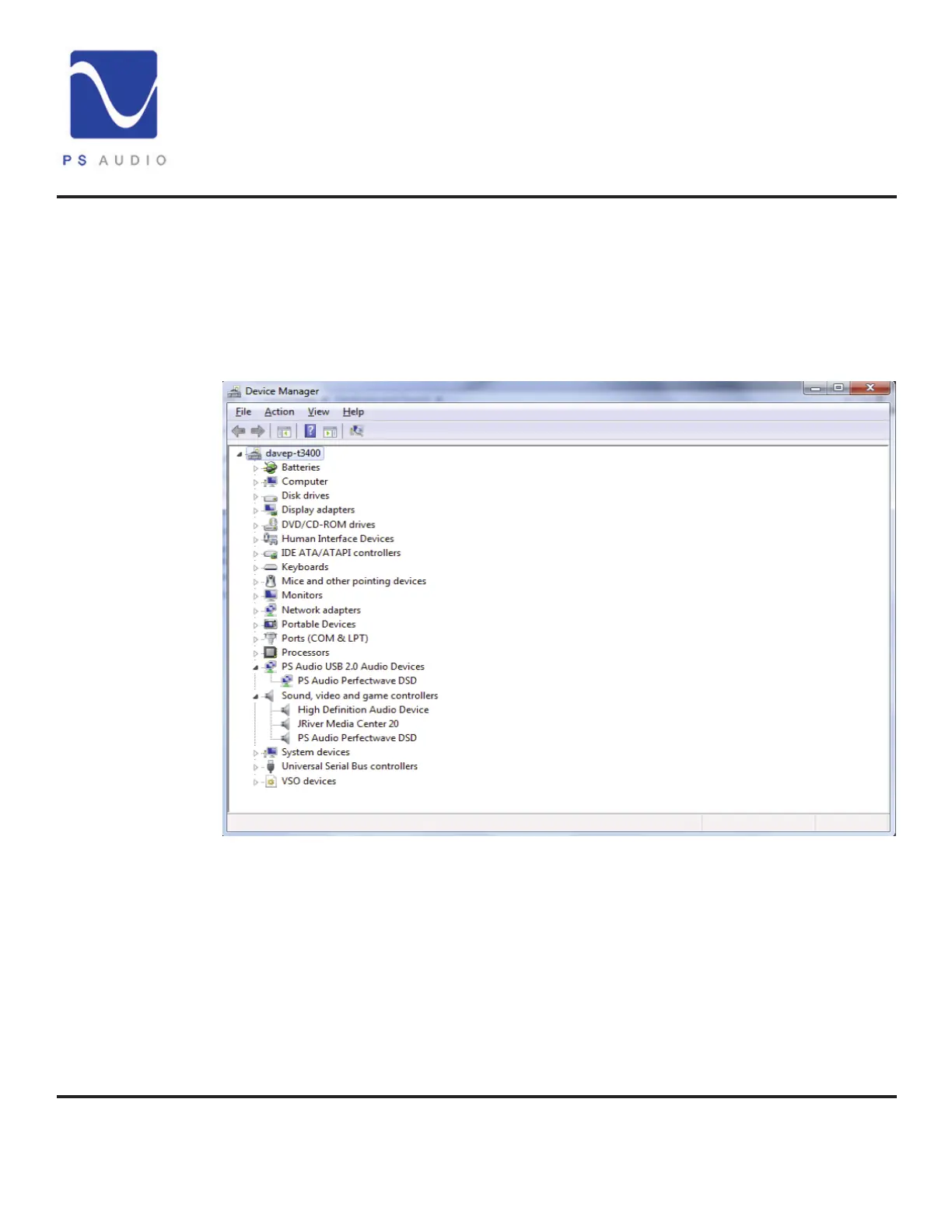
DirectStream Junior will show up under device manager as “PS Audio
PerfectWave DSD” It should show up under a heading “PS Audio USB 2.0 Audio
Devices”, this is the USB2.0 driver.
The entry under “Sound video and game controllers” is the USB1.0 fallback
driver.
It may be a driver
conict


 To Next Page