Need help?
Do you have a question about the PSB ALPHA AM5 and is the answer not in the manual?
Essential safety guidelines for operating the apparatus, covering usage, installation, and maintenance.
FCC and IC warnings, compliance information, and potential interference guidelines for digital devices.
Information on responsible disposal of the product at the end of its life cycle.
Welcome to PSB Speakers and the Alpha AM5, with instructions for unpacking and handling.
Guide on connecting the right speaker and understanding self-powered speaker limitations.
Details the front panel components: Remote Sensor, Status Light, and Control Dial functions.
Description of various audio inputs, outputs, power, and USB ports on the back panel.
Explains functions like Power, Volume, Input Selection, Mute, Mode, and Subwoofer control via remote.
Details bass/treble adjustment, Bluetooth disconnection, and indicator light behavior.
Instructions for teaching the remote control functions to a universal remote.
Step-by-step guide to pair, use, and disable Bluetooth devices with the AM5 speakers.
Details automatic standby behavior for optical, analogue, and Bluetooth sources to save power.
Recommendations for optimal speaker placement for sound quality and heat dissipation.
Solutions for distortion, low volume, and no sound from the right speaker.
Instructions for protecting, cleaning cabinets/drivers, and packaging for transport.
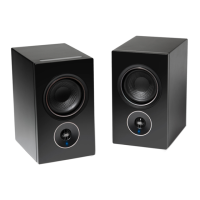
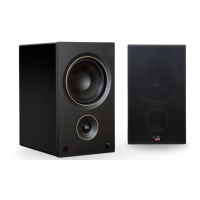
The PSB Alpha AM5 is a pair of powered speakers designed to deliver high-performance audio for music and video collections. These speakers integrate a built-in amplifier, offering a complete audio solution suitable for small to medium-sized rooms. The design is rooted in decades of acoustic research and rigorous testing, aiming to provide "true-to-nature" sound quality for both music enthusiasts and professionals.
The Alpha AM5 speakers are self-powered, meaning they do not require an external stereo receiver or amplifier to function. The system consists of an amplified left speaker and a passive right speaker, connected via an included speaker cable. The amplified speaker serves as the central control unit, housing various inputs and controls.
For audio input, the AM5 offers a range of options:
Beyond inputs, the AM5 includes a SUB OUT (Low Pass Filtered Output) for connecting an external active subwoofer. This output can be activated via the remote control, which also redirects low-frequency content to the subwoofer for enhanced bass response. A USB power port (5V, 1A) is available for charging devices or powering external components, but it does not support data transfer or music playback.
The system features an Auto Standby function to conserve power. If there's no user interface interaction or active source input for 20 minutes, the AM5 will automatically enter standby mode, reducing power consumption to less than 0.5W. For optical and analogue sources, the status light turns amber in standby. For Bluetooth sources, if audio streaming stops for over 20 minutes, the status LED changes from blue to amber. The speakers can be woken up by pressing "ON" on the remote control.
The Alpha AM5 offers intuitive control through both a front-panel dial and a comprehensive remote control.
Remote Control (PSR-1): The supplied remote control provides extensive command over the speakers' functions:
To pair a Bluetooth device, select the BT input (blue light) on the speakers. The LED will flash blue-red for two minutes, indicating Discovery Mode. Users then search for the AM5's unique device ID in their mobile device's Bluetooth settings. A solid blue light confirms successful pairing. If pairing fails, the LED turns solid red, and the process can be retried. Once paired, the AM5 will automatically connect to the last paired device when Bluetooth is activated. Bluetooth audio playback can be disabled by switching to another input source or by turning off the Bluetooth connection on the mobile device. The Bluetooth interrupt button on the remote or the back of the speaker can also disconnect the active Bluetooth stream.
The AM5 supports Infrared (IR) Learning, allowing it to learn control codes from non-PSB remote controls. This feature enables users to command functions like Power ON/OFF, Volume UP/DOWN, Input Selection, and Mute using a preferred universal remote. To activate IR learning, hold the MUTE button for 5 seconds; the status light will flash red and white. Users then press the desired function button on the PSB remote (e.g., POWER ON), which causes the status light to flash blue twice, then solid blue. Next, the corresponding button on the non-PSB remote is pressed, and the status light flashes green twice to confirm successful learning. This process is repeated for all desired functions. The IR learning setup times out after 10 seconds of inactivity.
For optimal performance, the Alpha AM5 speakers should be placed symmetrically at a comfortable listening location, free from obstructions at the front or back. A minimum of three inches of clearance around the back of both speakers is recommended. This ensures good air circulation for heat dissipation and proper performance of the rear-firing ports.
To ensure long-lasting enjoyment, it's crucial to respect the speakers' limits and avoid excessive volume levels, which can lead to "clipping" and permanent damage. If distortion or diminishing precision is detected at loud levels, the volume should be reduced immediately. The manual explicitly warns against testing peak listening levels by turning the volume to the maximum.
Regular cleaning is essential for sanitary use and longevity. However, excessive cleaning or abrasive materials should be avoided as they can cause damage. The speakers should not be stored in extreme temperatures, humidity, or exposed to liquids.
The PSB Alpha AM5 is designed to be a user-friendly, high-fidelity audio system that prioritizes sound quality, ease of use, and durability, provided proper care and usage guidelines are followed.
 General
| Tweeter | Yes |
|---|---|
| Speaker type | 2-way |
| Woofer diameter | 100 mm |
| Speaker position | Front |
| Tweeter diameter | 19 mm |
| Number of drivers | - |
| Speaker enclosure | Ported |
| Speaker placement | Tabletop/bookshelf |
| Audio output channels | 2.0 channels |
| Number of tweeter drivers | 1 |
| Woofer diameter (imperial) | 5.25 \ |
| Frequency range | 55 - 20000 Hz |
| RMS rated power | 100 W |
| Product color | Black |
| Housing material | MDF, Metal, Vinyl |
| Package depth | 381 mm |
| Package width | 467 mm |
| Package height | 340 mm |
| Package weight | 10710 g |
| Amplifier class | D |
| Audio RCA inputs | 2 |
| USB connector type | USB Type-A |
| Connectivity technology | Wired & Wireless |
| Cables included | Audio (3.5mm) |
 Weight and Dimensions
| Depth | 240 mm |
|---|---|
| Width | 170 mm |
| Height | 290 mm |
| Weight | 9750 g |

 To Next Page