EasyManua.ls Logo

PSB Alpha iQ - User Manual

PSB Alpha iQ
26 pages
Print Icon
To Next Page IconTo Next Page
Loading...
www.psbspeakers.com

Other manuals for PSB Alpha iQ

Question and Answer IconNeed help?

Do you have a question about the PSB Alpha iQ and is the answer not in the manual?

Summary

Safety and Regulatory Information

Important Safety Instructions

User instructions for safe operation.

FCC Compliance and Warnings

FCC rules, interference, and radiation limits for operation.

IC Compliance and Warnings

Industry Canada compliance and radiation exposure limits.

Warning Symbols Explained

Explains symbols for dangerous voltage and important instructions.

Introduction and Product Overview

Product Introduction

Welcome and overview of PSB Alpha iQ speakers and their features.

Unpacking and Contents

Instructions for unpacking and listing of included items.

Front Speaker Controls

Identifies controls on the front of the primary and secondary speakers.

Speaker Status and Controls

LED Status Indicators

Explains LED blink codes and their meanings for speaker status.

Primary Speaker Top Panel

Details the buttons and their functions on the primary speaker's top panel.

Primary Speaker Back Panel Connections

Ground Terminal

Connects turntable ground leads or provides system grounding.

Phono Input

Input for Moving Magnet (MM) phono cartridges only.

Subwoofer Output

Connects to an external active subwoofer.

Primary Power Inlet

Connection point for the power cord.

Optical Digital Input

Connects to digital audio sources via TOSLINK cable.

Auxiliary Analog Input

Connects to analog audio sources using a 3.5mm cable.

HDMI Input

Connects to TVs for audio output, supports PCM only.

LAN Network Port

For wired Ethernet connection to the network.

USB Storage Port

Connects USB mass storage devices for playback.

Secondary Power Inlet

Connection point for the power cord for the secondary speaker.

Service Function

Used for restoring the secondary speaker to factory default settings.

Internal Service;USB Port

Port for internal use only, not for customer use.

Secondary Speaker Back Panel

Best Practices for Alpha iQ

Network Performance Tips

Advice on improving streaming performance via network.

System Setup Procedure

Guidance on setting up one system at a time for proper bonding.

Setup Guide

Pre-Setup Requirements

Conditions to ensure before starting the setup process.

Wired Connection Setup

Step-by-step guide for setting up via wired Ethernet connection.

Player Selection and Naming

Selecting the speaker in the app and customizing its name.

Speaker Pairing and Positioning

Pairing the secondary speaker and selecting the primary speaker's position.

Setup Completion and Updates

Linking to secondary, checking for upgrades, and final setup completion.

Wireless Connection Setup (Android)

Step-by-step guide for setting up via Wi-Fi on Android devices.

Player Selection and Network Connection

Selecting the speaker and connecting to the home Wi-Fi network.

Wi-Fi Network and Password Entry

Selecting network security and entering the Wi-Fi password.

Naming and Network Configuration

Customizing the speaker name and network setup.

Secondary Speaker Pairing

Pairing the secondary speaker and selecting the primary speaker's position.

Wireless Setup Completion and Updates

Linking, checking upgrades, and completing wireless setup.

Wireless Connection Setup (iOS)

Step-by-step guide for setting up via Wi-Fi on iOS devices.

Network and AirPlay Setup

Connecting to the network and configuring AirPlay settings.

Player Updates and Pairing

Checking for speaker upgrades and pairing the secondary speaker.

iOS Setup Completion

Finalizing the setup, including linking and preparation stages.

Factory Reset Procedure

Resetting the Primary Speaker

Steps to perform a factory reset on the primary speaker.

Resetting the Secondary Speaker

Steps to perform a factory reset on the secondary speaker.

Speaker Placement and Care

Optimal Speaker Positioning

Guidance on placing speakers for best performance and clearance.

Protecting Your Investment

Advice on avoiding excessive volume and potential damage.

Cleaning and Maintenance

Instructions for cleaning the speakers safely.

Packaging for Transport

Recommendations for retaining and using original packaging.

Cabinet and Driver Care

How to clean cabinets and protect drivers and ports.

Environmental Considerations

Product Disposal

Guidelines for recycling and proper disposal of the product.

Product Specifications

Overview

The PSB Alpha iQ Streaming Powered Speakers are an all-in-one audio system designed to deliver high-performance sound from streaming services and legacy sources. Comprising two wireless bookshelf speakers with built-in amplifiers, the Alpha iQ aims to provide natural musical dynamics and precise imaged sound without cable clutter. The Primary and Secondary Speakers communicate wirelessly, covering most rooms in an average-sized home without delays or latency, ensuring synchronized and clear music.

Function Description

The Alpha iQ speakers serve as a complete audio system, integrating streaming capabilities with traditional audio inputs. The Primary Speaker acts as the central hub, connecting to your home network (wired or wireless) and various audio sources, while the Secondary Speaker wirelessly receives audio from the Primary Speaker.

Important Technical Specifications

  • Frequency Response:
    • On Axis @ 0° ± 3dB: 64Hz-20kHz
    • LF Cutoff -10dB: 35Hz
  • Amplifier Power (per speaker):
    • Tweeter: 30 watts
    • Woofer: 60 Watts
  • Acoustic Design:
    • Tweeter (Nominal): 3/4" (19mm) Aluminium Dome with Ferrofluid and Neodymium Magnet
    • Woofer (Nominal): 4" (100mm) Cone Rubber Surround Steel Basket
    • Design Type: Bass Reflex
  • Acoustic Design (Inputs):
    • Analog: 3.5mm, Phono MM
    • Digital: BluOS, HDMI eARC, Optical
    • Wireless: aptX™ HD Bluetooth (Sink and Source, 2-way)
  • Construction:
    • Cabinet Sleeve: MDF
    • Front Baffle: MDF on Aluminum
    • Rear Baffle: Aluminum
  • Size (W x H x D):
    • Net Dimensions: 5 11/16" x 9 11/16" x 7 5/8" (145 x 246 x 192 mm)
  • Weight:
    • Net Weight: 7.36 kg/16.2 lbs (pair)
    • Gross Weight: 8.27 kg/18.2 lbs (pair)
  • Shipping Dimensions: 10 2/5" x 15 13/16" x 15 3/16" (268 x 402 x 385 mm)
  • Finish: Painted, Matte Black, Matte White

Usage Features

The Alpha iQ offers a range of features for versatile use:
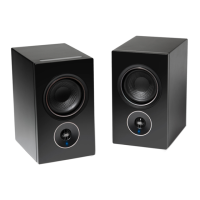
  • Status Indicator: An LED on the front of the speakers provides visual feedback on the device's status, including network connection, hotspot mode, upgrade installation, and pairing status.
    • Blinking green: Trying to connect to Wi-Fi Network
    • Solid green: Hotspot mode (Ready for Setup)
    • Alternately blinking red and green: Installing upgrade
    • Solid purple: Hotspot mode timeout (Press and Hold Play/Pause for 5 seconds to resume hotspot mode)
    • Solid red: Initialization and upgrade mode
    • Alternately blinking blue and purple: Not paired
    • Solid blue: Connected to network and Ready to use with BluOS App
  • Top Panel Controls (Primary Speaker):
    • Play/Pause (>II): Press to play, pause, or resume playback. Also used for restoring the Primary Speaker to factory default settings.
    • Volume (+/-): Tap + to increase volume or – to decrease volume in 1 dB intervals for fine-tuning.
  • Back Panel Controls (Primary Speaker):
    • Ground Terminal: Connect a turntable ground/earth lead or a separate earth ground for the Alpha iQ.
    • Phono Input: Input for Moving Magnet (MM) phono cartridges only.
    • Sub Out: Connect to an external active subwoofer. Subwoofer settings (enable, crossover) can be configured via the BluOS App.
    • Power Inlet: Connect the appropriate power cord for your region. Ensure the cord is firmly connected before plugging into a mains outlet. Always disconnect from the mains outlet first.
    • Optical Input: Connect via TOSLINK optical cable to digital audio sources like CD/BD/DVD players, digital cable boxes, or tuners.
    • Aux Input: Connect via the supplied 3.5mm analog cable to analog audio sources.
    • HDMI eARC Input: Connect via Ultra-High-Speed HDMI cable to a TV's HDMI port. Ensure the connected device's audio setting/format is set to PCM only. Only TV audio output is supported.
    • LAN/USB Port:
      • LAN: For wired network connection using an Ethernet cable. Requires a broadband router with a built-in DHCP server.
      • USB: Connect a USB mass storage device (FAT32, NTFS, or Linux ext4 formatted) to access and play music via the BluOS App.
  • Back Panel (Secondary Speaker):
    • Power Inlet: Connect the appropriate power cord.
    • Service Port: Used for restoring the Secondary Speaker to factory default settings.
    • Service/USB Port: For internal use only, not customer use.
  • BluOS App Control: The Alpha iQ is primarily controlled via the BluOS Controller App (Android, iOS, Kindle, Windows, macOS). The app facilitates setup, network connection, player naming, pairing, and access to streaming services and local sources.
  • Network Setup: Supports both wired (Ethernet) and wireless (Wi-Fi) connections. The setup process guides users through connecting to their home network and pairing the Primary and Secondary Speakers. It is recommended to set up one system at a time to ensure proper speaker bonding.
  • Automatic Updates: The system automatically checks for and installs firmware upgrades during setup or when available. It is crucial not to interrupt or power down the Alpha iQ during this process.
  • Factory Reset: Allows users to restore the speakers to their factory default settings, clearing all customizations, Wi-Fi configurations, file shares, and saved playlists. This process is performed separately for the Primary and Secondary Speakers.

Maintenance Features

  • Cabinet Care: PSB cabinets should be treated like furniture. Dust lightly with a soft cloth, avoiding abrasive materials. For heavy soil, wipe carefully with a slightly dampened water-based cleaner.
  • Drivers and Port Care: Avoid touching speaker diaphragms during cleaning to prevent damage. Use a lint-free cloth to clean driver ports.
  • Environmental Protection: At the end of its useful life, the product should be returned to a collection point for recycling of electrical and electronic equipment, not disposed of with regular household waste.
  • Listening Levels: To protect your investment and ensure long-lasting enjoyment, avoid excessive volume levels that could lead to "clipping" and permanent damage. Turn down the volume immediately if harsh, distorted midrange or diminishing precision is detected. Never test peak listening levels by turning the volume to maximum.
  • Care and Cleaning: Regular cleaning is essential for safe and sanitary use. Avoid excessive cleaning that could jeopardize product longevity. Do not store in extreme hot or cold temperatures or humidity, and avoid exposure to liquids.
  • Packaging: Retain all original product packaging for future transport needs. Carefully place the speakers into their original packaging and close each panel.

PSB Alpha iQ Specifications

General IconGeneral
BrandPSB
ModelAlpha iQ
CategorySpeakers
LanguageEnglish

Related product manuals