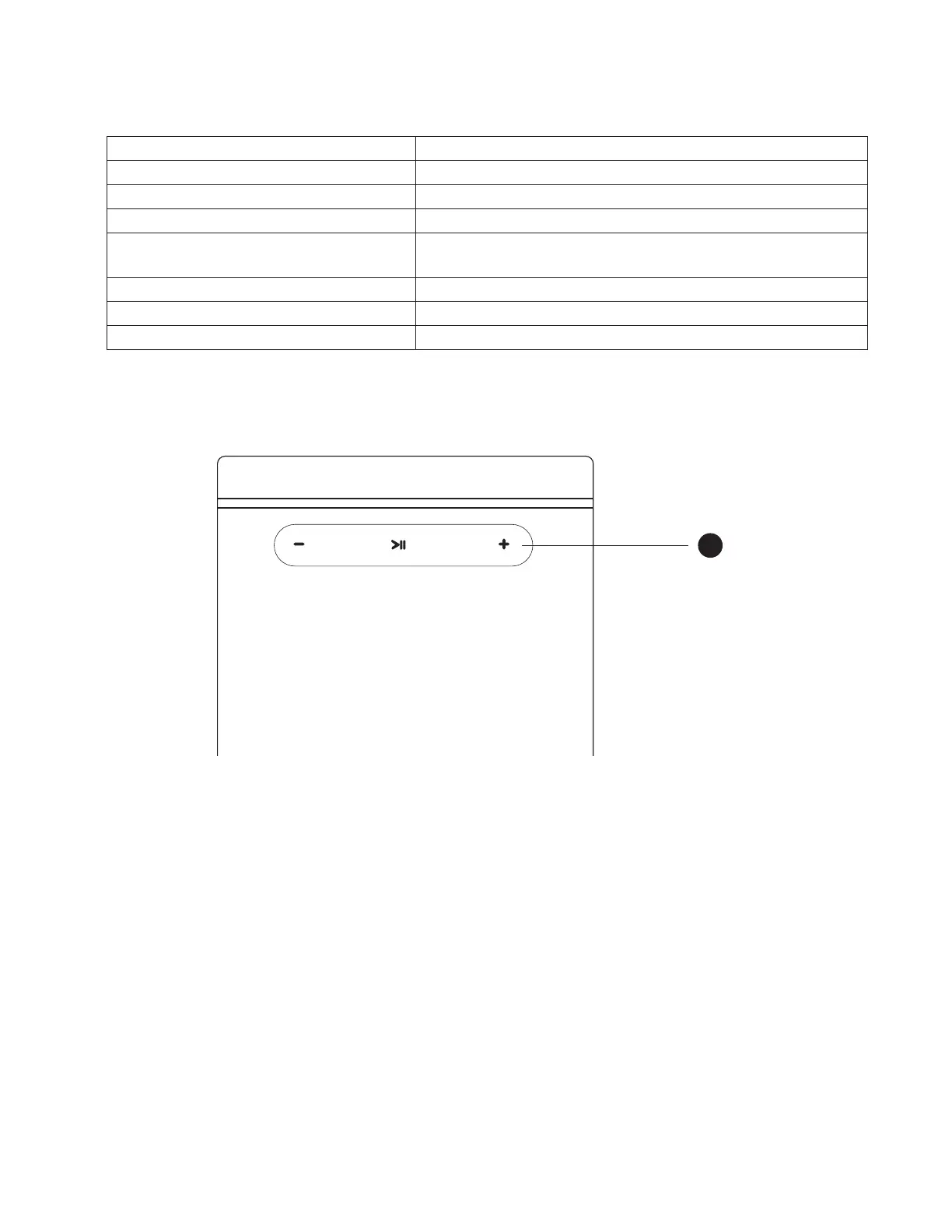
1. Status Indicator
Below is a table of the LED blink codes and their corresponding descriptions.
LED BLINK CODE DESCRIPTION
Blinking green Trying to connect to Wi-Fi Network
Solid green Hotspot mode (Ready for Setup)
Alternately blinking red and green Installing upgrade
Solid purple Hotspot mode timeout
• Press and Hold Play/Pause for 5 seconds to resume hotspot mode
Solid red Initialization and upgrade mode
Alternately blinking blue and purple Not paired
Solid blue Connected to network and Ready to use with BluOS App
Top Panel - Primary Speaker
2. >II>II,+, –,+, –
>II
• Press to play, pause or resume playback of current song.
• Use also for restoring Primary Speaker to factory default settings. Refer to section about FACTORY RESET.
+, –
• Use to vary volume level. Tap + to increase the volume level or – to decrease the volume level in 1 dB intervals. This volume tap
method allows you to fine-tune your volume setting.
2


 To Next Page