12 13
10. Connect any additional features, such as intercom, camera, or gate
operator that are installed on the VP.
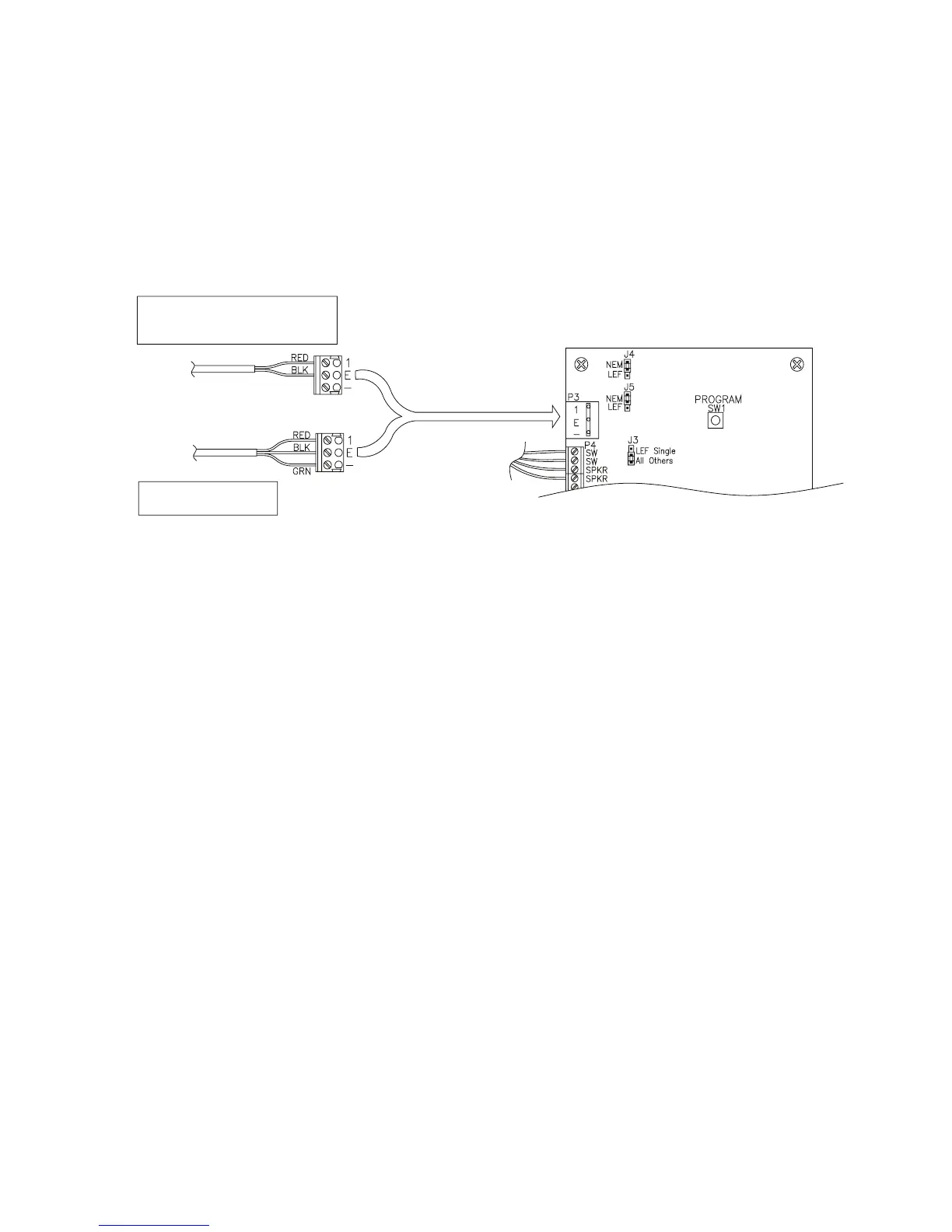
• Intercom. Connect the wires to terminal block P3 in the upper left
corner of the board as shown in Figure 15. The connection and
jumper settings will vary depending on whether the intercom is LEF
Single Master Station, LEF Multiple Master Station, or NEM type
intercom. Refer to the manufacturer’s instructions.
Figure 15
The VP with Intercom can be connected to an Aiphone LEF or
Aiphone NEM intercom. The intercom wiring must be separate from
all other wiring to either keypad. Use 18 AWG, 2- or 3-conductor
shielded cables for the intercom depending on the type of intercom
being used. Refer to the Aiphone specications for more detail. The
intercom type jumpers on either keypad circuit board must be set
to match the type of intercom that you are using. See Figure 16 for
details on setting the jumpers.



 To Next Page