To alter the number of valves connected to the system use the left
DOWN or right UP buttons. When the desired number of valves has
been entered enter the middle SET button.
3
Keep pressing the set button to skip the next few pages until the
user gets to OnTime page.
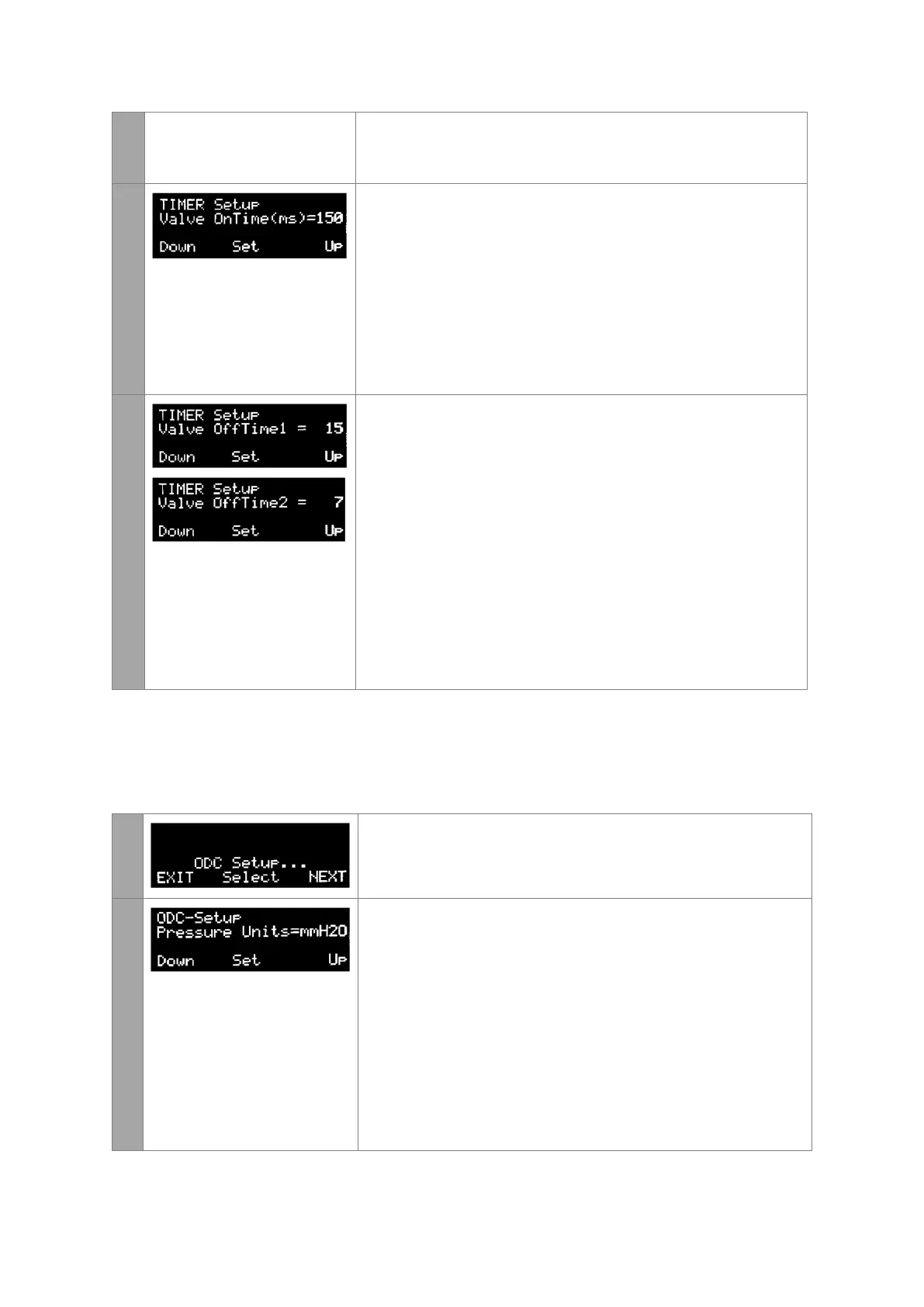
This page modifies the length of the pulse duration.
The pulse duration is user selectable in milli seconds (ms) and can be
between 1ms to 999ms in length.
To alter the on time OnTime select the left DOWN or right UP
buttons. When the desired on time has been entered enter the
middle SET button. In this example the on time is 150 milli seconds.
4
This page modifies the length of time between pulses. The interval
between pulses is user selectable in seconds (sec) and can be
between 1s to 999s in length.
OffTime1 - This is the off time used during normal
operation when the differential pressure is between Low
and Fast settings (see ODC section following)
OffTime2 - This is the off time used during normal
operation when the differential pressure is between Fast
and High settings (see ODC section following)
To alter the off times, select the left DOWN or right UP buttons.
When the desired off time has been selected enter the middle SET
button. In this example the off time 1 is 15 seconds and off time 2 is
7 seconds.
On Demand Cleaning (ODC) Settings
This menu allows the user to change the differential pressure settings that initiate and
terminate the cleaning cycle. Keep pressing NEXT until the ODC Setup page is displayed.
1
To modify the on demand cleaning settings, select the middle SELECT
button.
2
This page specifies the units for differential pressure measurement.
The user has three options
mmH2O – this unit of measurement is millimetres of water
gauge. The range of measurement for this unit is 0 to
250mm H2O
inH20 – this unit of measurement is inches of water gauge.
The range of measurement for this unit is 0 to 10” water
KPa – this unit of measurement is kilopascals. The range of
measurement for this unit is 0 to 2.5KPa.
To alter the units, select the left DOWN or right UP buttons. When
the desired units have been selected enter the middle SET button.


 To Next Page
 Loading...