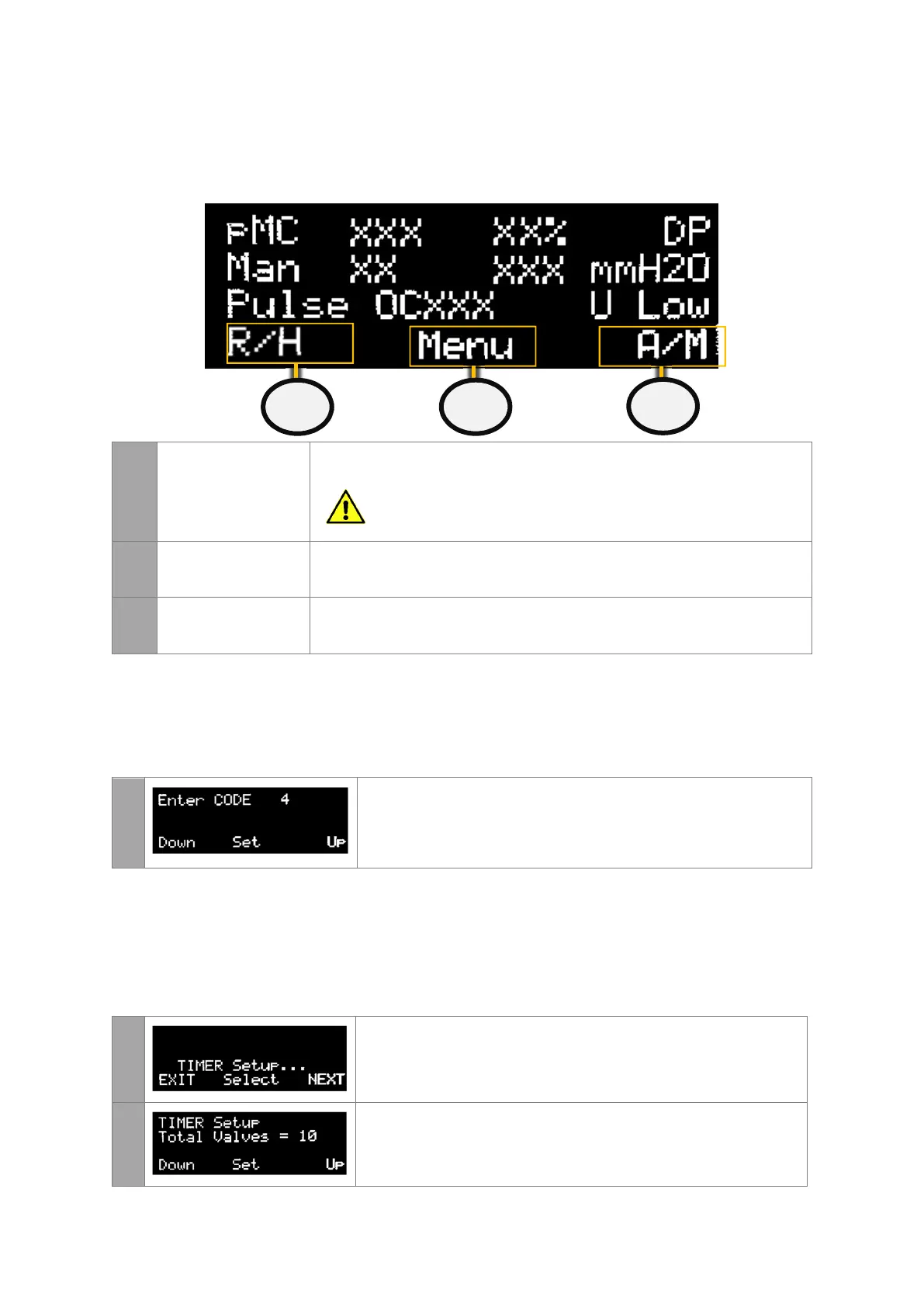
If any of the three buttons are pressed the following screen will appear. This allows the user
to change between auto or manual mode, pulsing or halting and allow the user to enter the
Menu section.
13
PULSE OR HALT Press on the left button to manually change the state between Halted and
Pulsing.
This option is only available in manual mode. If the unit is
in Auto mode it cannot be manually halted.
14
MENU Press on the middle button to check alarms, enter maintenance mode or to
alter the settings of the controller.
15
AUTO OR MANUAL Press on the right button to manually change the controller between
Manual and Auto mode.
Accessing the Settings Area
From the main screen, continue pressing the middle button unit the Enter CODE page
appears
1
To enter the code, select the left DOWN or right UP buttons. The
password code for all controllers is set to 4.
When this has been entered enter the middle SET button.
Timer Settings
This menu allows the user to change the settings of the controller such as number of valves,
sequencing, the pulse on and off times. Keep pressing NEXT until the TIMER Setup page is
displayed.
1
To modify the controller timer settings, enter the middle Select
button.
2
This page specifies the number of valves connected to the ECo.


 To Next Page