19
Ver 2.0 A_6/28/2023
P / T / Z
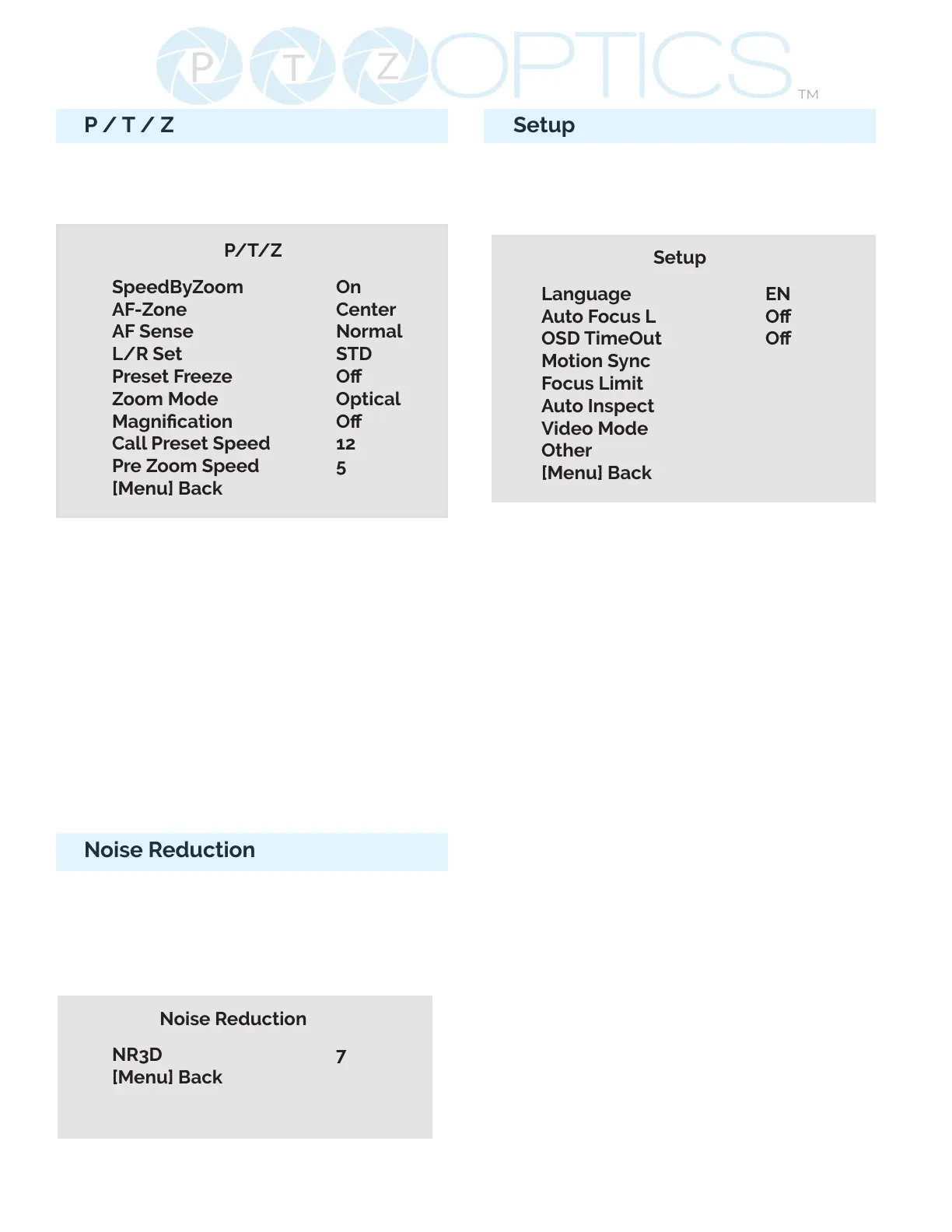
Move the main menu cursor to [Focus],
and press [HOME] key enter the Focus
page as shown in the following gure:
P/T/Z
SpeedByZoom On
AF-Zone Center
AF Sense Normal
L/R Set STD
Preset Freeze O
Zoom Mode Optical
Magnication O
Call Preset Speed 12
Pre Zoom Speed 5
[Menu] Back
SpeedByZoom: On, O
AF Zone: Front, Top, Center, Bottom
AF Sense: High, Normal, Low
L/R Set: STD, REV
Preset Freeze: On, O
Zoom Mode: Digital, Optical, Hybrid
Magnication: available only in Digital
Zoom Mode: 2x, 4x, 8x, 16x
Call Preset Speed: 1~24
Pre Zoom Speed: 0~7
Noise Reduction
Move the main menu cursor to [Noise
Reduction], and press [HOME] key enter
the Noise reduction page, as shown in
the following gure.
Noise Reduction
NR3D 7
[Menu] Back
Setup
Move the main menu cursor to [Setup],
and press [HOME] key enter the Setup
page, as shown in the following gure.
Setup
Language EN
Auto Focus L O
OSD TimeOut O
Motion Sync
Focus Limit
Auto Inspect
Video Mode
Other
[Menu] Back
Language: Options include: English,
Chinese
Auto Focus L: Lock the focus in the
current position. Options include: O, On
OSD TimeOut: Auto close OSD Menu.
Options include: O, 2.5min
Motion Sync: Synchronize pan, tilt,
and zoom to arrive at the preset
simultaneously.
Options include: O, On (Can be reached
by entering the Setup > Motion Sync).
Max Speed: The maximum speed Motion
Sync will use when calling presets.
Options include: 185 ~ 230 (increments of
5)
Focus Limit: Dene a range the camera
can focus within. Options include: O,
On (Can be reached by entering Setup >
Focus Limit).
• Furthest Pos: Dene the farthest focus
position. Options include: INF, 1m ~ 20m
• Nearest Pos: Dene the nearest focus
position. Options include: INF, 1m ~ 20m


 To Next Page