29
Ver 2.0 A_6/28/2023
Camera Settings
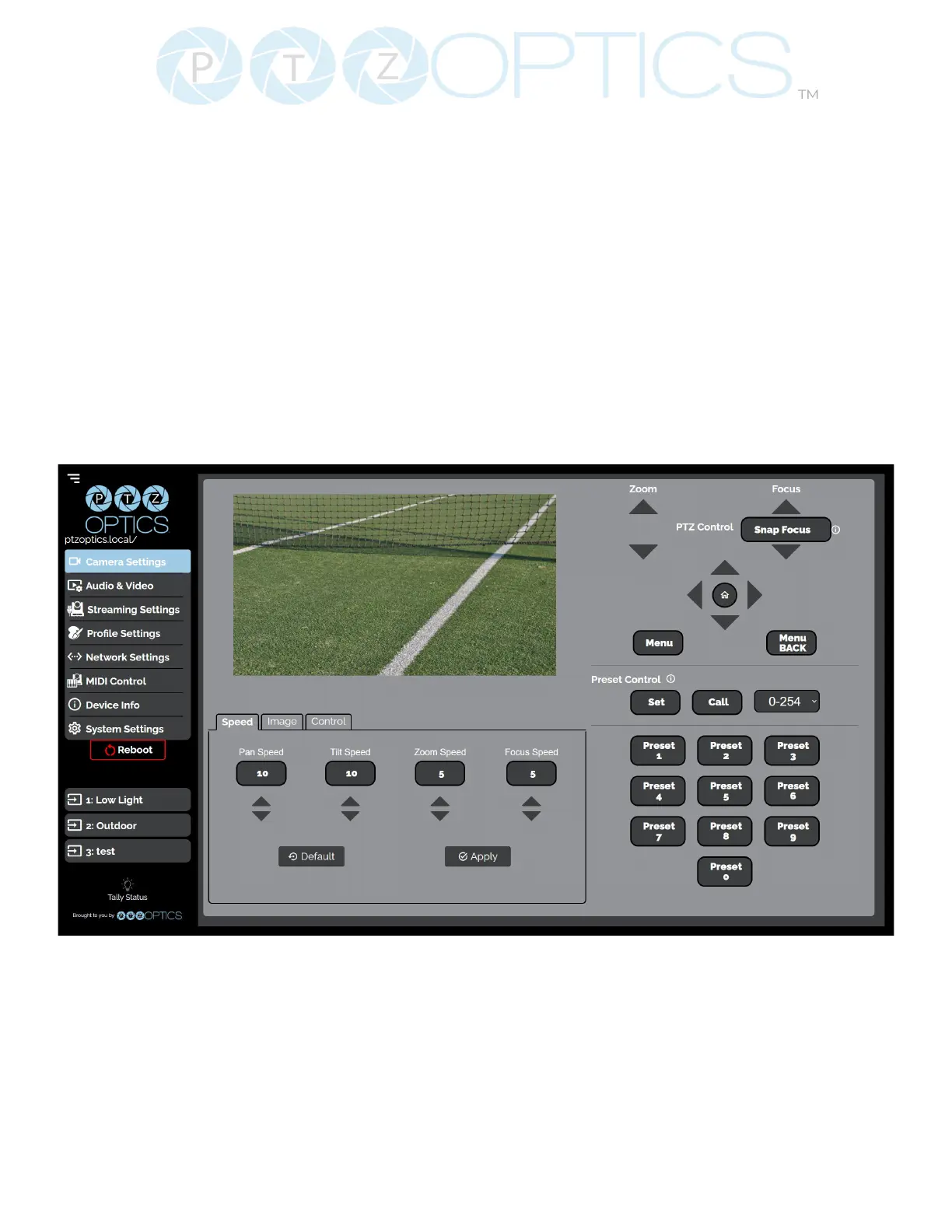
The Camera Settings page gives you access to the Camera’s Video Feed, PTZ Control, OSD Menu,
Preset Control, Speed Settings, Image Settings & Control Settings.
All settings in the Image tab are also available in the camera’s menu. The settings are oered in the
Web UI so you don’t have to open the Menu while the camera is in use.
• The PTZ Control section lets you Pan, Tilt, Zoom, and Focus the camera.
• The Menu and Menu Back buttons allow you to navigate the Menu when needed.
• The Preset Control section allows you to save and call up to 255 presets.
Ŝ The Preset 0 – 9 buttons allow you to quickly call the rst 10 presets
The Speed tab within Camera Settings page allows you to adjust the speed at which the camera
will Pan, Tilt, Zoom and Focus while in the Web UI.
• You must click the “Apply” button to save the current Speed settings to the camera.
• The “Default” button will revert the Speed settings to factory default, as shown in the image
above


 To Next Page