12
534 Trestle Place Downingtown, PA, 19335 USA · Tel: +1(484)593-2247 · Email: support@ptzoptics.com
Rev 2.0 2023-10-23
Connection Guide
1. To start your camera, please connect the power adapter to the DC-12V power connector port on
the back of the camera, ensuring all connections are correct and secure.
2. The power indicator on the front panel of the camera will illuminate.
1 2
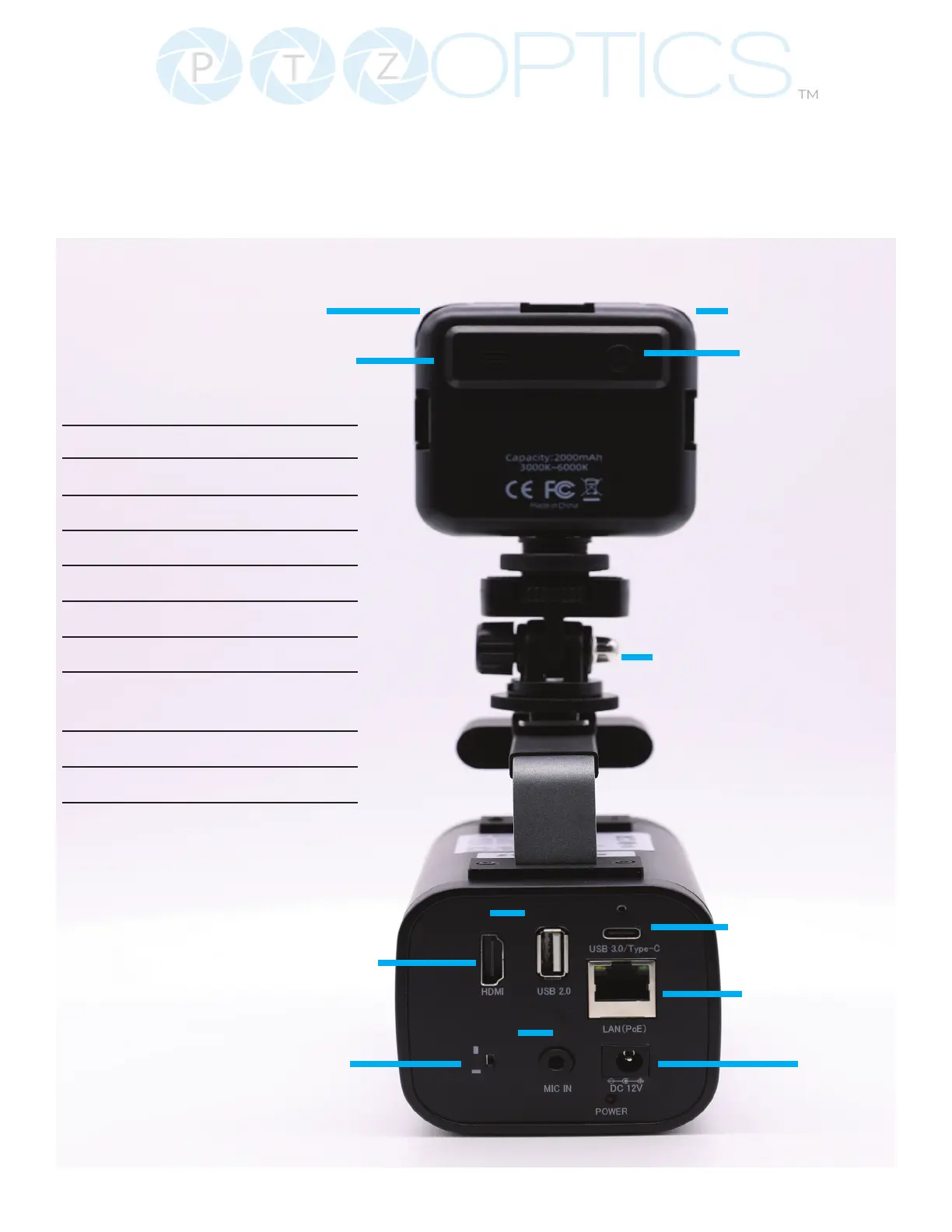
1. Color Temp Dial
2. Dimmer Dial
3. LED USB C Port
4. LED Power Button
5. Cold Shoe Tilt Mount
6. HDMI
7. USB 2.0 5V Power
8. USB 3.0 Type C (Video)
9. Horizontal & Vertical
Screen Flip Switch
10. Mic Line In
11. LAN (POE)
12. DC 12V Power
3
7
6
8
9
10
11
12
5
4


 To Next Page