17
Rev 2.0 2023-10-23
On-Screen Display
Main Menu
There are many ways to adjust the
camera’s On-Screen Display (OSD) Menu.
The following instructions will go over
the OSD Menu while using the included
IR remote.
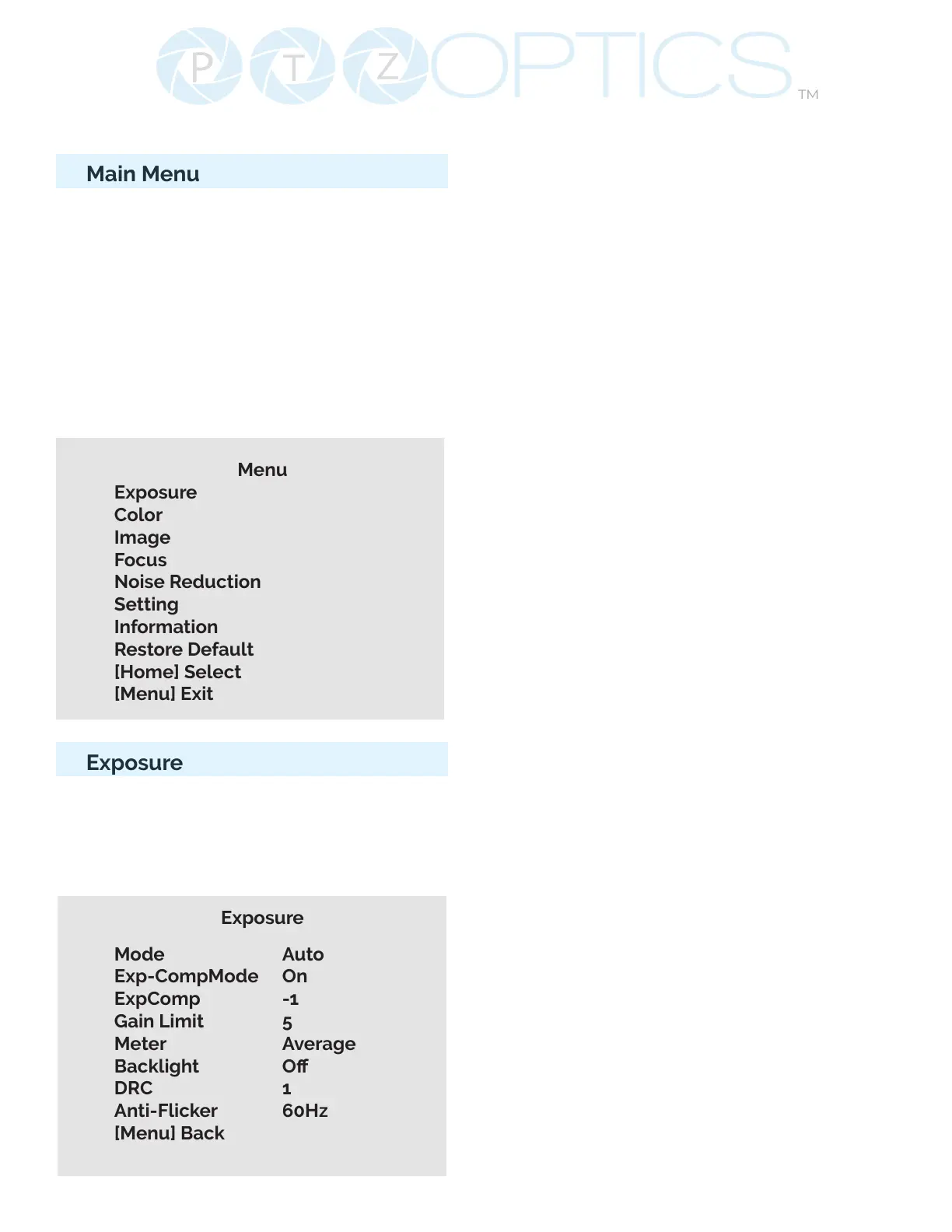
Press the [Menu] button to display the
OSD Menu. Use the arrow buttons to
navigate the OSD menu, the [Home]
button to make selections, and the
[Return] button to go back a sub menu.
Menu
Exposure
Color
Image
Focus
Noise Reduction
Setting
Information
Restore Default
[Home] Select
[Menu] Exit
Exposure
Move the cursor to the “Exposure” option
and press the [Home] button to enter the
Exposure page, as shown in the gure
below.
Exposure
Mode Auto
Exp-CompMode On
ExpComp -1
Gain Limit 5
Meter Average
Backlight O
DRC 1
Anti-Flicker 60Hz
[Menu] Back
(Exposure) Mode: Auto, Manual, SAE,
AAE, Bright
ExpCompMode: On, O (Eective only in
Auto mode).
Exp-Comp: -7 ~ +7 (Eective only when
ExpCompMode is On).
Backlight: Toggle Backlight
Compensation. Options include: On, O
(Only available in Full Auto mode).
Bright: 0 ~ 23 (Eective only in Bright
mode).
Gain Limit: 0 ~ 15 (Eective only in Auto,
SAE, AAE, & Bright mode).
Anti-Flicker: O, 50Hz, 60Hz (Eective
only in Full Auto, AAE, Bright mode).
Iris: Close, F11.0, F9.6, F8.0, F6.8, F5.6,
F4.8, F4.0, F3.4, F2.8, F2.4, F2.0, F1.8
(Eective only in Manual, AAE mode).
Meter: Average, Center, Smart, Top.
(Available only in Full Auto, SAE, AAE, &
Bright)
Shutter: 1/30, 1/40, 1/50, 1/60, 1/70,
1/80, 1/90, 1/100, 1/110, 1/120, 1/130,
1/140, 1/150, 1/160, 1/170, 1/180, 1/190
(Eective only in Manual, SAE mode).
Gain: 0 ~15 (Eective only in Manual
mode).
DRC Strength: Dynamic Range Control
0 ~ 8


 To Next Page