19
Rev 2.0 2023-10-23
Focus
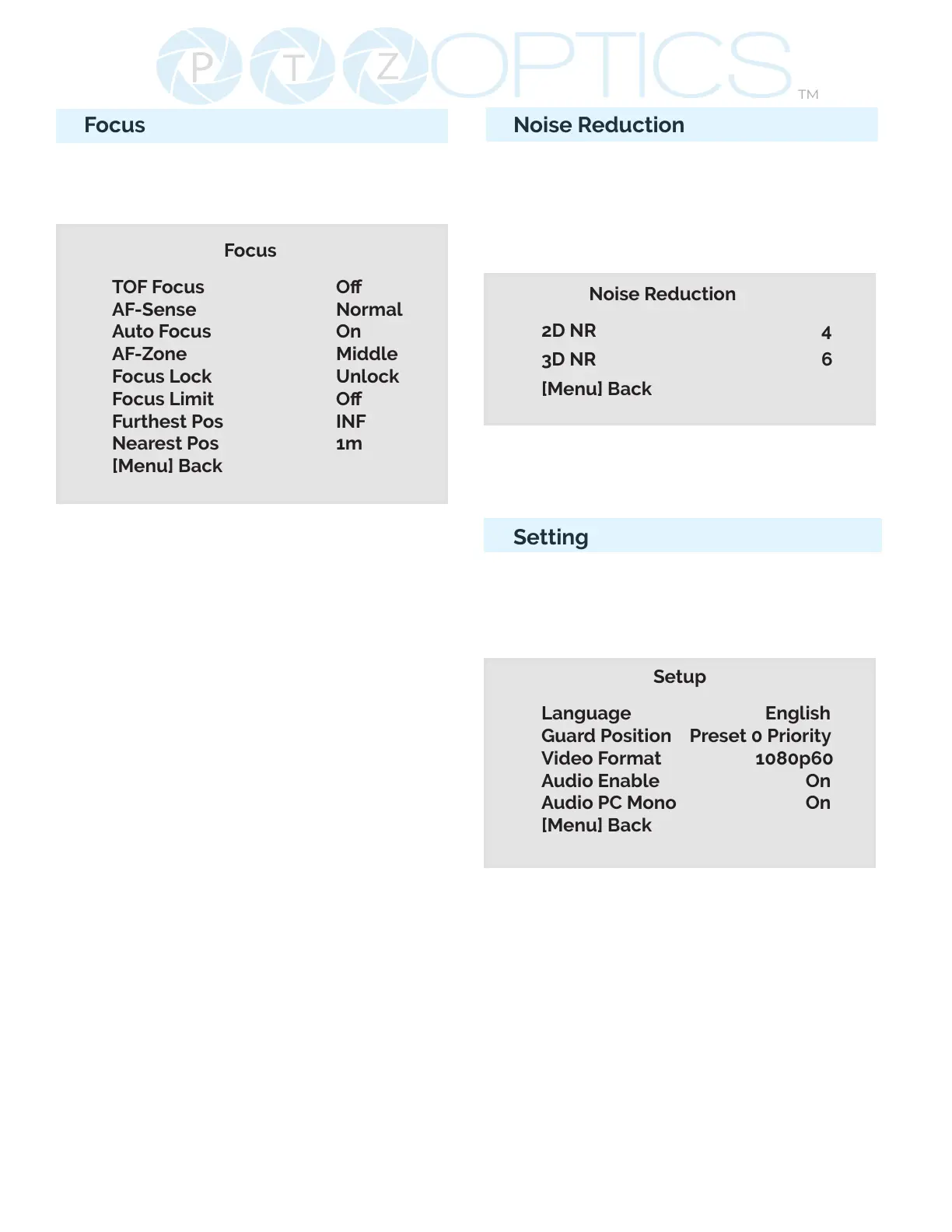
Move the main menu cursor to [Focus],
and press [HOME] key enter the Focus
page as shown in the following gure:
Focus
TOF Focus O
AF-Sense Normal
Auto Focus On
AF-Zone Middle
Focus Lock Unlock
Focus Limit O
Furthest Pos INF
Nearest Pos 1m
[Menu] Back
TOF (Time of Flight): On, O. Measures
distance between camera and subject
based on light signal travel time.
AF-Sense: High, Normal, Low
Auto Focus: On, O, One Push
AF-Zone: Determine what area the
camera focus targets. Front, Top, Middle,
Bottom
Focus Lock: Lock, Unlock
Focus Limit: On, O
Furtthest Pos: INF, 1M - 20m (Only
available when focus limit is on)
Nearest Pos: INF, 1M - 20m (Only
available when focus limit is on)
Noise Reduction
Move the main menu cursor to [Noise
Reduction], and press [HOME] key enter
the Noise reduction page, as shown in
the following gure.
Noise Reduction
2D NR 4
3D NR 6
[Menu] Back
2D NR: Auto, Close, 1 - 5
3D NR: Auto, Close, 1 - 8
Setting
Move the main menu cursor to [Setup],
and press [HOME] key enter the Setup
page, as shown in the following gure.
Setup
Language English
Guard Position Preset 0 Priority
Video Format 1080p60
Audio Enable On
Audio PC Mono On
[Menu] Back
Language: Options include: English,
Chinese
Guard Position: Preset 0 Priority, Zoom
Stop Save
Video Format: 1080p60, 1080p50,
1080p30, 720p60, 720p50
Audio Enable: On, O
Audio PC Mono: On, O


 To Next Page