22
534 Trestle Place Downingtown, PA, 19335 USA · Tel: +1(484)593-2247 · Email: support@ptzoptics.com
Rev 2.0 2023-10-23
Discovering your Network Info
To discover your IP address range/scheme, Subnet Mask, Gateway, & First DNS, follow the
instructions below for Windows or Mac OS. You may need to talk with your IT department
to obtain this information.
Windows
1. Open the Start menu and type “CMD” into the search bar.
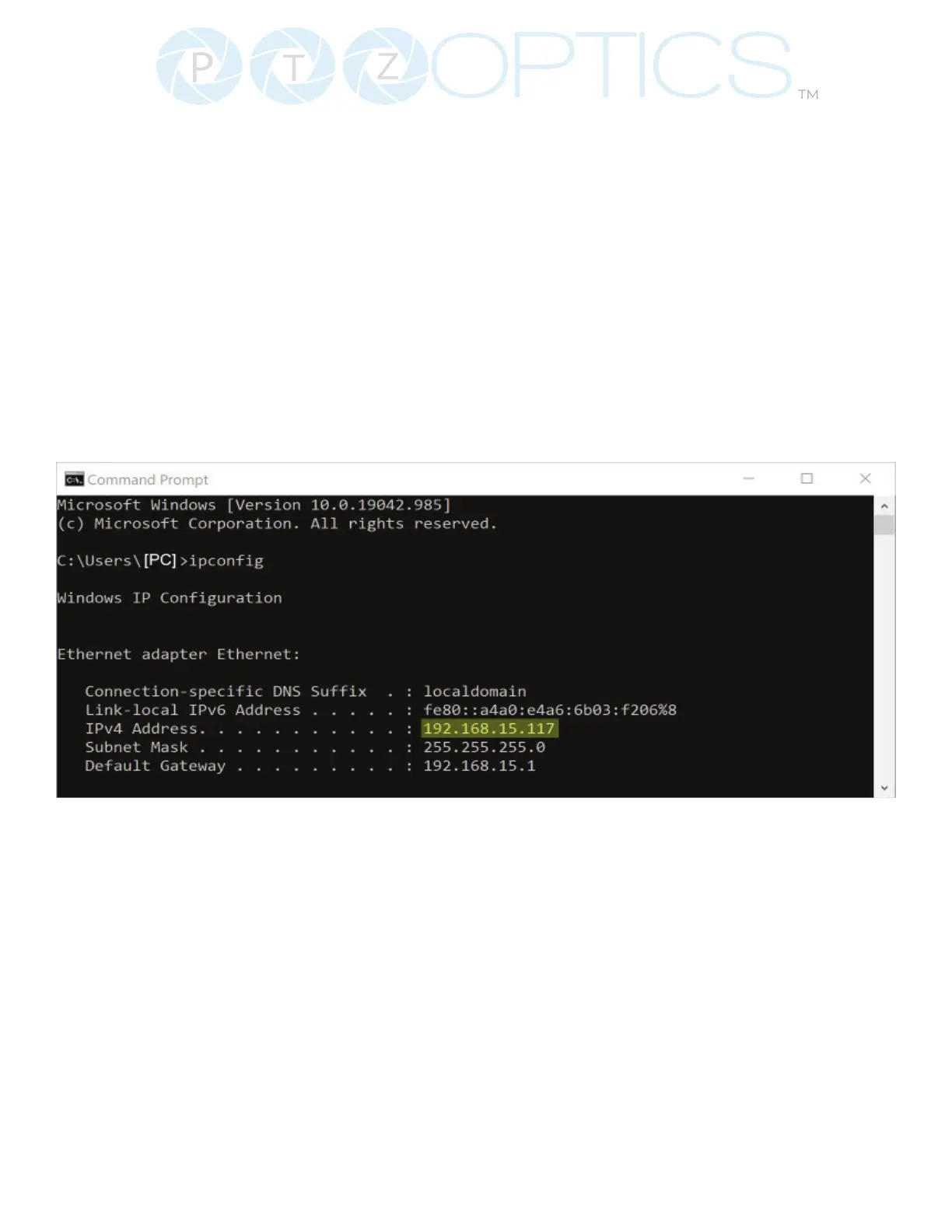
2. Once the Command Prompt is open, type in “ipcong” and press the Enter key.
3. Scroll down to the section titled “Ethernet adapter Ethernet” or “Ethernet adapter Wireless
Network Connection”.
4. Locate the “IPv4 Address” in that section. This is your computers local IP address.
5. In the example above, the PC’s local address is “192.168.15.117”, making the network range
“192.168.15.xxx”.


 To Next Page