34
534 Trestle Place Downingtown, PA, 19335 USA · Tel: +1(484)593-2247 · Email: support@ptzoptics.com
Rev 2.0 2023-10-23
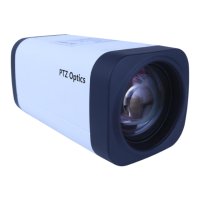
Image
The Image > Image tab within the Camera Settings page allows you to adjust the camera’s
Luminance, Saturation, Contrast, Sharpness, and Hue.
▪ You must hit the “Apply” button for these changes to take eect.
▪ The “Default” button will revert the Image settings to factory default.
▪ The “Undo” button will revert the Image settings to the last saved settings.


 To Next Page