48
534 Trestle Place Downingtown, PA, 19335 USA · Tel: +1(484)593-2247 · Email: support@ptzoptics.com
Rev 2.0 2023-10-23
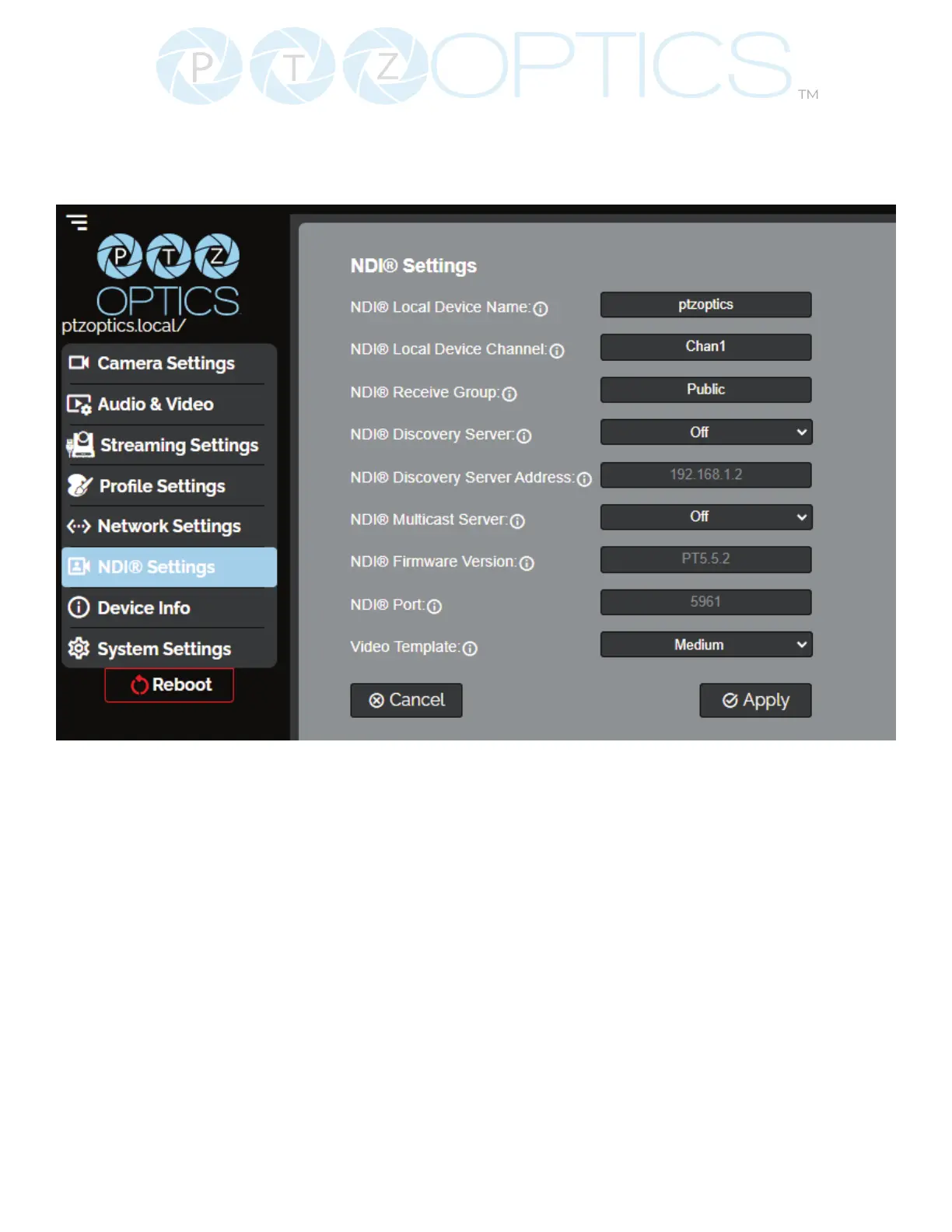
NDI Settings
The NDI Settings page allows you to manage the NDI settings of the Studio Pro camera.
• NDI Local Device Name: The name you assign to your NDI device.
• NDI local Device Channel: The video feed you assign to your local device name.
• NDI Receive Group: Dene which devices on a LAN group can see your NDI sources. Your
camera and the computer’s NDI receive group must match in order for you to
view the NDI video feed. Your NDI device can be part of multiple groups.
• NDI Discovery Server: Can be toggled on or o. The NDI discovery server provides more
reliable discovery and distribution of NDI sources across your LAN.
• NDI Discovery Server Address: Dene the address of your discovery server.
• NDI Multicast Server: Can be toggled on or o. (Network must rst be congured to
Multicast) Allows a single NDI source to be viewed by multiple PCs more reliably.
• NDI Firmware Version: NDI rmware version currently running on the camera.
• NDI Port: Default 5961. How you reach the NDI feed of your camera.
• Video Template: Select O, High, Medium, Low, NDI|HX3: H.264, 1080@50, NDI|HX3: H.264,
1080@60, NDI|HX3: H.265, 1080@50, NDI|HX3: H.265, 1080@60


 To Next Page