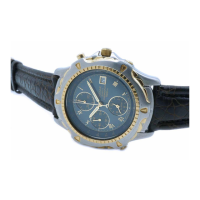
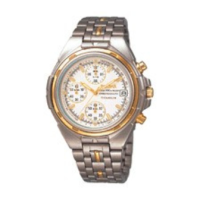
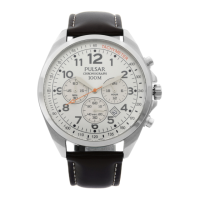
PULSAR CAL. 7T62, YM62 ALARM & CHRONOGRAPH
This manual describes the PULSAR CAL. 7T62 and YM62 models, which are alarm and chronograph watches.
Function Description
The watch features a time/calendar display, a stopwatch, and a single-time alarm.
TIME/CALENDAR:
- Displays hour, minute, and small second hands.
- The date is displayed in numerals.
STOPWATCH:
- Measures up to 60 minutes in 1/5 second increments.
- Includes split time measurement functionality.
- After 60 minutes, the stopwatch will restart counting from "0" repeatedly up to 12 hours.
- Restart and stop of the stopwatch can be repeated by pressing button A.
- Measurement and release of split time can be repeated by pressing button B.
SINGLE-TIME ALARM:
- Rings only once at a designated time within the coming 12 hours.
- The alarm time can be set in one-minute increments.
- At the designated time, the alarm rings for 20 seconds and then automatically disengages.
- To manually stop the alarm while it is ringing, press button A or B.
- While the crown is in the normal position, the ALARM hands indicate the current time when the alarm is disengaged and the designated alarm time when it is engaged.
- If the stopwatch is measuring, the alarm rings differently than usual, but this is not a malfunction.
- While the alarm is ringing, pressing button A or B will only stop the alarm; no stopwatch operation can be made.
TACHYMETER (for models with tachymeter scale on the dial):
- To measure hourly average speed of a vehicle:
- Use the stopwatch to determine how many seconds it takes to go 1 km or 1 mile.
- The tachymeter scale indicated by the STOPWATCH second hand gives the average speed per hour.
- Example: If the STOPWATCH second hand indicates "90" after 40 seconds for 1 km, the average speed is 90 km/h.
- The tachymeter scale can only be used when the time required is less than 60 seconds.
- For extended distances (e.g., 2 km), multiply the tachymeter scale figure by the distance. For shortened distances (e.g., 0.5 km), multiply the tachymeter scale figure by the distance.
- To measure the hourly rate of operation:
- Use the stopwatch to measure the time required to complete 1 job.
- The tachymeter scale indicated by the STOPWATCH second hand gives the average number of jobs accomplished per hour.
- Example: If the STOPWATCH second hand indicates "180" after 20 seconds for 1 job, the rate is 180 jobs/hour.
- For multiple jobs (e.g., 15 jobs in 20 seconds), multiply the tachymeter scale figure by the number of jobs.
Important Technical Specifications
Battery:
- Battery life: Approximately 3 years.
- Battery type: SEIKO SR927W.
- Battery life may be less than specified if the stopwatch is used for more than 2 hours a day and/or the alarm rings for more than 20 seconds a day.
- The watch remains accurate while the small second hand is moving at two-second intervals, even when the battery is nearing its end.
- When the battery nears its end, the small second hand moves at two-second intervals instead of normal one-second intervals, indicating it's time for replacement. The alarm will not ring if the small second hand is moving at two-second intervals, even if it is engaged.
Water Resistance:
- Non-water resistant: If "WATER RESISTANT" is not inscribed on the case back, the watch is not water resistant and should not get wet.
- Water resistance (3 bar): If "WATER RESISTANT" is inscribed, the watch can withstand accidental contact with splashes of water or rain but is not designed for swimming or diving.
- Water resistance (5 bar): If "WATER RESISTANT 5 BAR" is inscribed, the watch is suitable for swimming, yachting, and taking a shower.
- Water resistance (10 bar/15 bar/20 bar): If "WATER RESISTANT 10 BAR", "WATER RESISTANT 15 BAR", or "WATER RESISTANT 20 BAR" is inscribed, the watch is suitable for taking a bath and shallow diving, but not for scuba diving. A PULSAR Diver's watch is recommended for scuba diving.
- Important notes for water-resistant watches:
- Ensure the crown is pushed in completely before using in water.
- Do not operate the crown when the watch is wet or in water.
- If used in sea water, rinse the watch in fresh water and dry it completely.
- When showering or bathing with water-resistant watches, do not operate the crown when wet with soapy water or shampoo.
- Warm water may cause slight time loss or gain, which corrects when the watch returns to normal temperature.
- Pressure in bar is a test pressure and should not be considered as corresponding to actual diving depth.
Operating Temperature:
- The watch works with stable accuracy within a temperature range of 5°C to 35°C (41°F to 95°F).
- Temperatures over 60°C (140°F) may cause battery leakage or shorten battery life.
- Very low temperatures below -10°C (+14°F) for a long time may cause slight time loss or gain, which corrects when the watch returns to normal temperature.
Usage Features
Crown/Buttons:
- Crown positions:
- 'a': Normal position
- 'b': First click
- 'c': Second click
- Button A: Start/Stop/Restart for stopwatch.
- Button B: Reset/Split/Split release for stopwatch.
Screw Down Crown (for models with screw down crown):
- Unlocking: Turn Crown counterclockwise until threads are no longer felt, then pull out.
- Locking: Push Crown back to normal position, then turn clockwise while pressing lightly until tight.
Setting the Time and Adjusting the Stopwatch Hand Position:
- All adjustments (main time, alarm hand, stopwatch hand position) are made with the crown at the second click position.
- Pull out the crown to the second click when the small second hand is at the 12 o'clock position.
- Main Time Setting: Turn the crown to set the hour and minute hands. It's recommended to set hands a few minutes ahead to account for other adjustments. Ensure AM/PM is correctly set.
- Alarm Hand Adjustment: Set the ALARM hands to the time the main time hands indicate. Press button B repeatedly to set ALARM hands; holding button B advances them quickly.
- Stopwatch Hand Position Adjustment: If stopwatch hands are not at "0" position:
- Press button A for 2 seconds (STOPWATCH minute hand turns a full circle).
- Press button B repeatedly to set STOPWATCH minute hand to "0" position (holding button B advances quickly).
- Press button A for 2 seconds (STOPWATCH 1/5-second hand turns a full circle).
- Press button B repeatedly to set STOPWATCH 1/5-second hand to "0" position (holding button B advances quickly).
- ALARM and STOPWATCH hands can be readjusted in order by pressing button A for 2 seconds.
- After all adjustments, check that main time and alarm hands indicate the same time.
- Push the crown back to normal position in accordance with a time signal.
- Notes:
- If the stopwatch is measuring when the crown is pulled to the second click, it will automatically reset to "0".
- If the alarm is set when the crown is pulled to the second click, the ALARM hands will turn to indicate the current time.
Setting the Date:
- Before setting the date, ensure the main time is set.
- Pull out the crown to the first click.
- Turn clockwise until the desired date appears.
- Push back in to normal position.
- Notes:
- Adjust the date at the end of February and 30-day months.
- Do not set the date between 9:00 p.m. and 1:00 a.m. to avoid improper date change.
- Do not press button B when the crown is at the first click position, as this will move the ALARM hands.
How to Stop the Alarm:
- Press button A or B while the alarm is ringing.
- Push the crown back in to normal position. The alarm is automatically engaged.
How to Cancel the Alarm Time You Have Set:
- Pull out the crown to the first click.
- Press and hold button B until ALARM hands stop and indicate the current time.
- Push the crown back in to normal position.
- Note: The single-time alarm cannot be set for a time more than 12 hours ahead of the current time. If you hold button B to advance ALARM hands quickly and they stop at the current time (disengaging the alarm), release button B, then press and hold it again to set the desired time.
Maintenance Features
Battery Change:
- When the battery expires, replace it as soon as possible to prevent malfunction.
- After replacement, set the time/calendar and alarm, and adjust the stopwatch hand position.
- WARNING: Do not remove, short-circuit, tamper with, heat, or expose the battery to fire. Keep out of reach of children.
- CAUTION: The battery is not rechargeable.
Care of Case and Bracelet:
- Wipe periodically with a soft dry cloth to prevent rusting caused by dust, moisture, and perspiration.
Periodic Check:
- It is recommended to have the watch checked once every 2 to 3 years by an AUTHORIZED PULSAR DEALER or SERVICE CENTER to ensure the case, crown, buttons, gasket, and crystal seal remain intact.
Precautions Regarding Case Back Protective Film:
- If your watch has a protective film and/or a sticker on the case back, peel them off before using the watch.
General Precautions:
- Magnetism: Avoid strong magnetism.
- Shocks & Vibration: Avoid dropping or hitting against hard surfaces.
- Chemicals: Avoid exposure to solvents, mercury, cosmetic spray, detergents, adhesives, or paints, as they may cause discoloration or damage.

 Need help?

 To Next Page
 General