9
RESTORING WELLNESS ONE PULSE AT A TIME
Operating Instructions
The True Pulse A2500
®
’s design allows users to explore a variety of therapy durations and intensity settings to
accommodate various conditions, or heath maintenance regimens.
Session Set-up Procedure
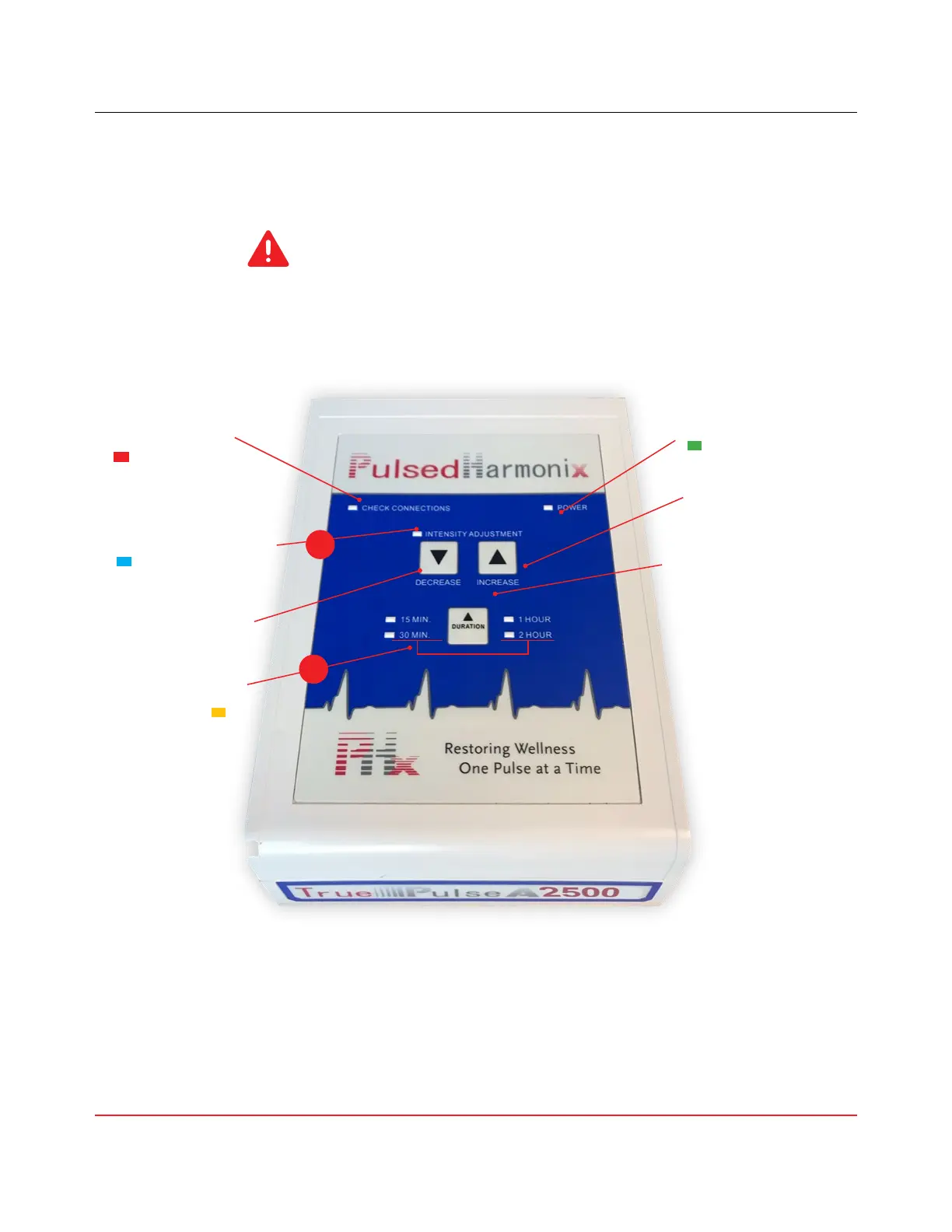
Indicates your
connections are not set-
up properly.
Check connections
red light
Indicates the level of
Pulses Per Second (PPS)
Pulse activity blue light
Power indicator
Increases PPS
Decrease intensity
See table below for time
combinations
Time increments
Increase intensity
Decreases PPS
Increases time of therapy
From 15 min. - 3 hours 45 min.
15 min. increments
IMPORTANT: The duration of the session must be selected before
choosing the desired intensity setting, otherwise pulsing will not begin.
1
Indicates the device is on
2
Press the Duration button to set the treatment session duration. Each time the Duration button is pushed, 15 minutes
is added to the session time up to a maximum of 3 hours and 45 minutes. The next press of the Duration butt on,
after
the maximum time, ends the session time and stops pulsing.
1.
2. Press the Increase/Decrease Intensity Adjustment buttons to adjust the intensity of pulses per second (PPS).
*While the session is in progress, the intensity can be increased or decreased without interruption of the session.



 To Next Page