7
Charge remaining
(when powered by a ChargePAK)
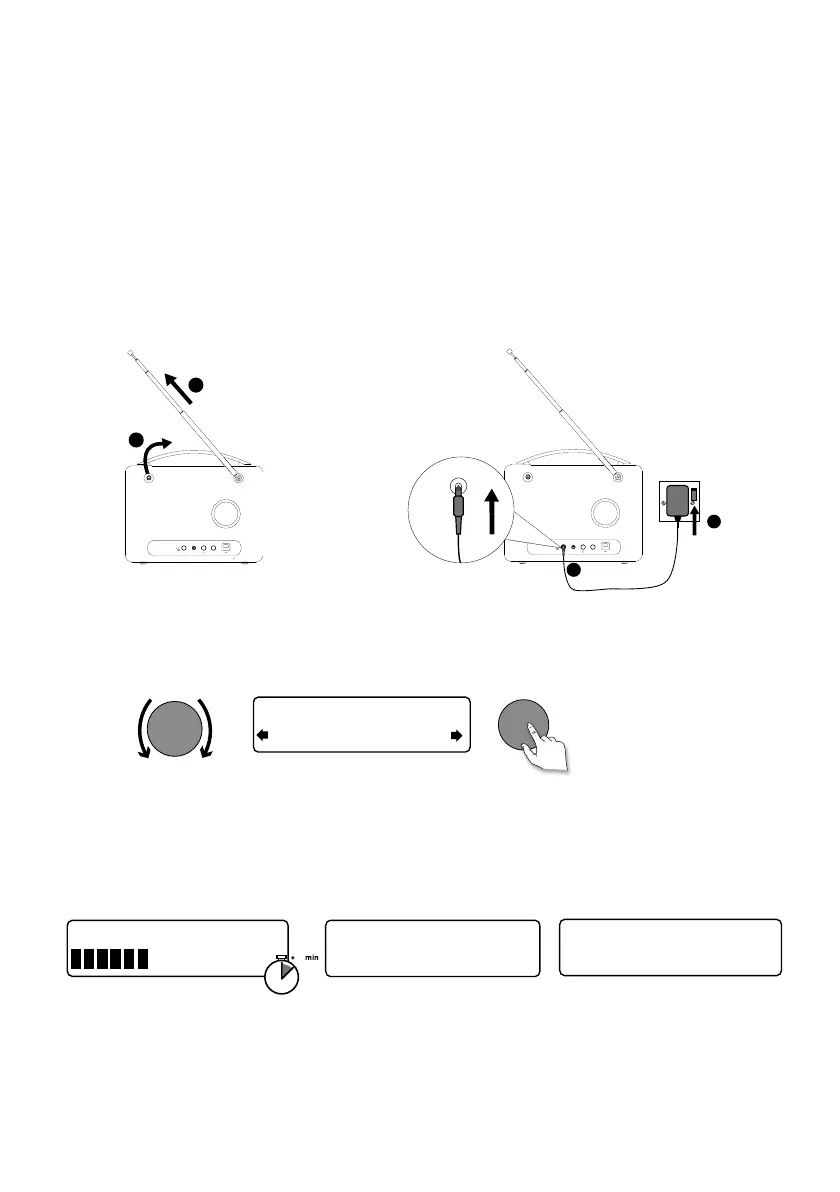
• Unclip the aerial and fully extend it (steps A and B).
• Insert the jack of the supplied mains adapter into the socket on the rear of the radio (C).
• Plug the mains adapter into the mains supply (D).
Wait for your radio to complete an Autotune and find all available digital stations. When the
Autotune is complete, a station will start playing.
Getting started
Quick set up
Note: If you have a ChargePAK F1 rechargeable battery (sold separately) fit it now before plugging in
Evoke. See page 18 for more information.
Now tuning...
Talking to the people wh
BBC Radio 2
Select your language when prompted. Turn the Select dial to select a language (English/
Francais/Deutsch/Italiano) and push to confirm.
Select
Deutsch
Language
Select
Autotune 29
1
1
2
3
Aux in9V DC
A
B
9V DC
9V
DC
Aux in
D
C
EVOKE_D4_Mio_Bluetooth_v2_UKAus.indb 7 8/15/2014 9:47:46 AM


 To Next Page