4
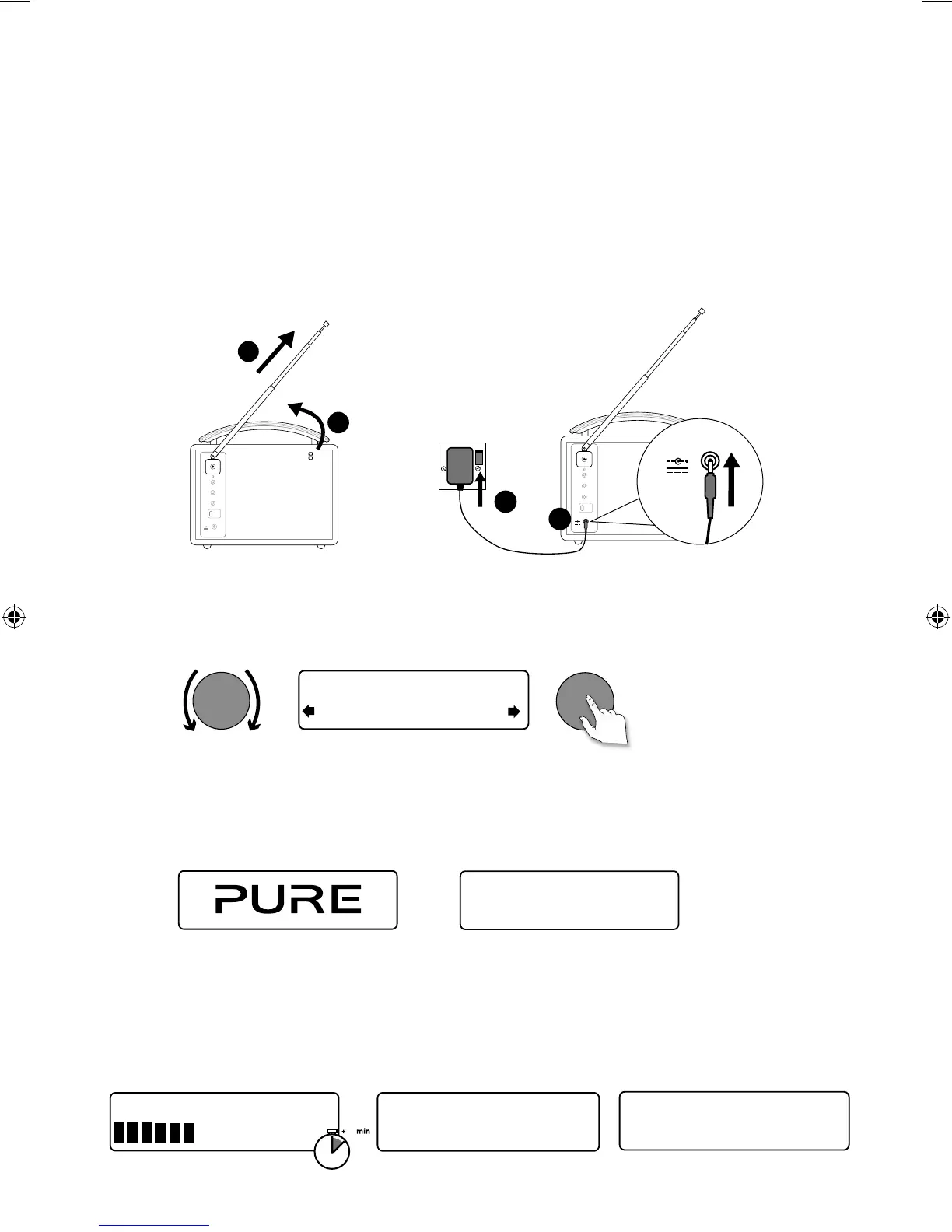
• Unclip the aerial and fully extend it (steps A and B).
• Insert the jack of the supplied mains adapter into the socket on the rear of the
radio (C).
• Plug the mains adapter into the mains supply (D).
Wait for your radio to complete an Autotune and find all available digital
stations. When the Autotune is complete, a station will start playing.
Start
Quick set up
B
A
Stereo Out
Aux In
6V DC
D
Stereo Out
Aux In
6V DC
6V DC
C
Now tuning...
Talking to the people wh
BBC Radio 2
Select your language when prompted. Turn the tune dial to select (English/
Francais/Deutsch/Italiano) and push to confirm.
Tune
Deutsch
ect Language. Choisissez
This will be followed by the Energy Saving mode screen.
By default, Energy saving is enabled but it can be switched off from within
the menu (see page 15).
With energy saving on, power consumption in standby is less than 1W.
Enabled
Energy saving
Tune
Pure Evoke Mio 29
1
1
2
4
3
EvokeMio_DG_manual-Euro.indb 4 7/25/2013 5:24:08 PM



 To Next Page